We remain fully operational. Our teams are working around the clock to ensure your deliveries continue safely.

下载应用程序





Buy anything from 5,000+ international stores. One checkout price. No surprise fees. Join 2M+ shoppers on Desertcart.
Desertcart purchases this item on your behalf and handles shipping, customs, and support to Macau.
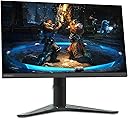
🎮 Level up your game with Lenovo G27-20 — where pro performance meets sleek style!
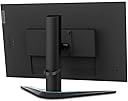
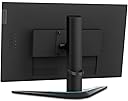
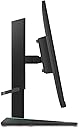
The Lenovo G27-20 is a 27-inch Full HD IPS gaming monitor featuring a rapid 144Hz refresh rate and 1ms response time for ultra-smooth visuals. It supports AMD FreeSync Premium and NVIDIA G-SYNC compatibility to eliminate screen tearing. Designed with a near-edgeless bezel and ergonomic height and tilt adjustments, it combines immersive viewing with comfort. Eye-care technologies reduce blue light and flicker, making it ideal for extended gaming or professional use.


| ASIN | B08Z5JNL1C |
| Adaptive Sync | FreeSync |
| Additional Features | Anti Glare Screen, Blue Light Filter, Flicker-Free, Height Adjustment, Wall Mountable |
| Aspect Ratio | 16:9 |
| Best Sellers Rank | #128,429 in Electronics ( See Top 100 in Electronics ) #2,882 in Computer Monitors |
| Brand | Lenovo |
| Brightness | 400 cd/m² |
| Color | Black |
| Compatible Devices | NVIDIA GeForce G-SYNC compatible graphics card devices |
| Connectivity Technology | DisplayPort, HDMI |
| Contrast Ratio | 1000:1 |
| Customer Reviews | 4.0 out of 5 stars 48 Reviews |
| Display Resolution Maximum | 1920 x 1080 Pixels |
| Display Technology | LCD |
| Display Type | LED |
| Hardware Connectivity | DisplayPort, HDMI |
| Has Color Screen | Yes |
| Image Contrast Ratio | 1000:1 |
| Is Electric | No |
| Item Dimensions D x W x H | 10.24"D x 24.11"W x 15.46"H |
| Item Weight | 0.01 Ounces |
| Manufacturer | Lenovo |
| Model Name | G27-20 |
| Model Number | 66C2GCC1US |
| Mounting Type | 2020-11-23T00:00:00.000Z |
| Native Resolution | 1920x1080 |
| Number of Component Outputs | 2 |
| Picture Quality Enhancement Technology | Advanced |
| Power Consumption | 49 Watts |
| Refresh Rate | 144 Hz |
| Resolution | FHD 1080p |
| Response Time | 1 Milliseconds |
| Screen Finish | Glossy |
| Screen Size | 27 Inches |
| Screen Surface Description | Glossy |
| Shape | Rectangular |
| Specific Uses For Product | Business, Gaming, Personal |
| Total Number of HDMI Ports | 1 |
| UPC | 195348268387 |
| Viewing Angle | 178 Degrees |
| Voltage | 240 Volts |
| Warranty Description | 1 Year Limited |
| Warranty Type | Limited Warranty |
J**N
Great value for the money.
For a monitor of its class (1080p) this monitor has proven its worth with a respectable refresh rate clear picture quality and ease of use. Currently my fiancé has 2 of these monitors mounted to a standard VESA mount for work and gaming and has been nothing but ecstatic. the professional look and durable feel just add to the dual use of these monitors not to flashy for an office while still able to handle regular gaming at a high quality for the pixel density, in short, I would highly recommend This monitor for anyone interested in a duel 1080p monitor setup.
�**�
Works great as an external monitor for a Steam Deck
Bought this used in "good condition" from Amazon and the product received was indeed in good condition. Pros: - The picture is bright, colorful, and vibrant. The bezels around the sides and top are about .25 in and the bottom one is about .75 in. - Refresh rate is as high as advertised and the features/osd menu allow for overclocking and motion blur compensation of some sort but I don't have a need to use those. - Enabling sRGB prevents adjusting brightness which is annoying but not uncommon especially in budget monitors. Cons: - Height adjustment of the stand isn't working, again I purchased this used so I expected something to be amiss and this isn't a dealbreaker I contacted Amazon support who ended up forwarding me to Lenovo support but I had to deduct a star from the product. - The On Screen Display (OSD) is accessed from the buttons on the back side of the monitor and are pressed with your right hand looking at it. The menu is not intuitive at all, even with the manual open it's hard to accomplish anything with ease. I would deduct a point here if I didn't already for the stand but at the end of the day I ideally set the monitor up once and then I'm done so I very rarely go through the headache of having to fight the menu. If someone from Lenovo reads this do better product testing because there's no way anyone used this and thought it was good.
C**R
Great Gaming Monitor
Highly satisfied with this monitor, fulfilled everything I hoped it would be.
K**R
Ok
Not worth the price plus it went down $30.00 after I ordered returned it nice picture bit can get a 4k for same pr oh ce
V**L
Calidad de imagen y el peso
Lo uso para mi PC se ve excellent
Z**H
Top notch monitor, but a little pricey for 1080p
I absolutely love this monitor, I have it mounted on a double arm mount, and looks great. I mostly play siege and the 1ms response time is great, very smooth and love the 144hz. It is a bit pricey for 1080p monitors, maybe a year or 2 ago the price would be acceptable, but you can get a premium (asus, acer lg etc) for the same price. It isn't a deal breaker, but if this was lowered to the 200 mark, it would definitely be a top seller.
D**N
There are better choices out there at this price.
After experimenting for a while with this monitor I used it for a short while for the gaming aspect which eventually it just became the third monitor on my desktop. Since this was my first time using a monitor designated for gaming, I wanted to try it. My graphics card on my PC (custom built) is an AMD RX 570 8 with 8 GBs of VRAM (not relevant for a monitor really). I’m not certain what part of my PC didn’t care for it but when I set my video card to display video at the 144Hz refresh rate I got a lot of stutters when playing games but everything seemed to be fine when I dropped due to the all so common 60 Hz refresh rate for me it defeats the purpose of using a 144 Hz refresh monitor. I run an AMD FX 8370 8-core CPU with 16 GB of DDR 3 RAM, I know, quite archaic really on my end but it runs even the later games very well. That’s a bit off-topic but I think listing my other specs should help. The problem is I don’t think with the monitor but with my hardware somewhere and I was unable to determine what the stutter was caused by, basically seeing gameplay and freeze (in the MS range of seconds) but it’s enough to detract from enjoying a game. In my case, I tested it with a couple of games, such as Resident Evil Village, and the Crash Bandicoots trilogy remake all with bad stutter results. The bottom line is I don’t feel like I have the proper hardware to really utilize this monitor the way it could be. And this is not the monitor’s fault. I can say this it has a wonderful color gamut and is very bold for colorful applications, the image quality I didn’t think was very great for a 1080p monitor, and at this price, I would expect Lenovo to just make it 4K, but lord have mercy this review might have been worse in that case. LOL! On the other hand, the built-in AMD Free Sync capability I can say for sure is great as my card is Free Sync enabled, and not seeing the usual screen tearing without having to fiddle with settings on my graphics settings and in-game settings were nice. Even at 60 Hz, I loved playing games on it as the colors really pop out at you but again it defeats the purpose. I’m not going to in any way shape or form blame the monitor is simply something on my graphics that I was unable to figure out. Maybe my video card just struggles with 144Hz? I know it hates 4k which it will do but it's worse in stutter so I’m going with my hardware as the issue. Check the specs on your graphics cards before you delve into a monitor of this grade. The built-in stand is excellent and has no wobble whatsoever and adjusting the height is effortless, the size is perfect too. There are not a lot of settings on monitors that I mess with except the usual temperature settings like cool, warm, and dark. I don’t recall a setting of the sort on this unit but I typically use Windows monitor calibration tool and I’m pretty happy with it. Coming back to image quality I personally thought text and general computing images were a bit more “blocky” and “pixilated”. My 27-inch Dell monitors I use in the same playing field of resolution (non-4K) I think display better quality images for daily use and they were cheaper than this one. Other reviews I read prior to writing mine state there are better choices out there for the price and to be honest, I have to agree with them. It's not a bad monitor, it's just that when it comes to gaming monitors, Lenovo never comes to mind for me and I don’t feel they have enough experience in this area to be marketing these. I would stick with better choices such as ASUS for example. Also, out of the box mine suffered from a little slightly black splotch defect in the LCD which looked as if something was inside the panel blocking a portion of light, it was small but I notices these things with my OCD which was simply a manufacturer defect from what I could tell. And Lastly in the future before I ever shop for a gaming monitor again, I’ll do more research on my hardware capability to make it run smoother. I think with the proper hardware and something not as old as what I’m using I think I would’ve been better able to compile better details on this product.
B**Y
Lenovo G27-20 27-inch Gaming Monitor
Out of the box this monitor is thin and reasonably light-weight but feels sturdy at the same time with no flimsy parts. The height-adjustable stand allows for many different viewing angles and positions. And the actual display during game-play is bright and sharp.. Images on screen really pop and look very smooth. And 27-inch is just right for my needs. A solid and great performing gaming monitor at a decent price too from Lenovo.