We remain fully operational. Our teams are working around the clock to ensure your deliveries continue safely.

下载应用程序





Buy anything from 5,000+ international stores. One checkout price. No surprise fees. Join 2M+ shoppers on Desertcart.
Desertcart purchases this item on your behalf and handles shipping, customs, and support to Macau.
🖤 Lock in flawless CPU stability with style and precision!
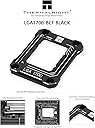
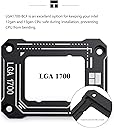
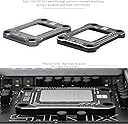
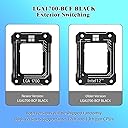
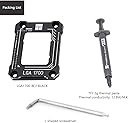
The Thermalright Anti-Bending Buckle is a CNC-machined aluminum alloy backplate designed specifically for Intel 12th and 13th Gen LGA1700 CPUs. It prevents CPU and motherboard bending by applying uniform pressure via a curved plate, improving thermal performance and ensuring long-term hardware stability. Easy to install with included tools, it features durable anodized black finishing that complements high-end builds without leaving installation marks.


| ASIN | B0B5Q34SZ1 |
| Best Sellers Rank | #1,405 in Computer Internal Components |
| Brand Name | Thermalright |
| Compatible Devices | Desktop |
| Cooling Method | Air |
| Customer Reviews | 4.8 4.8 out of 5 stars (1,157) |
| Included Components | 1 |
| Item Dimensions L x W x H | 2.13"L x 0.24"W x 2.76"H |
| Manufacturer | Thermalright |
| Material Type | Metal |
| Power Connector Type | 4-Pin |
| UPC | 796520302679 796520302563 |
| Unit Count | 1 Count |
E**N
If you have this platform and a good cpu, just get one of these.
Getting one for every lga1700 socket I have. The thermal paste is good, the stability helps for oeace of mind (no bent cpu or motherboard), and the temps are a tony bit easier to amange. A big bonus is the ease of re-application for thermal paste.
T**J
Just get it
I had the typical Intel CPU retainer on my MB which, with research, would give you unequal pressure on the chipset resulting in higher CPU temps. For those with the 13700 series, we are all struggling to keep the temps down to respectable numbers. Not only did this get rid of the standard CPU retainer, but it looks and performs much better. Pros: Installation was a breeze. Look at GamersNexus YouTube video for installation so you create equal pressure when tightening down. Temps are brought down as of now. I’m still verifying that with extensive use so I’m not providing initial temp numbers. Quality is very good. I got the black to match my MB. Seems to be CNC machine metal. Cons: None as of now. Just get it. It will only improve your CPU temps, especially at this low price.
L**Z
Easy install process and more importantly, peace of mind
What worried me the most was the possibility of bending the motherboard or the processor due to Intel's lever mechanism. After installing this brace from Thermalright the temperature dropped by 4-6°C compared to what is was before (also using the Thermalright Assassin 120 SE air cooler). Not a huge difference now but in the long run it does pay off. I combined it with MX-4 thermal paste, but FYI this kit actually included a tube of thermalright TF7 thermal compound. The installation process is straightforward if you know what you're doing. It's delicate but not complicated. As long as you don't expose the socket by leaving the processor in place, follow the recommended cross-pattern tightening of the screws, and only tighten them until minimal force is reached, you should be fine. It worked perfectly for me on the first try. --Highly Recommend, Especially Considering the Low Price, ease of installation, and more importantly, peace of mind-- I hope this helps! If you have any more questions or need further assistance, feel free to ask.
J**N
Excellent Quality and Easy Installation
It comes with everything needed for installation, including thermal paste. The overall build quality looks excellent, and it performs its job perfectly.
R**S
Great fit, takes the stress from Intel's ILM off of the CPU!
When I built my gaming rig two years ago, I marvelled at how much pressure it took to lock my Intel CPU into place with Intel's interlocking mechanism (ILM.) A few months after that, I started hearing stories of people winding up with bent Intel CPUs or bent pins on the motherboard due to uneven pressure being applied by the ILM. I finally got around to ordering this Thermalright frame, and installed it a couple days ago. It fits over & around the CPU like a glove. So far, so good -- the computer seems to be stable and performing about the same as before, and the operating temps don't appear to have changed, though I didn't buy it for this reason. It wasn't a particularly easy install, your mileage may vary depending on whether your motherboard manufacturer used adhesive to hold an unmounted CPU backplate in place (mine didn't), but it was about as easy as one could hope for. As I'm hoping to get about 10 years of life out of this computer, I saw this Thermalright bracket as a necessary modification to avoid long-term damage to my CPU & board. If you are on the fence about it, I'd say do it, but be sure to give yourself a couple hours to do it properly & without any outside stress/distractions. Also, blow out the dust in your computer (esp around the CPU & cooler) a few days before!
K**I
Pretty much a mandatory accessory for LGA1700 motherboards
I do not trust liquid coolers so I use air cooling for any computer system I use. Yet, to cool these incredibly powerful, hot-running chips, you need a huge air cooler to get the job done. The default retention bracket system that Intel put in-place for its LGA 1700 platform does not have a great surface-area contact. If you use a large or heavy cooler mounted to the socket, the problem gets worse. This is where this little thing comes in. So long as you follow the instructions carefully and do NOT rush the installation job, it fits perfectly as intended. It has made a very noticeable difference in temperatures with the performance of my Deepcool AK620 cooling my i7-14700KF, dropping a few degrees just from the improved contact. It comes with some additional thermal paste as a nice bonus, too. If you have an LGA1700 motherboard, this is pretty much a mandatory accessory for you to buy and install.
R**N
Works as advertised, but be careful with installation!
I have a 12600k, paired with a 360mm AIO in push-pull configuration. Before installing the bracket, the CPU reached a max temp of 66C under a stress test, as a benchmark. I used the default BIOS fan curve, which was quite aggressive. I installed the bracket very slowly and carefully. There are no marks or anything to indicate how much to turn the screws during installation, or how much to tighten them. At first, I rotated each screw 90 degrees in a star pattern, to slowly lower the bracket down as evenly as I could. I repeated until I started feeling a little bit of resistance. After that, I rotated each sides 45 degrees in a star pattern, until they stopped screwing down when applying very little torque. I did not overtighten. I turned my computer on and it wouldn't boot. The motherboard flashed the CPU and RAM lights. It turns out that I had overtightened the screws after all. After reinstalling, I made sure to stop tightening the screws the moment that I felt any resistance. And sure enough, my computer booted up just fine after that. As for the results, my CPU now runs at a maximum temperature of 60C under a stress test, and that's with a much lower and quieter fan curve. So not only does it run much cooler, it also allows my whole system to run much quieter at the same time. TL;DR - As long as you install the bracket correctly (see the video from Gamers Nexus about that), you'll definitely notice improvements in CPU temps
A**D
Works exactly as expected and extremely useful for power hungry cpu's like the i9's and the 14th generation intel cpus.
د**ل
ممتاز وفرق ٧ درجات
H**S
Having read and viewed many reviews on the 13trh gen (and 12th gen) Intel CPU Integrated Loading Mechanism (ILM) not allowing the heat spreader on thee chips to be optimally aligned with the cold plate face of either air or water cooled CPU heat sinks, I decided that I wanted to get one of these frames. My choice was either the Thermal Grizzly version or this Thermalright version. I am glad I purchased this Thermalright version as it is far easier to get a hold of, and is far cheaper than the Thermal Grizzly version. It is also for more straight forward to install as the ends of the frame are designed to touch the top of the PCB surface which automatically prevents the frame from exerting too much force on the CPU. Using this product gave me peace of mind that I was giving my CPU cooling solution it's best chance to keep my 13th gen CPU as cool as possible.
M**I
It really help in the temperature and cooling. The performance is just a big difference. Good if you're a heavy user. If you're not and just play light games or watching movies on your pc, you don't need this. Save your money. This only shines when your machine is under a heavy tasks.
A**E
Excelente
TrustPilot
2 周前
2 个月前