Buy anything from 5,000+ international stores. One checkout price. No surprise fees. Join 2M+ shoppers on Desertcart.
Desertcart purchases this item on your behalf and handles shipping, customs, and support to Macau.
🎵 Upgrade your sound game—convert digital to analog like a pro!
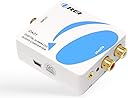
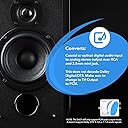
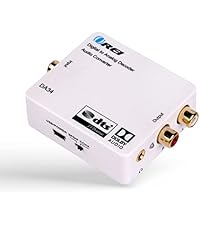
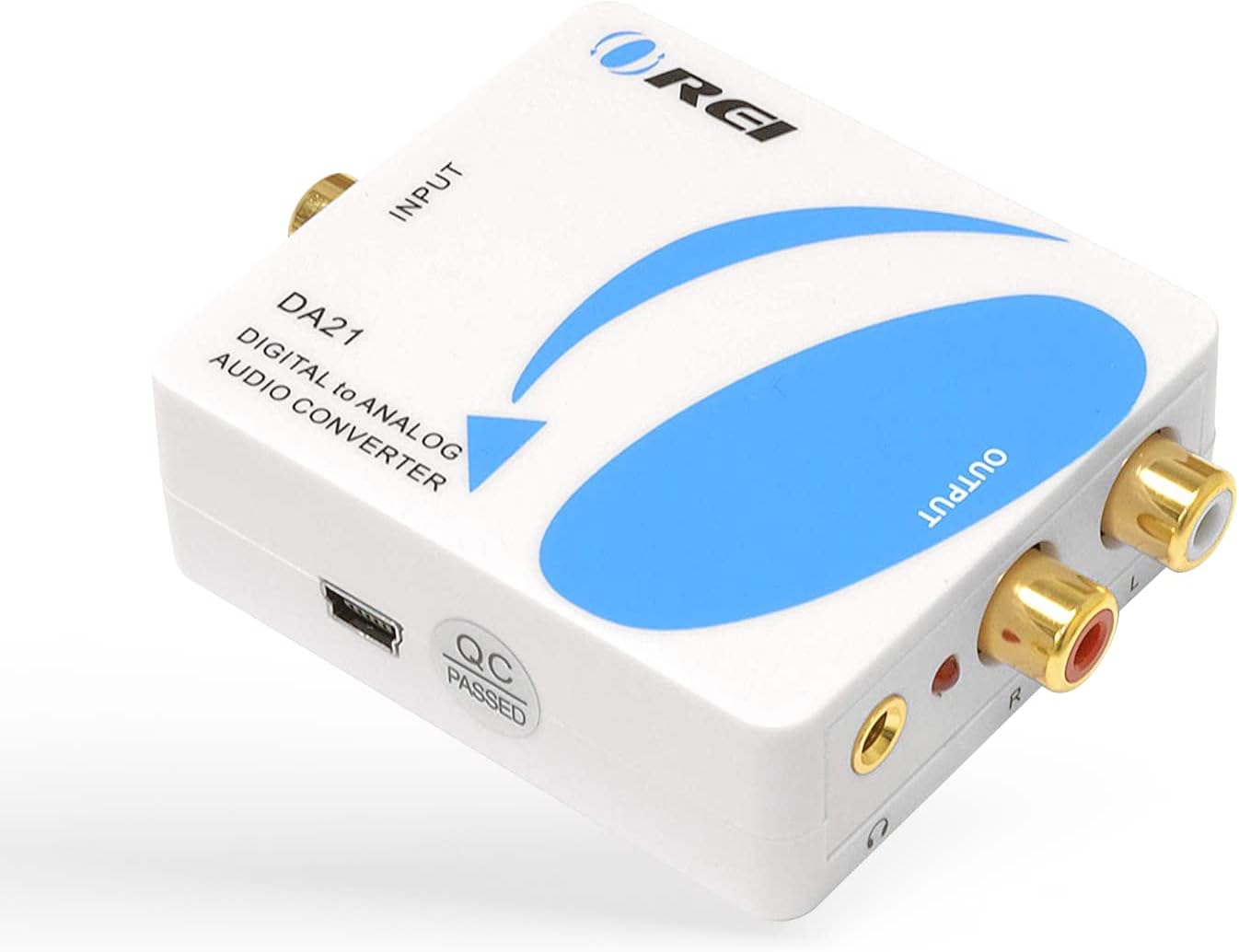
The OREI DA21 converts coaxial or optical digital audio signals into analog stereo output via RCA and 3.5mm jack, supporting all popular PCM sample rates up to 192kHz/24-bit. Ideal for connecting modern digital devices to legacy audio systems, it excludes Dolby/DTS decoding and requires source devices to output PCM audio. Compact and reliable, it’s perfect for professionals seeking seamless integration of vintage audio gear with contemporary digital sources.


| ASIN | B008EPW7TA |
| Best Sellers Rank | #23,218 in Electronics ( See Top 100 in Electronics ) #56 in Digital-Analog Converters #60 in Signal Converters |
| Brand | OREI |
| Brand Name | OREI |
| Customer Reviews | 4.3 out of 5 stars 1,308 Reviews |
| Global Trade Identification Number | 00610395790280 |
| Interface | Coaxial |
| Interface Type | Coaxial |
| Item Dimensions L x W | 2.95"L x 2.17"W |
| Item Weight | 6.4 ounces |
| Manufacturer | Orei Products |
| Manufacturer Contact Information | info@orei.com |
| Material Type | Plastic |
| Minimum Supply Voltage | 5 Volts (DC) |
| Model | DA21 |
| Mounting Type | Cable Mount |
| Number of Channels | 2 |
| Number of Pins | 1, 2, 3 |
| Packer Contact Information | info@orei.com |
| Part Number | DA21 |
| Smart Home Compatibility | Not Smart Home Compatible |
| UPC | 610395790280 887480723328 796594185772 |
| Unit Count | 1.0 Count |
| Upper Temperature Rating | 104 Degrees Fahrenheit |
| Warranty Description | 90 days warranty |
Y**?
It works! Enables you to use the a full, "real" sound system instead of wimpy TV speakers.
It works! We recently bought a Samsung Blu-Ray player as a gift for my son-in-law and his sweetie. Their flat screen had so-so built-in speakers and their old skool receiver had no HDMI inputs, just stereo RCA analog audio inputs. I purchased this unit and ALSO purchased this cable C2G / Cables To Go 29115 Velocity S/PDIF Digital Audio Coax Cable (6 Feet) . When we hooked it up it immediately worked. Audio content from movies sounds good, clear. Sound is in sync with the picture. Now their setup has some real bass and oomph. This will be a solution for them until they can afford a modern 7.1 surround receiver/speaker setup. Note: We went into the Blu-Ray player's audio settings and confirmed that PCM was set as the default. - - - - - - - - - - - - - - - - - - - - - - - - CAVEATS, TECHNICAL ADVICE: Caveat 1: This only produces stereo output (Left and Right analog audio jacks). In the setting of your Blu-Ray player: You ** have ** to use PCM (Pulse Code Modulation) output setting if you want this to work right -- it specifies that right on the box. Now, some people may have an older receiver that would have a feature to synthesize surround for a 5.1 system but usually, if you have that feature available to you, then one would "tend to" also have HDMI inputs on their receiver. If you have HDMI inputs on your audio receiver... why bother? This is a work around for those who don't. IF your receiver has HDMI inputs, the high likelihood is that you don't need this. IF your receiver has HDMI inputs and you aren't getting audio output 1. Check your settings and the sequence in which you turn components on (I find that turning on my plasma TV before turning on my receiver works better). 2. You might need to find an HDMI cable that specifies it has "audio return". All that being said, if you need this kind of workaround solution to deliver an analog feed an older sound system, then ---> running your Blu-Ray player's sound output through a decent stereo's analog inputs using this interface conversion box beats the pants off using the the wimpy speakers in most TVs. - - - - - - - - - - - - - - - - - - - - - - - - - - - - - - - - - - - - - - - - - - - - - - - - - - - - - - - - - - - - Caveat 2: OREI DOES ** NOT ** GIVE YOU A NON-OPTICAL (i.e. copper wire) CABLE ...which I believe will be the solution most people actually want. YOU HAVE TO PURCHASE ONE SEPARATELY. I strongly recommend buying a specifically "Digital" cable, labeled as being meant for SPDIF (Sony/Panasonic Digital Interface) like in the link I mentioned above - they run 5 - 10 dollars. If you try using a conventional RCA analog audio cable the digital signal may corrupt or the sound could stutter, especially over longer cable lengths. - - - - - - - - - - - - - - - - - - - - - - - - - - - - - - - - - - - - Caveat 3: I suppose there may be some Blu-Ray players out there that, for cost cutting purposes, have omitted the SPDIF connector that looks like a single RCA jack. In which case this product would not be a solution you could use. Final note: This unit also comes with an optical connector interface and a probably 3 ft optical cable. I did not use that feature or test it so cannot speak to how well it works. You * could * run the blu-ray player's HDMI cable to your flat screen and then, IF it had an optical out, use the supplied optical cable to this OREI box and then run RCA analog cables to your stereo. The big unknown is: Will the audio output "lag" or stay in sync with your TV? Sometimes you can set video / sound delay in your TV. You'd just have to test. Again, if your receiver has HDMI built in, there is usually no need to use this kind of product.
E**J
Works flawlessly and no fuss!
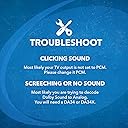
Like many people who outfitted their entertainment systems with nice audio systems years ago, I'm between a rock and a hard place as a growing number of companies are no longer including standard RCA analog outputs on their equipment. Specifically, I purchased a Sony Blu-Ray/DVD player and it will output only HDMI or digital coaxial sound. That means for me that I can play it through my modern tv speakers only, but not through my twenty year old gorgeous sounding audio system which I love! Enter this nifty little converter, which was easy to use with only one difficulty, which was quickly resolved. First I hooked it up in the most obvious way possible. (In case anyone wants the obvious details: Plug one end of a digital coaxial cable into your Blu-Ray/DVD player and the other end into this converter box. Then plug a pair of red-and-white RCA cables into the converter and the other end into stereo receiver's input. Then plug the converter into a/c power outlet.) First result? Noise. So I looked at the box and noticed a red sticker that said "Important notice! please set the digital output of the audio source to PCM, otherwise there will be noise." I did that, and it worked like a charm. I had thought that since my device was set to "auto" it would automatically pick the right format, but it did not. The red sticker also warns you that the product doesn't decode dolby digital or DTS audio stream. So I guess if you have either of those, don't buy this! For me it worked great. If you do buy it, make sure you have a digital cable (coaxial or SPDIF optical) and a pair of red-and-white RCA cables. Neither are included. PROS Works great to hook up modern digital sound devices (Blu-Ray/DVD players for example) to an older audio receiver and speakers. Can also be used to hook up a device with digital sound output (ie. a DVD/Blu-Ray player) to stereo headphones via a simple headphone jack. Simple to use and good sound quality Directions minimal but essential info included via a red sticker on the box. Read the red sticker! CONS Doesn't work for dolby digital or DTS audio stream. Cables not included---buy your own first!
K**L
Gives You the Inputs...but Output is slightly weak
I have my LG 42LM3400 42" 1080p 60Hz Cinema 3D LED TV connected through a digital optical cable to this device. The stereo output is connected to an old all-in-one Panasonic Home Theatre System (it's from 2005, so it only plays DVD's). I use only a PS3 and Chromecast to view media, no cable. The device works very well, audio is always in sync and there is no distortion. I have had no overheating from the device. It hangs from the digital cable connected to the TV, so it probably receives decent cooling. I do have 2 complaints though. 1. Although the device is always powered on, sometimes the audio doesn't output immediately upon power up of the TV and PS3. This never occured with my old LG TV connected to the Panasonic System. It doesn't bother me though because it doesn't always happen and it lasts for at most 2 seconds. There is never interuptions after the TV is on. 2. Volume's maximum setting is much lower than when I had my old TV directly connected to the Panasonic system. This is an issue when watching Netflix if there are other semi-loud device on (fans, air conditioner, vaccuum). I would probably need an amplifier to get the volume I used to have with straight analog connections. I still think this is a good buy if you need to hook your new TV with digital only outputs to an old analog Home Theatre System. It's cheaper than buying a new system and it works fine. Just don't expect Movies to be at their loudest. Curiously, when streaming audio on the PS3, the volume get noticeably louder than other content. I'm very pleased with this item as it has worked great for the past 2 months.
B**A
Does the job, even with my 2.1 Speakers
I have a PS3 and Xbox that I use with my Logitech Z623 2.1 speakers but I use to have to switch analog cables every time I switched playing consoles to use my speakers. I couldn't just hook up my speakers to my TV as this would only give me 2 Channel stereo audio (I would not get bass from the sub woofer this way). I also could not just buy an analog splitter as I plan on buying either a PS4 or XBOX ONE in the future, neither of which support analog, only optical so I had to find a way to split an optical cable (which I did) an then convert the optical to analog and still get 2.1 sound from my system because I didn't buy those speakers to not get my bass. I do not know much about audio systems so I wasn't sure what would work and what would not so before I bought the converter as I could not get anyone to confirm that I would get 2.1 audio using it with my speakers, I tried a couple of cheaper options that didn't work at all. Finally, after posting on youtube, (I tried asking the sellers but they either could not confirm or said it it would not work) a knowledgeable user assured me that this converter would do the job and I was very happy to find out he was right after getting this converter in the mail. I decided to spend a little more to get this converter over the cheaper ones listed as I thought it would assure me a better quality converter and from what I can tell it is reliable. While the AC cable is pretty basic and the converter is light weight, its construction is solid and it even has an aux output. The converter displays a red light while plugged in but it's no problem under a desk and the converter does output slightly lower audio than without but that is to be expected and it isn't a big deficit for a speaker system but more importantly, the audio is still very clean. Furthermore, I don't get any static noise from the converter when I leave my speakers on but I am also using it with premium quality analog cables. Bottom line, buy this converter if you need one and yes, you can get 2.1 audio using this with an optical cable and analog cables to a proper 2.1 speaker system.
S**N
Audio Converter Cables
This product worked exactly as advertised. I have a toshiba flat screen tv with the usual tinny built in sound system. It had been connected to a cheap sound bar via a "glass" audio cable, but the sound bar stopped working. Rather than pay anywhere from $100 to much more for a new sound bar, I had the idea to use an existing amplifier sitting under the tv in the form of an upper end Sony boom box with detachable speakers which had an audio in connection but only via a 3.5mm jack. This TV had only one option for an audio output and that was a connection port for a "glass" cable - Toslink I think they call it. I was not too optimistic about finding a signal converter knowing that the TV output was a digital signal, and the Sony audio input is an analog signal. But, a search on amazon turned up this converter which had the proper connection port to connect the converter to the Sony, via a 3.5 mm cable, the necessary software to do the signal conversion and then another port for connection of the converter to the TV via a glass cable. Neither of these cables are included. This converter cable hooked up easily, worked perfectly and has been working for several weeks now. I can watch the tv in the am for news with just it's own speakers on and that is fine. But, if I am watching a movie and want to get more depth and at least a "high fidelity" sound, I turn on the Sony and crank up the volume. It is not the same a s a surround sound system for reasons I won't get into here but it sounds much much better than the stock tv speaker and quite frankly, much better than the previously used sound bar. My main tv's have true surround sound systems, but this tv is in a breakfast/dinner nook. What started all this is that I could barely hear some of the movie's sound tracks - say while eating dinner due to the incredibly poor built in tv speakers and the goofy muffled sound tracks they put on movies nowadays. Now, I crank up the Sony amp and it works very well. I bought a second one of these converters for future use with another tv I have that currently also uses a cheap sound bar which seems to be on it's way out.
B**K
Works fine, but has to be reset regularly
I am using this audio converter with a Sony BDP-S5100 Blu-Ray player. My Blu-Ray player has no analog stereo outputs, just the HDMI and the digital coax outputs. In order to use headphones, this audio converter (or something similar) is essential to convert the digital PCM signal from the coax output of the Blu-Ray player to analog stereo suitable for my headphones. Anyway, this device works fine for that purpose; I have been pleased with the quality of the sound produced. Just keep in mind that you have to remember to set your Blu-Ray player (or Roku, or whatever) to output PCM stereo sound, not digital surround sound, else this won't work (since it *does not* have surround sound decoders for Dolby, DTS, etc.). I leave this device on all the time. My only complaint is that every day or two, when I turn on the Blu-Ray player, I get no sound - but, once I reset the Orei, everything works fine. So, it looks like the Orei locks up regularly; however, it has not done this during active use. Once I pull the power plug out and reinsert the jack, everything works fine again. In my case, the Orei is in a hard-to-access location, so this is a major irritant. If you don't mind resetting it, or if you turn the Orei off and on every time you turn your source player off and on, this may not matter to you.
C**D
Excellent option for legacy systems
Works great. Crystal clear signal. Small form factor. Converts optical signal perfectly. Recommend for legacy systems.
B**R
Excellent value. Happy with the performance. No problems to report.
I bought this after buying one of those new, high-tech wireless speakers. The one with Apple Airplay, DLN, Spotify Connect, and all that jazz. But the speaker didn't have an Optical line-in for my television. So, I bought this, ran the Optical Out from the TV, converted it through this box, and ran the mini-RCA into the speaker. At first, I wasn't thrilled with the result. However, I have come around, and I love it. First of all, for the money, this is hands down the best solution available. (I could broadcast to the speaker using Airplay, but the sound would cut out sometimes, and that only works when I'm watching AppleTV.) The sound quality is perhaps not 100 percent as full as what I get over the WiFi, but I would put it at 95 percent, which is great considering the value and the assurance of having a wired connection that won't cut out. (Imagine pausing and rewinding the movie every time the WiFi causes the sound to cut out.) I leave it plugged into the power outlet and my TV all the time. It works great, on command, and without issue. Initially, I had some serious problems with sound delay, but I went into the speaker setting and turned off the delay from Line In. Then I used the TV delay control in sound settings to get the sound perfectly in sync. Make sure the TV output is set to PCM instead of Dolby or DTS. This product lets me get everything I need from my new favorite speaker. Getting the model that had the Optical input would have cost hundreds more. I'm quite happy with this purchase.
R**A
PERFECT SOLUTION FOR OPTICAL TO RCA
100% satisfied, perfect solution for my Studio monitors to work with my New Samsung QLED TV.
A**R
Works with Vintage Equipment
Bought so I could try to run my tv through a Pioneer SX 727. Worked perfectly. Was a bit surprised as the wire coming from the "optical" audio output was very thin. To be honest, now the sound coming out of the TV is as good or better than any of the other inputs! Also, very easy to install. I see they are lumping several models into this review section, so, I bought the blue and white one if that helps. Needs an outlet for the power supply. Good purchase!
C**N
Buen producto
Nesecitaba un producto como este para la salida de audio digital de un proyector que usamos para reuniones por motivos religiosos...Funciono muy bien, compacto, pero muy funcional sin ninguna distorsion de audio. La verdad buena relacion calidad/precio. Y les digo funciono muy bien esa primera y unica vez porque de ahi a los dos dias entraron unos ladrones y se llevaron todo(Esto es Mexico). En fin......ahora tendremos que empezar a comprar todo de nuevo y no dudare en comprar otro...Saludos¡¡¡¡
C**G
Easy Setup, Great Performance (Just Needed PS5 Audio Settings Tweaked)
Really good and easy to set up it worked straight out of the box with no hassle. The only issue I had was with the Sony PlayStation 5 audio sounding weird at first, but that turned out to be a settings issue rather than the device itself. Switching the PS5 audio output to 2-channel instead of 7.1 fixed it completely. Overall, very solid and does exactly what it’s supposed to.
U**R
It works with my Samsung TV
Quality is good
Trustpilot
2 weeks ago
3 weeks ago