Buy anything from 5,000+ international stores. One checkout price. No surprise fees. Join 2M+ shoppers on Desertcart.
Desertcart purchases this item on your behalf and handles shipping, customs, and support to Macau.
🔋 Power your Predator, own your grind — never settle for less!
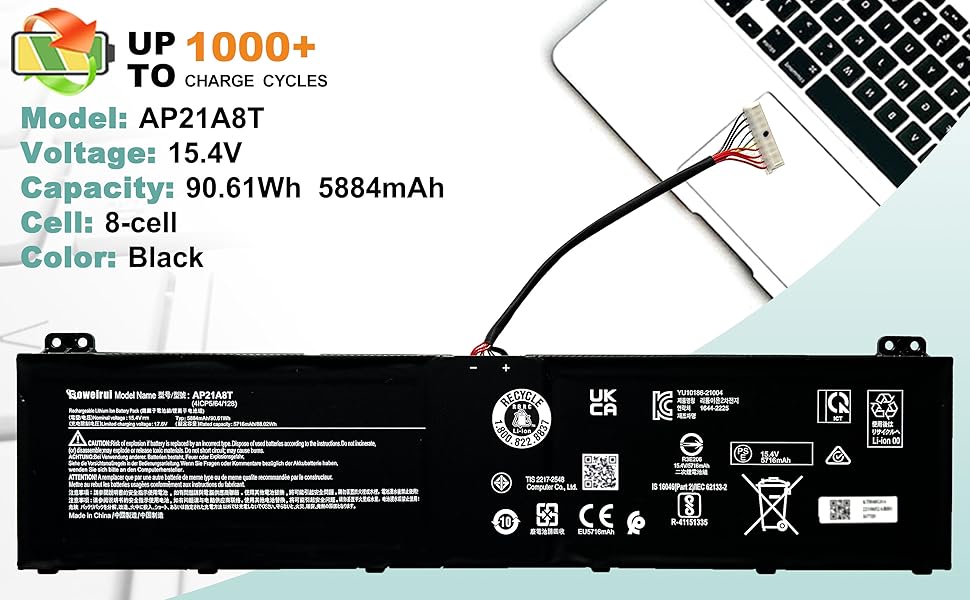
The BOWEIRUI AP21A8T battery is a 15.4V, 90.61Wh lithium-ion replacement designed specifically for Acer Predator Helios 300 and Nitro 5 series laptops. It supports over 500 recharge cycles, meets strict safety certifications, and comes with installation tools and instructions for a seamless upgrade experience.


| ASIN | B0BXPQVQM2 |
| Antenna Location | Laptop |
| Battery Capacity | 5716 Milliamp Hours |
| Battery Cell Composition | Lithium Ion |
| Battery Cell Type | Lithium Ion |
| Battery Weight | 9 Ounces |
| Best Sellers Rank | #27,745 in Electronics ( See Top 100 in Electronics ) #194 in Laptop Batteries |
| Brand | BOWEIRUI |
| Compatible Phone Models | for Acer Predator Helios 300 Series, for Acer Predator Helios 300 PH317-56-78LY, Predator Helios 300 PH315-55-72EA, Predator Helios 300 PH315-55-770K, Predator Helios 300 PH315-55-965Z, Predator Helios 300 PH317-56-78SM, Nitro 5 AN517-55-78KU, Nitro 5 AN517-55-713K, Predator Helios 300 PH315-55-78L7, Predator Helios 300 PH315-55-796N, Nitro 5 AN517-55-50P0, Predator Helios 300 PH317-56-7929, Preda… |
| Customer Reviews | 3.9 out of 5 stars 286 Reviews |
| Item Dimensions | 9.8 x 2.23 x 0.23 inches |
| Manufacturer | Dongguan Mingyiyuan Electronics Co., Ltd. |
| Model Name | AP21A8T |
| Model Number | AP21A8T |
| Number of Batteries | 1 Lithium Ion batteries required. |
| Recommended Uses For Product | Laptop |
| Reusability | Rechargeable |
| Voltage | 15.4 Volts |
A**R
Surface Battery
The battery quit charging so I purchased this replacement one. It was a bot of a challenge to install and in the process we broke my screen. It had nothing to do with the battery, but the way Microsoft puts their computers together when they are made. I was able to pass the new battery and the tools I purchased to help put the battery in to my computer tech son. It's a great battery.
A**B
Perfect fit, works great
I was honestly a little nervous ordering this replacement battery, but it fit my Acer perfectly and fired right up with no issues. Installation was pretty straightforward, and my laptop is finally holding a solid charge again like when it was new. Battery life has been great so far, and it feels good not having to keep my charger plugged in all the time. Definitely a great buy if your original battery is starting to give up.
B**R
Don't Do It! No instruction. No Youtube video. Take it to a pro!
I've changed batteries in several laptops and other miniature devices over the years. Thought this would be a snap. Well, it WAS a snap. Snap and the screen broke! UGHHH! I found a YouTube video for my model Surface Pro 5 with an unintelligible narrator. He didn't show the heating of the edge to release the adhesive. His started with prying the screen off. I tried that. Failed. Found another for a different Microsoft Surface. It showed heating. So I continued. Carefully heated around the edge and tried to get a thin card into it. That's when it snapped. I didn't heat nearly long and hot enough. It needs to be REALLY heated, and then continue heating the edge as you work your way around. Proceed at your own risk. Now, I'm going to need to see if someone replaces screens. GRRRRR! Not happy at all. I missed the return window. Maybe I'll try to change it again. Can't break my Microsoft Surface any worse than it is right now (with a broken screen). NEW Additional Notes: Today (2 days later in frustration) I went ahead and removed the cracked screen. Ya gotta get the edge of the screen and the aluminum case edges really hot. Like hot enough to not want to touch. Else, the adhesive will not let go. The little suction cup was useless. Maybe I was doing it wrong; but with no example to follow, how is a person to know? How hot? how long? Intelligible and detailed video, please. The vendor suggests new adhesive for reassembly, although none is included in the kit. Yes, it needs new adhesive. Buy that separately. I continued with the badly cracked screen removed. There are two flat cables. It is very easy to damage one or both of the cables. I recommend having new ones on hand, just in case. Finally, the battery replacement, itself, is very straightforward and not terribly difficult. With the new battery installed the Surface Pro5 now works great, albeit with the cracked screen that I will not reinstall. Instead, I'll buy a new screen and cables. The battery itself is apparently good; but this is not a typical DIY project. Once the screen has been removed (if it can be done without cracking and damaging it) the rest is relatively easy. My ONE-STAR is not for the battery, itself; but for the lack of warnings and almost certainty of cracking the screen with no instructions and additional parts that will be needed. I'd have paid $100 or more for a new battery replacement kit that was complete with instructions, advice, hints, and everything needed. Next time, I'll take my new Microsoft Surface (yes, my Plan B was to buy a new one if I failed at replacing the battery in the old one) to a professional and let them take the risk of damaging the screen. I don't think I'll ever attempt this again. HOWEVER: Since the battery has been replaced and now all I need is a new screen, adhesive, and connectors, I'm going to continue the project and give this Pro 5 to my wife. Should cost less than $250 to make this one whole again. I need to order a new screen, the 2 cables and an adhesive strip kit.
A**R
Best Battery for Surface Pro 5 Laptop
I went online to find a replacement battery for Surface Pro 5. I found few sites which sell the battery but don't find much information. At last I found this in Amazon with detailed battery specification. I got it within 2 days . I replaced my surface Pro 5 battery myself by going through youtube . It is fitted to my laptop perfectly without any issue. It has been 2 weeks and I don't find any issues. It is working great. Thanks to seller. And also price was great as well. I highly recommend them
M**E
Good battery, poor fit
New battery works however, its it thicker than the original battery, which causes the bottom of the laptop case to stick out. I am not able to completely seal the bottom of the case.
P**N
Great replacement for Acer Nitro's!
My battery was failing in my Nitro 17 AN-41, and I needed a replacement. This may have saved my laptop, and it wasn't that much money. I'm glad I chose this one. Very easy installation for my laptop, at least; there actually weren't any screws holding my battery in place, it simply slid out, making it super simple. (Your Acer model may have screws). I recommend this if you need a new battery! I even tested the battery health using the cmd prompt, and the capacity was fully maxed out! You are good to go with this battery. 👍
D**R
Quick delivery
Just received the replacement battery. Got it very quickly, in only 2 days. It came with a nice assortment of tools and packaged very well. Can't wait to replace my original battery with this replacement. My battery just doesn't hold a charge any longer. The only downside that I see is there's no instructions. This is easily resolved though by using YouTube. Thanks for a great product!
J**P
Works as described For Surface Pro 4!
Battery works as described, from a product standpoint it's great, could use adhesives for the battery but luckily, I used heat to remove the old, inflated battery (Do not recommend doing this as it is dangerous!!!). Also, a very nice addition for them to provide the necessary drivers to unscrew stuff as well as trim removal picks. For those looking to remove their battery on the Surface Pro 4: First of all, you will need this kit (recommend your repair kit but the provided screw drivers are ok), a heat gun or Hair blower (what I used), patience(!), and lastly, the Ifixit guide is the main resource recommended. When removing the screen, be very patient and look under the screen assembly when you are pulling off, I personally ripped a flex cable doing this. Finally, once you spend the few hours replacing the battery, get the battery fully charged and let it cycle until it dies, afterwards you should see if you have maximum capacity.
D**F
Works without fiddling
Its my second battery change for my surface pro 4. This one worked right away, really compatible. The first was a bad experience (I had the resolder the old battery board to the new battery).
M**.
Used and in bad condition.
Was really surprised that the battery is not new. It is used and in bad condition. Really disappointing as I had to buy another one and waste time waiting.
R**K
Fonctionne bien
extrêmement compliqué à changer. il faut vraiment prendre le temps d'écouter les vidéos attentivement. La batterie garde moins la charge que celle d'origine, mais mon Surface Pro fonctionne maintenant
P**O
Screwdrivers
Was missing the screwdrivers to complete the job very upset with that product
A**R
Not as labelled
Won’t hold charge and doesn’t come with the tools shown.
Trustpilot
3 weeks ago
2 weeks ago