๐ Elevate Your Data Game!
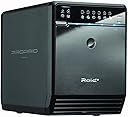
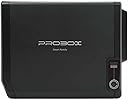
The iview Mediasonic HF2-SU2S2 ProBox is a robust 4-bay SATA hard drive enclosure designed for professionals seeking efficient data management. It supports all 3.5" SATA I/II/III drives, offers impressive transfer rates, and features a smart cooling system, making it an essential tool for any tech-savvy manager.
| ASIN | B002UUPWP6 |
| Brand | Mediasonic |
| Color | Black |
| Compatible Devices | Personal Computer |
| Connectivity Technology | usb |
| Customer Reviews | 3.9 out of 5 stars 124 Reviews |
| Global Trade Identification Number | 00629329000272 |
| Hard Disk Form Factor | 3.5 Inches |
| Hardware Interface | USB |
| Hardware Platform | PC |
| Item Weight | 6 Pounds |
| Manufacturer | iview |
| Mfr Part Number | HF2-SU2S2 |
| Model Number | HF2-SU2S2 |
| UPC | 629329000272 629329000524 |
| Warranty Description | 1 year |
S**Y
Works good for ZFS, but has a few drawbacks.
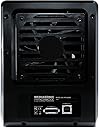
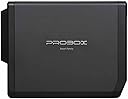
I have a few of these running now in a FreeBSD (9)/ZFS environment (using a variety of siis cards which support port multipler under FreeBSD). I have few complaints, but the pros outweigh the cons. Cons: Firstly, the LEDs are *bright*. If you are putting these in some sort of room or media rack, I suggest picking up some black tape to cover 90% of the lights. Secondly, when using eSATA, the boxes do not "sense" when the computer is booting. Every time I reboot my file server, I need to manually turn these back on. I'd say this is the #1 drawback to these enclosures. Thirdly, the external power supply is nice -- but it should be a standard plug & on the back of the unit. Placing the plug on the side is rather dumb. Technically, there was no reason they couldn't have used a standard transformer that uses a standard barrel type plug. Lastly, the cover that says "Probox" is junk. It falls off at a slight touch. Pros: - It works! I have had 0 "stalls" or "timeouts" on these enclosures. Some other enclosures at this price point seem to get too many requests at once and then timeout their reads/writes creating a bottleneck. I haven't measured exact speed, but in a big array with these enclosures, I can pull over 1GB(!)/sec. More speed than I know what to do with. :) - It has an adjustable fan speed as well. I occasionally read my drive temps to make sure they are not running warm. The ability to keep the fans at "3" - max speed is a nice bonus. - They are cheap. I've been buying them used from amazon, and have been receiving new & unopened units. Not sure if I just keep getting lucky. - I don't have to remove screws from the back or side of the unit. That means I can leave the unit in place should I need to replace a HDD. - In the future, if I change my server from eSATA to SAS or something else, I can still use these enclosures or give them to someone who might. Less technically savvy people are more likely to use USB (albeit USB 2.0). In the past, I had used the generic "4 bay to ESATA" enclosures found on other websites (cant mention the brand, but think plain black square matte box, usually bundled with a raid card). I found that over time, the internal controller or power supply would go bad on them. I've had 3 of these "go bad" (power supply issues), and a 4th randomly lost a single port. While I can continue to RMA them, I expect my electronics to last longer than a year. I know these Mediasonic's will last for awhile.
J**Z
Works well, is quiet, looks nice, well built
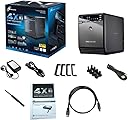
I've had this ProBox since 12/29/10 and it's been working 24x7 since then with two 1TB drives and two 500GB drives. So far no failures on the drives and the unit has been working reliably as well. Until recently I had this attached to an old computer via USB acting as a poor man's NAS. I have the two 1TB drives mirrored and the two 500GB drives mirrored. The mirroring is being done in software. Performance was okay, it worked but was a little slow. Reasons for this: USB interface and software mirroring. I wanted to take advantage of the eSATA port so I recently upgraded my machine, installed a PCIe eSATA card, and installed FreeNAS. I've not been running this configuration very long so I don't have had statistical data, but it's A LOT faster copying files & using the shared space. Example: I kept my iPhoto library on this while connected via USB. It would take several minutes to load iPhoto and there was a noticeable delay opening the full resolution images in the application. Now iPhoto almost feels like the files are local to my laptop. It's not quite as fast as having the files on my laptop, but it's darn close. The ProBox is fairly sleek looking and fits in well enough on my desk. The drive access lights are indeed bright, but it's in my office so it never bothers me. I think it looks kind of cool actually. The fan is very quiet unless it spins up to high. I have this sitting near a window and only occasionally will it spin the fan up to medium when the afternoon sun in on the office window. I was recently working from home and in the morning it was on low and in the afternoon kicked into medium a few times. The increase in noise was negligible. If I manually adjust the fan speed to high you can hear it though. I also like that you can manually adjust the fans to try to keep the drives as cool as you want. Drives slide right in to mount and come with a plastic piece you screw to the front that "latches" them into the enclosure. The ProBox even comes with a screwdriver to attache these pieces which is nice. The front pops open with a push and opens down or comes off. There is a metal retainer which much be un-clipped to actually remove the drives. It looks like the main purpose of the front door is to make the front look nice, and to channel the air from the bottom of the unit to the top to try to maximize airflow through the chassis. The construction of the ProBox is nice. It feels nice and solid when you to move it. Like others have mentioned the only weird thing is the power plug is on the side of the unit. All-in-all I've been very happy with this. I'm really thrilled with the performance now that I've switched to using the eSATA interface. If you need a cheap, well-built way to add 4 drive bays to your computer I think you would have a hard time beating this in terms of price, fit/finish, and functionality. PROS ---------------------------------------------- * Well built, looks nice * Drives easily slide in & out * When fan is on low or medium it's very quiet * Comes with screwdriver to attach drive plate * Relatively inexpensive compared to other solutions CONS ---------------------------------------------- * Power plug is on the side, can't easily set multiple units side-by-side * Drive activity lights are bright, could be an issue in a living room or bedroom * USB 2 isn't ideal for connecting multiple, large drives
P**O
Good Value, No Sleep/Idle for Drives, Not for NAS Backup
This is a fantastic value. For under $100 (as of 2/2011) you get a solidly built, compact, 4-bay SATA enclosure that supports both eSata and USB 2.0. There are a couple of downsides to the Mediasonic 3.5-Inch USB 2.0 and eSATA Pro Box 4-Bay Enclosure HF2-SU2S2 (Black) : * Although there is a sync mode that will turn the unit off or put it to sleep it only works when the device is connected to also goes to sleep or gets turned off. That's fine if you're using it with a PC but with a NAS it means that it stays on all of the time with the disks spinning. That's a waste of disk and energy if it's being used once in a while. * There's a *really* bright blue activity light that will easily light up a room at night and is even visible from the street! * The power connector is on the side. Makes for messy wiring and is kinda annoying. You should also know that your host sata interface needs to support multiplexing or you'll be able to access the first drive via sata (not a problem with USB). That's just a limitation of this product and it's clear from the documentation. Just an FYI.
D**K
Worked wonderfully, until it didn't :(
This was a great item at the onset, I had it all set up via esata, all the temps were within spec, it only lasted 8 months before it just self-destructed and would no longer power up. I may have received a tainted item, but sadly I lost 6tb of data (thankfully backed up) in a matter of moments.
P**K
Great storage solution, could be better.
Pros: Affordable Compact solution, easier to organize Auto-power feature Easy to swap hard drives in and out Cons: Power-cord sticks out to the side Audible rattling from fan Auto-power feature limited to your computer's on/off state Unnecessarily bright light Finicky hard drive support SMART status only available for the drive 1 slot Running out of space in my mid-tower, I didn't want to have a messy individual enclosures lying around. I also didn't want to shell out $$$ for a NAS server, either. Mediasonic Probox was the perfect solution to my problem. Now, for the cons...my gripes with it are minor but still enough to knock a star off. Firstly, the fan rattles and can get annoying in a silent room. Finding a replacement fan has been fruitless. My computer also wasn't happy with the 3 TB Hitachi hard drive I put in there and refused to boot, prompting me to swap it with a lower capacity hard drive. The HDD indicator light is distracting and I have it covered at all times.
B**S
Amazingly small foot print!
This thing is amazingly small for an enclosure that holds 4 SATA Hard disk drives, I am truly impressed by the build quality of materials and workmanship, Installing Hard disks is easy just attach the handle with screws that they provide (Hey they even give you a screw driver!) and presto! You are ready to use your hard drives via USB or ESATA interface. Accessing all the 4 drive bays using USB 2.0 interface is no big issues, Most of the operating systems will directly support this without any need for additional drivers. However, if you plan on using the ESATA interface you will need to plan and attach this to an ESATA port that supports Port Multiplier w/ FIS-based switching in order to access 4 HDDs simultaneously. Some newer motherboards easily does this, Please do some research with your motherboard documentation and or update the drivers for your onboard SATA/ESATA interfaces to support this feature. If you motherboard does not support Port Multiplier w/ FIS-based switching in order to access multiple HDDs simultaneously, You can buy a PCIe or PCIMCIA based add-on controller card that must explicitly say that it can support Port Multiplier w/ FIS-based switching in order to access the 4 HDDs simultaneously. Amazon sells a lot of these cards for various applications (Desktop PC or Laptops) Desktop solution : one of them is Syba SD-SA2PEX-2E PCIe 2x e-SATA Ports with SIL3132 Chipset , if you want just RAID 0 or 1 or if you want more features you need to shell out little bit more and buy other such add-on cards. Laptop Solution: one of them is Syba SD-PCBX-ESA2 ExpressCard SIL3132 Chipset 2x e-SATA II (SATA2) Ports, 54mm, Up to 3.0Gb/s There are many more add-on cards offered elsewhere, but do your research and make sure that ESATA interface must support Port Multiplier w/ FIS-based switching in order to access 4 HDDs simultaneously. PROS [+] Very Small foot print [+] Very reasonably priced [+] Excellent Quality and build of materials [+] Keeps all the drives well cooled for prolonged operation [+] Very good transfer rates even with USB 2.0 (Averaging 25 to about max 37.5 MBytes/s) CONS [-] Very Bright Blue LED's that flash like crazy! (Nothing a black electrical tape cannot hide) [-] Can be very loud if the FAN is operating at high speed [-] Power connector port is on the side which makes it impossible to keep multiple units side by side Despite the few cons, the Pro Box 4-Bay Enclosure HF2-SU2S2 is a very good purchase! Highly recommended! GO buy one!
B**B
Don't buy Mediasonic 4 Bay USB2.0 Products
Pros: + Low price for 4 bay drive enclosure + Attractive Case + Works with multiple drives (Western Digital 2TB "Green" drives, Hitachi 3TB drives, etc.) + Mediasonic honors the product warranty + New USB3.0 product works fine, multiple friends have had good luck with it. Cons: - Most motherboards do not support SATA port multipliers, so, eSATA interface can see only 1 drive. Easily remedied with the purchase of an additional eSATA card if you have a PCIe slot free.) - USB2.0 Port Fails to function over time. The connection stops working after a power cycle. The box turns on, but the USB port fails to negotiate and connect. Tried multiple computers and multiple cables). The Mediasonic Forum notes multiple instances of this bug. Both my friend and I have had this problem. - This is an end of life product, with no end user workaround or fix. Overall, I recommend going with the newer USB3.0 product for $20-$30 more - the NEC controller and firmware are pretty solid.
M**N
so far so good
I had a couple of external drives that were taking up too much space and one of them had a bad board/connector so I couldn't read the drive. Decided to strip all the drives down to the bare drive and load them into this unit. Quality of the unit seems pretty nice, though it's my first multi-bay enclosure purchase so no reference point. The drives load from the front, which is nice, and they inserted fairly easily. Had to wiggle one of my drives around to get it to align properly, but not a big deal. Fan is quiet. It's connected to an older (2007) iMac and it's worked fine for my Time Machine backups and other uses.
Trustpilot
2 months ago
4 days ago