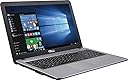
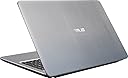
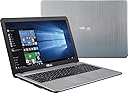
My wife and I use computers with GNU/Linux operating systems. However, in order to update our Garmin GPSes (we have four), we need to use a computer using the Microsoft Windows operating system. Back in 2013, I bought an ASUS X502C Core i3-3217U Dual-Core 1.8GHz 4GB 500GB 15.6" LED W8 Laptop - White which fulfilled that need. However, the more I used it, the more I appreciated its physical merits (display, keyboard, sound quality, etc.) and, as we decided we needed a new computer to take with us on trips (and did not want to spend a lot of money), I decided to buy a new inexpensive Windows computer and convert the Asus X502C to Linux. This older Asus works positively great as a Linux computer. It is light in weight and is a pleasure to take on trips. Unfortunately, the computer I chose for my new Windows one was this Acer Aspire One Cloudbook, 14-Inch HD, 64GB, Windows 10, Gray (AO1-431-C7F9) includes Office 365 Personal - 1 year , a disaster if I ever saw one! (You can read my very lengthy review if you wish; it details my travails with this machine and its Windows OS from November 2015 until earlier this month.) Having the choice of just discarding this Acer Aspire One or converting it to Linux to see if I could get some use out of it, I chose the latter option. (It finally does work as a computer but the major problem with its internal battery - discussed at length in my review - persists.) Of course, for use with those Garmins, I needed a new computer with a Windows operating system. (So there went my intended savings!) Based on extensive research here on Amazon as well as other places as well as my past experience with the Asus brand (see below), I chose this Asus X540LA-SI30205P 15.6-Inch Laptop (Intel Core i3, 4GB Memory,1TB Hard Drive, Windows 10 Home), Silver . I'm glad I did (at least so far). It arrived yesterday and I went through Windows' setup procedure. I added just two (2) programs: Garmin Express and CCleaner. (I also uninstalled the MacAfee antivirus program; I do not wish to pay for any programs on this computer and, as it has essentially only one use, Windows Defender and Windows Firewall are just fine.) Though configuring, updating, and cleaning took about five hours, the computer functioned just fine and everything was finished around 9:00 PM last night. Among other things I deactivated as many of Microsoft's 'spying' settings as was possible. This morning I turned the computer on and updated all of our Garmins. The entire procedure went smoothly, something that could not be said about that Acer Aspire One. (During the eight months that the Acer was a Windows computer - and during the short periods when I actually had it in my possession and it was not at Acer's repair station - I was only able to update the Garmins once. And that updating was very troublesome; because of 'freezes' and so forth the process took two days to complete!) The keyboard on this new Asus X540LA is excellent, with a very good "feel" to it. The display is very nice; it's crisp, it is easy to read text, and viewing on it is easy on the eyes. The speed of the Intel i3 processor is very good, much better than Intel's lower lines (Pentium, Celeron, etc.), and I am pleased with its speed. It even has a built-in CD/DVD drive, something which more and more computers are eliminating. And with all that, it weighs relatively little. Obviously at this point I cannot comment on longevity. But this is my third Asus computer (the other two are still in use) and, considering my experience with this brand, I expect that this one will last just as long and will give as good service as the other ones. Naturally, should there be any problems, I shall report them here. I can recommend only one accessory: a laptop bag. This Case Logic Bryker 15.6" Laptop Bag (BRYB115) in the one I am using. It is a very nice well-designed bag. (This AmazonBasics 15.6-Inch Laptop and Tablet Bag , which I also own, is much less expensive and is also very nice.) In the mean time, if you are in need of a very good, fast, feature-laden, and lightweight computer for general use or for use when traveling, I can highly recommend this one. I thank you for reading this report and for taking my opinions into consideration. Lawrence H. Bulk ===== Update: September 29, 2016 The following is just an FYI concerning the Microsoft Windows 10 operating system, NOT the computer itself. This past Sunday the Windows 10 Anniversary Upgrade (version 1607) installed to the computer. After that upgrade was finished, I found that there was a new version of the CCleaner program. I downloaded and installed it. Within the program there was a new option: Old Windows Installation. I checked that option. Then I began the cleaning process. That process took thirty-eight (38) hours to complete! I know that that amount of time is hard to believe but it's true. Frankly, I was afraid that I had destroyed the entire operating system and I was tempted to shut off the computer. But I resisted that temptation and I'm glad I did. When all was done, I shut down the computer, waited about a minute, and then restarted it. I fully expected to see some sort of 'failure' notice. But no. The computer booted up and operated perfectly and it continues to do so. But I have to tell you that this was a 'white-knuckle' process which lasted over a day and a half. This sort of thing is just another reason why my wife and I continue to use GNU/Linux operating systems rather than Windows. Thanks again for reading this. Lawrence H. Bulk ===== Update: October 24, 2017 On Saturday, October 21, 2017, the computer downloaded the new Windows 10 Fall Creator's Update, Version 1709. After the installation was complete and the computer restarted, I started the cleaning process with the CCleaner (which is set to delete the <windows.old> files, in other words, the obsolete previous installation). This was at 5:30 PM EDT on Saturday (the 21st) afternoon. The process took SIXTY-ONE (61) consecutive hours, finishing just this morning, Tuesday (the 24th) at about 5:20 AM EDT. Oh brother!!! Then I found out that there was a newer version of CCleaner introduced just today! So I downloaded and installed that. And, after updating the one other extra program I have on this computer (Garmin Express, now version 5.7.1), I restarted the computer and ran the new CCleaner (which has some extra cleaning options). Then, of course, I "defragmented" the computer. Those two processes took about an hour and a half. When all is said and done, I essentially have a brand-new Windows 10 computer. Most people do not go through all of this rigamarole. But, with Windows keeping all of the detritus, NOT doing this is what eventually slows down your computer and you think that it's just getting old and it's time for a new one. (That, of course, is what Microsoft and the computer manufacturers WANT you to think!) Knowing about all this and doing it is all well and good as it does completely renew your computer but, if I had to have Microsoft Windows as my only operating system, well, I wouldn't even WANT to own a computer! Just give me Linux! Lawrence H. Bulk