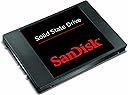
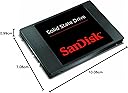
⚡ Upgrade your speed, save your wallet, and join the fast lane!
The SanDisk 64GB SATA III 2.5-inch Internal SSD delivers up to 490 MB/s read speeds and 350 MB/s write speeds, offering a cost-effective, energy-efficient upgrade to revitalize older computers. Its durable design is backed by a 3-year warranty, making it a reliable choice for professionals seeking faster boot times and smoother application performance without premium pricing.
| ASIN | B007ZWLRSU |
| Brand | SanDisk |
| Brand Name | SanDisk |
| Cache Memory Installed Size | 64 |
| Color | Black |
| Compatible Devices | Desktop |
| Connectivity technology | SATA |
| Customer Package Type | Standard Packaging |
| Customer Reviews | 4.6 out of 5 stars 2,828 Reviews |
| Data Transfer Rate | 750 Megabytes Per Second |
| Digital Storage Capacity | 64 GB |
| Digital storage capacity | 64 GB |
| Form Factor | 2.5-inch |
| Global Trade Identification Number | 00619659080792 |
| Hard Disk Description | Solid State Drive |
| Hard Disk Form Factor | 2.5 Inches |
| Hard Disk Interface | SATA 6 GB/s |
| Hard disk description | Solid State Drive |
| Hard disk form factor | 2.5 Inches |
| Hard disk interface | SATA 6 GB/s |
| Hard-Drive Size | 64 GB |
| Hardware Connectivity | SATA 6.0 Gb/s |
| Installation Type | Internal Hard Drive |
| Item Part Number | SDSSDP-064G-G25, SDSSDP064GG25 |
| Item Weight | 0.18 Pounds |
| Manufacturer | SanDisk |
| Manufacturer Part Number | SDSSDP-064G-G25 |
| Media Speed | 350 Megabytes Per Second, 490 Megabytes Per Second |
| Model Name | SDSSDP-064G-G25 |
| Model Number | SDSSDP-064G-G25 |
| Network Connectivity Technology | SATA |
| Read Speed | 490 Megabytes Per Second |
| UPC | 619659080792 |
| Unit Count | 1.0 count |
M**E
An SSD for the masses
Sandisk are no amateurs when it comes to memory. They have consistently innovated and provided reliable, affordable and fast storage to the masses, and this SSD is no exception. This isn't the first SSD sandisk have created, so they are no strangers to the industry. When it comes to SSD storage, you want the fastest read speeds possible, because thats means your computer is going to be able to load applications and data quicker. This SSD achieves a read speed of about 430 - 470MB per second. These speeds are at the top end of the performance chart, meaning your boot times, application loadings and general system responsiveness is going to feel super fast and snappy. However, where the cost is significantly reduced is in the write speed. This SSD is able to achieve write speeds of up to 200mb, which isn't blazing fast but by all means not slow. For pretty much most users, a slower write speed and a super fast read speed is going to be the same, as they will never utilise a higher write speed, because you will be reading data more often than writing, and when you are writing data, 200mb is a large amount, and isn't going to bottleneck you. When you consider the price to other SSD's with the same storage capacity, you cant go wrong. This SSD is considerably cheaper because you are paying for what you do not and not paying for what you don't need. Its perfect for anyone, whether it be someone who just wants to browse the internet or a power gamer looking for fast loading times and no texture lag, this SSD is going to serve you well. If you are looking for an SSD to give a new lease of life into your system at an affordable cost, then this is the one to go for.
B**F
brilliant upgrade for ageing laptop!
OK, this is not for those looking for the very best. It looks really cheap and plastic compared to the sleek Samsung 830 I bought at the same time and probably doesn't perform in the same benchmark league either. Nor are there any accessories of any type in the box. Frankly, I don't care about the numbers, all I am worried about is the real world results. I bought it to try and revive a 6-7 year old Toshiba Satellite Pro L20 with a Centrino single core 1.73Ghz processor running XP Home and a SATA 1 40Gb hard drive. The laptop hardly got used because it just took too long to boot - easily 10-15 minutes, and was extremely sluggish after that. I've been toying with the idea of trying an SSD and when the Sandisk 64gb appeared in the Amazon flash sale, I thought I would give it a go. On connecting to the computer with the USB to SATA cable supplied with the Samsung, I was concerned to see no recognition of the SSD. I then tried my Windows 7 desktop and realised it needed to be initialised before formatting so I let Windows 7 do the honours. (From numerous comments on the web, I understand Windows 7 does a better job of formatting an SSD than XP so this is the preferred option). Back to the laptop and I downloaded the free version of Macrium Reflect to clone the hard drive. After 3 attempts, this did not work so I then tried the EaseUS Disk Copy Freeware. On installation, this prompted the creation of a boot CD which then needs the computer to be restarted and enter the boot menu at POST (press F12 immediately after starting the computer) and select boot from CD/DVD drive. EaseUS fired up and cloned the disk without a problem and the resulting cloned SSD worked perfectly. Note that the transfer rate over USB2 was around 1.2GB per minute - do the maths and you will see that this is a long process and is a real nuisance if it has to be repeated. I wasn't expecting much, but frankly I am amazed. From pressing the start button to Internet Explorer open and responsive now takes exactly 60 seconds. Everything seems to happen quicker. I am sure we will be using the laptop a lot more for quick online research from now on. I can't say how reliable this will prove to be, especially in the XP environment as I have only had it installed for a couple of weeks - time will tell. As an aside, I then put the Samsung 830 into my son's Dell with Intel C2D and running Vista expecting similar results, but was slightly underwhelmed. It is a little quicker to react, but the improvement is nowhere near as dramatic. I needed the Free EaseUS Partition Manager to reduce the size of the partition to be cloned in this case and also found EaseUS Disk Copy Freeware did not work, but Macrium Reflect did! Reducing the partition was a long process, in my case nearly 2 hours. The system reported over 52,000 files to be moved and when it took 5 minutes to move the first 10, I started to worry, however it did get quicker as it went along.
D**H
Item is great, shame about delivery
This is a review of the item, so don't be put off when I say that the delivery of the item was an absolute shambles. Took about 10-14 days before I finally received the item due to the first one being lost in the post and then the second, replacement arriving very very late. Anyway, the actual SSD is very good. It was bought as a replacement hard drive for an old Dell XPS M1530 whose hard drive had broken. Lets just say that the speed difference is immense. I managed to install Windows 8 on the laptop, a task that I know will have taken it with the old conventional hard drive a few hours to complete, 10 minutes before it was fully installed. Boot times a great too, previously taking my laptop about 5 minutes to fully boot on the old hard drive (this being due to the old hard drive being nackered for a while), now with the SSD it takes around 12 seconds. The size thing is not too much of an issue either, I am fortunate enough to have a Windows Home Server at home to store my stuff on but if you do not have additional storage options such as a portable hard drive or if your using a desktop, a big hard drive for storage, so the 64GB version of the SSD is just right for me but if you have no other storage options then go for the 128GB version. Overall, definitely recommend this to all of you. Seriously, don't put off getting this the difference is chalk and cheese. I can not stress to you how much you all need to get this item (or an alternative SSD, the point is I want everyone to get SSD's!!).
J**.
Ideal !!
I bought this for use with a Hackintosh (A standard PC with Macintosh installed) - I found my Lenovo Z580's Mac boot time a little... slow, at around 35 seconds. With this the system boots in about 20 seconds and 15 seconds on what's called a quiet boot (A bit like safe mode, you could say). Pro's: - Easy to fit - Standard size and fitting screw holes - Quick - Silent - Lightweight Con's: - I bought the 64gb as when using Mac, I barely use any storage up (My HDD was 750gb and I only used 50gb) which can be limiting to people using Windows - Not as fast as some other brands, but it's still an SSD and is still moves like s*** off a shovel...excuse my French there... Overall: Would be a 5/5 if it could move like the other brands, good all round SSD and does just fine with my Hackintosh.
H**F
Cheap & fast!
I've never been a massive fan of hard drives, I never really upgraded my 160gb 7200rpm sata drive even after spending £800 on brand new hardware as I didn't think I needed it, but I knew there was something bottle necking my computer and I figured the hard drive is the only thing I never upgraded. I decided to splash out on the cheapest 64gb SSD I could find, which happened to be this one. All I can say is WOW, how did I live without an SSD before? Unrarring files, installing applications/games and running programs are done in the blink of an eye, not to mention that my PC now loads in 12 seconds from the boot menu to the start menu. My old hard drive used to take maybe 2 minutes for the system to get stable, it's more like 5 seconds using this SSD. My old hard drive had a read speed of about 46mb and write speed of 20mb, this one benchmarks at 460mb read and 260mb write, wow! Fully recommended if you're still using an old hard drive, this is a bargain!
G**P
Incredible - eventually
I bought three of these, two at 64 and one at 128 Gb. Two were for boot drives in desktop computers and the 128 was as a replacement drive in my Cocktail Audio. I can only agree with others - the speed of these things is almost unbelievable. Windows boots on the first desktop in a minute and that includes entering a password and about 30 odd seconds of BIOS initialisation. What I did not find anywhere at first was how to get the things to work at all. Mine had to be initialised and formatted before I could do anything with them, a function that others seem to miss out. It is easy, once you know that it needs to be done, just add it to a system either internally or by means of a USB connector and follow the instructions here : [...] I spent maybe five hours trying to get the first SSD working, I spent less than five minutes with the final one. The one in the Cocktail audio is perfect although the startup time is not improved there. Just silent running. They are silent, cool, use little power and they are FAST.
M**P
not a fast ssd but good value for what it is
I bought one of these to upgrade my old pc before giving it to my brother. It definitely speeds up boot times from the old 7200rpm WD Black caviar HDD, though not hugely, and it is of course completely quiet in operation. Also it is good value for a SSD of this size. Less than fifty pence per GB! However, when it comes to actual operation such as running anti virus scans I was surprised to see it was about the same speed as my old HDD. This is because the Random read/write performance is not very good (for an SSD). You will see in the info on the product that amazon provides, random read/write speeds of 8k/2k. Compare this to a fast SSD of 83k/39k - 10 times faster!! (these speeds taken from the sandisk Extreme SSD). For many operations random read/write speeds are much more important than the sequential speeds. So, in summary. good value if you want a silent hardrive that is somewhat faster than a traditional HDD. But - if you want to really notice a huge difference get a fast SSD, the extra twenty quid is money well spent. Which is why I have ordered a Samsung 830 to replace this one, I'm not giving my brother a PC that I'm disappointed with.
B**1
Good reliability
I have used four Sandisk Extreme SSDs in various computers, and had no issues with performance or reliability, unlike other brands and models of SSDs I had tried a year ago. I have put the Extreme SSDs in some older computers, like some Lenovo Thinkpad X60, R60, T61, and the performance increase (with Windows 7) was very noticeable each time, despite the fact that those laptops only support Sata 1.5, meaning that the SSD cannot work at full speed in term of data transfer speed. However, the seek time matters a lot and is much better than a regular hard drive. I had a few instances where those computers froze for a few seconds, but some registry settings fixed the issue. Even if older laptops don't have much RAM, I think a SSD would use the swap file a lot more efficiently and quickly. I would strongly recommend to buy a modern SSD, even if the host is only SATA1 compatible, as the reliability of previous models was just terrible, and it's not fun to keep reinstalling the OS etc. I had two SSDs dying suddenly before, and gave up on SSDs for a while. On my Thinkpad X60, the stock hard drive was running very hot, and the SSD is cool. However, I think the SSD is probably using more the CPU, and therefore the laptop does not run much cooler than before. Battery life has been improved, and of course it is quieter now.
M**E
Works good! Inexpensive!
Works great for me! Super cheap! Threw it in a laptop that had a bad HDD, and off to the races! At this price, I'm not all that concerned about Read/Write speeds. SSDs are a great choice for laptops that may be used around kids since they don't break from impacts as easily as HDDs. Memory house seller took their sweet time getting the package shipped but it was free shipping so can't really complain! I really considered going for a faster (and maybe more dependable) 250GB drive for just 30-40$ more, but I just needed cheap SSD to get a laptop up and running that someone had given to me. Windows 10 boots up in like 15-18 seconds. Just note, this does not have a 3.5" adapter tray if your planning to use this in a PC. You'll either need an adapter tray or some other arrangements (like velcro stickies or something).
F**O
EXCELENTE
EL DISCO ES SUPER RAPIDO, NO SUENA, CON LA COMPU NO IMPORTA EL PROCESADOR NI MEMORIA QUE TENGAS, TE ASEGURO QUE CON ESTE DISCO PODRAS TRABAJAR MUCHO MAS RÁPIDO SI TIENES UN I7 CON UN DISCO NORMAL, TIENES UN FERRARI CON RUEDITAS DE UN SMART AUNQUE SABEMOS QUE ESTOS DISCOS SON INMORTALES NO SE DAÑAN POR NADA, EN PARTICULAR A MI ME DIO UN PROBLEMA ALGO QUE ES INTERESANTE POR QUE UN DISCO TAN EXCELENTE NO SABEMOS COMO CUBRE LA GARANTIA, PUES LA GENTE DE SAMSUNG SE PORTO MUY MUY BIEN Y LA ATENCION FUE SUPER AGRADABLE, Y ME PIDIERON MANDARLES EL DISCO POR CORREO CERTIFICADO Y EN MANOS DE 10 DIAS ME ENVIARON UNO NUEVO.. ASÍ QUE APARTE DE RECOMENDARLOS POR QUE SON EXCELENTES SI LLEGARAS A TENER UN PROBLEMA SANDISK RESPUNDE SIN PROBLEMAS LAS GARANTIAS
T**S
Alltagstaugliche SSD-Festplatte (128 GB)
Diese SanDisk SSD ist optimal als System- oder Datenfestplatte einsetzbar. Sie wurde bei mir sofort korrekt im Bios und auch in Windows erkannt. Wenn man die Besonderheiten für den Einsatz von SSD's beachtet (möglichst den AHCI-Modus im Bios einstellen, aktivierter TRIM-Befehl im Betriebssystem, Prefetch bzw. Superfetch und Defragmentieren unter Windows deaktivieren), wird beim Einsatz der SSD als Systemfestplatte das ganze PC-System spürbar schneller, vor allem bei Programmstarts und beim Hoch- und Herunterfahren. Die SanDisk SSD erwärmt sich nur unwesentlich und ist natürlich wie alle SSD's geräuschlos und energiesparend. Bezüglich der Lebensdauer mache ich mir bei korrekter Einstellung im PC-System keine Sorgen. Die schlichte Verarbeitung finde ich gut. Da sich im Innern des Gehäuse nur RAM-ähnliche Chips befinden, ist die Ausführung komplett in Kunststoff absolut ok und gibt meinerseits überhaupt keinen Anlass zur Kritik. Mit Stand Januar 2014 sind hier 128 GB für knapp siebzig Euro zu haben - bei dem Preis sollte man erst gar nicht mehr an die 64 GB-Variante denken, zumal das 128 GB-Modell auch noch bessere Leistungswerte aufweist. Der Anschluss an eine SATA III Schnittstelle ergibt eine theoretische Geschwindigkeit von 6 GB/s. Die SSD läuft auch an SATA II Anschlüssen mit 3 GB/s. Ob man in der Praxis wirklich spürbare Unterschiede zu den teils erheblich teureren "Premiummodellen" von Samsung, SanDisk und Co. feststellen kann, wage ich mal zu bezweifeln. Benchmarks zeigen allerdings schon, dass es messbar schnelleres auf dem Markt gibt. Für mich spielt es aber keine Rolle, ob Windows nun in 5 oder 6 Sekunden hochgefahren ist. Die herkömmliche SATA-Platte ratterte da teils Minuten vor sich hin, bis das letzte Ikon auf dem Desktop aufgebaut war. Im Windows7-Leistungsindex erreicht die SanDisk 128 GB in meinem PC einen Index von 7,5. Das ist ok. Die SSD wird in einer unscheinbaren Schachtel geliefert, die kaum größer ist, als der Inhalt selbst. Software ist nicht enthalten, auch keinerlei Einbauschienen oder Ähnliches. Da keine mechanischen Teile verbaut sind, ist es der SSD völlig egal, in welcher Position sie sich befindet. Ob umgedreht, wackelnd oder vertikal spielt keine Rolle, solange die Anschlüsse fest aufgesteckt sind. selbst ein Schütteln während des Betriebs bringt die SSD nicht aus der Ruhe (für den Einsatz in einem Notebook sind SSD's neben Strom- und Gewichtersparnis auch deshalb besonders vorteilhaft). Bei mir liegt das Teil als Systemfestplatte lose im Festplattenkäfig eines Miditowers herum. Sollte der Preis noch weiter fallen, fliegt auch noch die alte Datenplatte heraus oder ich nutze eine weitere SSD als externe Festplatte in einem üblichen 2,5-Zoll USB3-Gehäuse. Ich bin jedenfalls gespannt, wie sich Preis und Größe der SSD's in Zukunft entwickeln. Auf der SanDisk-Homepage kann man sich eine Diagnosesoftware für die SSD herunterladen - wer's braucht... Fazit: schnelle, zuverlässige und günstige SSD ohne Schnörkel können nur 5 Sterne bedeuten.
W**F
SanDisk EXTENDS LIFE OF OLD LAPTOP
The hard drive of my old laptop was always "acting" up and the overall speed of the OS, whether Vista or Ubuntu, was quite slow, although Ubuntu was significantly faster. I did not want to invest very much to keep my old laptop functional, so I reviewed many the solid state hard drive offerings and found the 64 GB SATA 6.0 SanDisk to be the most economical match for my needs. Fortunately my old laptop i386 was able to accept the SATA 6.0 specifications. The SATA 6.0 is downwards compatible with the plain SATA specs which my old laptop has. The installation of the SanDisk was very easy. Fortunately I had a backup image of my old disk with the Ubuntu Operating System (OS) on a USB stick so that restoration of the image to the SanDisk was simple and worked well. If you do not have a backup image of your old disk then you can purchase a 'kit' specifically designed for migrating from your old hard disk to the new SanDisk. If you are planning to copy an image of your old disk, make sure that the SanDisk has the same Gigabyte (GB) capacity, or that it is larger in capacity than your old disk. If you have a backup image created by the "Ping" backup utility then the new disk capacity can be smaller than the old disk but must still be large enough to accommodate the OS and data image that was created by Ping. For me SanDisk was a good investment. I have converted my old laptop to a desktop with a separate monitor, and it is currently running Ubuntu 12.04 OS at speeds at least 5 times faster than before. 5 MONTHS later - October 29, 2014 and the SansDisk is still running flawlessly! ........ I have it partitioned for the Linux OS and (about 27 Giggabytes) and a file storage ........ partition (about 37 Gigabytes).
A**R
Parfait
Installé dans un portable Toshiba Satellite de 4 ans un peu vieillissant, ce disque fait des merveilles. Aucun bruit ne signale sa présence. La batterie semble tenir plus longtemps.Tout tourne sensiblement plus vite, même Internet. Arrêt et redémarrage avec Linux Mint 17.1 en 22 secondes (l'installation totale, avec le téléchargement de mises à jour, en 20 minutes). Pour le prix c'est très raisonnable! Le seul point noir c'est sans doute la taille un peu limitée (128 Go), mais je prends ça comme une invitation à se discipliner: ne pas laisser les trucs inutiles s'accumuler sur ce disque, faire du ménage régulièrement, s'en tenir au nécessaire. Pour l'instant c'est parfait.
Trustpilot
3 weeks ago
4 days ago