Desertcart purchases this item on your behalf and handles shipping, customs, and support to Macau.
🎯 Master your moves and sketches with precision that keeps up!
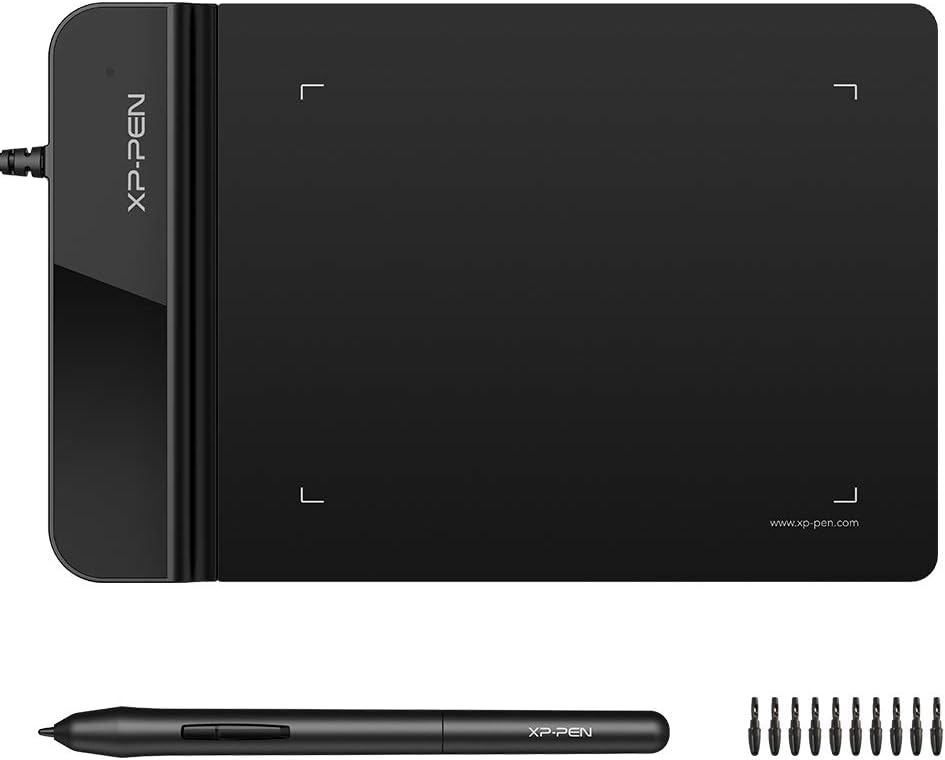
The XP-Pen G430S is a sleek, ultrathin 4 x 3 inch graphic tablet designed for OSU! gameplay, digital drawing, and professional use. Featuring 8192 levels of pen pressure sensitivity and a rapid 266 RPS report rate, it offers smooth, precise control without lag. Its battery-free stylus and ambidextrous design make it a versatile, portable alternative to traditional mice, perfect for creatives and gamers alike.


| ASIN | B01BA6XQI0 |
| Active Surface Area | 4 x 3 inch |
| Additional Features | Stylus |
| Best Sellers Rank | #2,993 in Computers ( See Top 100 in Computers ) #23 in Graphic Tablets |
| Brand | XPPen |
| Built-In Media | 1 XP-Pen Star G430 Graphic Tablet, 1 x Passive Pen, 1 x Quick Guide, 10 x Replacement Nibs, 1 x Pen-Clipper |
| Color | Black |
| Compatible Devices | computers |
| Connectivity Technology | USB |
| Connectivity technology | USB |
| Customer Reviews | 4.2 out of 5 stars 9,238 Reviews |
| Display Type | LED |
| External Testing Certification | Não aplicável |
| Item Weight | 0.55 Pounds |
| Manufacturer | XP-Pen |
| Mfr Part Number | StarG430 |
| Model Name | G430 |
| Model Number | StarG430 |
| Model name | G430 |
| Native Resolution | 1920x1080 |
| Number of Items | 1 |
| Number of Packs | 1 |
| Operating System | Windows |
| Operating system | Windows |
| Pressure Sensitivity | 8192 Levels |
| Pressure sensitivity | 8192 Levels |
| Screen Size | 4 Inches |
| Special features | Stylus |
| Specific Uses For Product | OSU Game, Online Teaching, remote working |
| Target Audience | Teacher |
| UPC | 602258815575 |
Z**E
Bought it for the second time
Very good product
A**R
Nice gift for my daughter
Bought it as a gift for my daughter and she is so happy with it.
L**L
It's up there with Huion. It's that good.
You'd expect this thing to fall apart or the pen to break its tip pretty easily. However, this thing is decent, but the tensegrity and durability of the material are astonishing! I consider myself a pretty reckless fellow, and I have the occasional "whoops" here and there. However, despite all the brunt damage, this has taken from falling, my heavy hand scribbling despite frustrations, it stands up valiantly! The drivers automatically detect once you plug and play, and the only thing I might need to complain about is the small form factor; however, voided when you realize this means more portability. Brilliant job, XP-PEN.
H**I
Not recommended
I found Box opened finger prints everywhere product looks used and returned out of the seal im not happy with this order .
N**.
Total Waste!
It was a complete waste of money! I wanted it to mark and write on my pdf documents. But you cannot write with much accuracy using it. In fact, its difficult to write and is nothing like many other reviews have written about it.
K**N
Works well
It is a good product but very small in size
A**I
Really small
Not satisfied
M**A
احببته
جميل
I**M
small
very small
L**G
Excellent for text input
Work with Microsoft Word flawlessly. I use this for Chinese text input. Way faster and accurate than using mouse.
M**S
A nice, small drawing tablet!
I bought this tablet for an alternative for now, as I purchased a Huion Kamvas display tablet and found myself unable to use it until I upgrade my PC (no USB-C port and no extra HDMI display ports for second monitors). I bought the smallest and cheapest one as I didn’t need anything fancy if this was going to be an alternative for me right now. I chose XP Pen as I always hear the brand be regarded in a very positive light by other artists. The tablet itself is slim, sleek, and doesn’t take up much space. Included in the box was the stylus itself, replacement tips and a tool to remove the pen’s tip, it also came with a manual as well. Setting up the tablet was very easy, finding which driver I needed on the website wasn’t a hassle either. The XP Pen tablet program is also very easy to use and is very direct. You can customize the pen tablet’s area of coverage on your screen or customize the pen pressure and buttons of the stylus. You can customize the buttons to act as a mouse with a double left click and right click, keyboard controls like shift or alt, or can be used within a drawing program as either an eraser or pen buttons to switch between. Using the tablet within an art program after customizing my preferred settings, I found the tablet to be very responsive to the stylus. I do feel a slight delay in my real movement and the movement of the stylus in an app, but I’m sure that can be fixed or customized within the app itself. Even though I bought a small size, it is not difficult to draw with. It’s a good tablet for the price and I am very glad I chose this brand for it!
E**A
Fácil de usar
Dice mi hijo que muy bien
K**K
Just what i wanted!!
This product is super helpful with my math assignments, especially with documents where I need to write on. The product is able to scroll click and maneuver just like a regular mouse, but when I go to right, it’s exceptionally good when applied pressure and writing as shown in the video. The buttons feel comfortable. The pen is sleek, but not too sleek so I can grip onto it. The sensitivity is just right it’s not too sensitive or hard to maneuver with the pen. There’s hardly ever any lag as I write and the design as well executed it allows me to write across the paper without getting off of the pad. If you’re thinking about getting this product for the same reason, I did I suggest going with this one it’s affordable and well worth your money.
Trustpilot
1 month ago
2 weeks ago