Buy anything from 5,000+ international stores. One checkout price. No surprise fees. Join 2M+ shoppers on Desertcart.
Desertcart purchases this item on your behalf and handles shipping, customs, and support to Macau.
🎥 Capture Every Moment, Relive Every Frame — No PC, No Hassle!
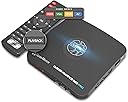
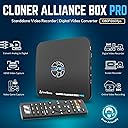
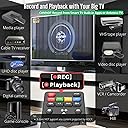
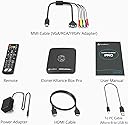
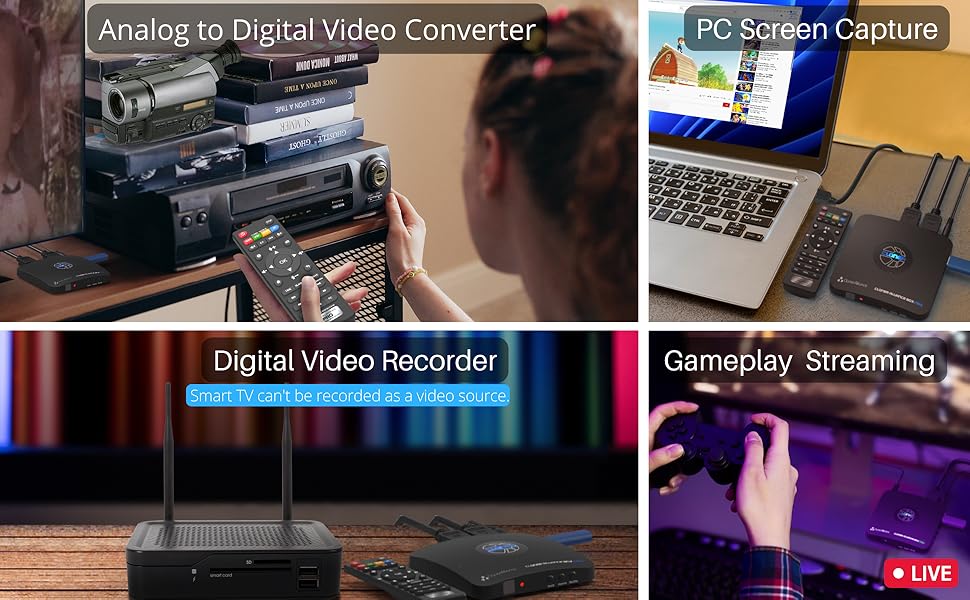
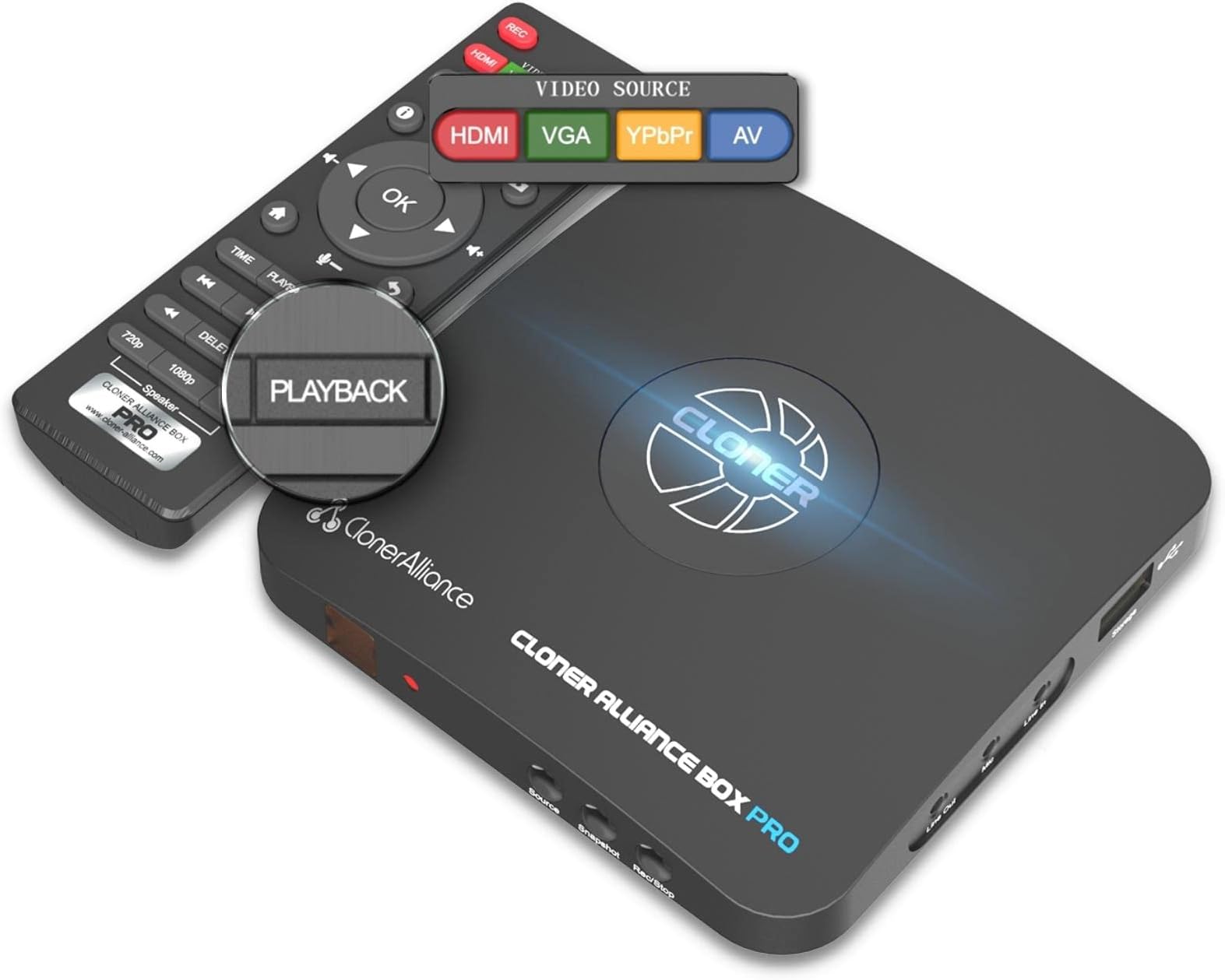
The ClonerAlliance Box Pro is a professional-grade standalone video recorder and converter that captures 1080p@60fps video from HDMI, RCA, YPbPr, and VGA sources. Designed for millennials who value preserving analog memories and streaming content with ease, it supports scheduled recording and instant playback on TV without needing a PC. Compatible with a wide range of devices from VHS players to game consoles, it delivers ultra-low latency and saves high-quality MP4 files on USB drives. Included free editing software empowers quick, lossless video trimming and combining, making it the ultimate tool for digital archiving and content creation.


| ASIN | B012T1D0IG |
| AV Output | MPEG-4 |
| Antenna Location | Video Recording |
| Best Sellers Rank | #31 in Internal TV Tuner & Video Capture Cards |
| Brand | ClonerAlliance |
| Built-In Media | Capture Card |
| Compatible Devices | Television |
| Customer Reviews | 4.0 out of 5 stars 2,098 Reviews |
| Hardware Interface | 3.5mm Audio, Component Video, Composite Video, HDMI, Micro USB 2.0 Type B, USB 2.0 Type A, VGA |
| Item Dimensions | 4.3 x 4.3 x 0.6 inches |
| Item Weight | 6.8 Ounces |
| Manufacturer | ClonerAlliance |
| Mfr Part Number | CA-998P |
| Minimum System Requirements | No PC Required |
| Model Name | ClonerAlliance Box Pro |
| Model Number | CA-998P |
| Operating System | Windows |
| Other Special Features of the Product | Passthrough Latency, Schedule Recording |
| Platform | Windows |
| Recommended Uses For Product | Video Recording |
| Special Feature | Passthrough Latency, Schedule Recording |
| Tuner Type | NTSC, PAL |
| UPC | 712395957967 |
| Unit Count | 1.0 Count |
| Video Capture Resolution | 1080p |
| Warranty Description | 90-Day No Hassle Return (at our cost) and 2-Year replacement Service. |
T**M
I LOVE MY CLONER BOX PRO!
I initially purchased the HDML Cloner Box (non Pro) because of the good Amazon reviews. I was looking for an HD DVR device and the HDML Cloner Box reviews said that it would record virtually anything across an HDMI connection with excellent video quality. I ran into the common issue of the “blank screen” after hooking up the Cloner Box and went the manufacturer web site (Cloner-Alliance) for help and found the “Pro” model with Remote Control, Timer Recordings, and Instant Playback. The Pro being a new product had no reviews on Amazon so I didn’t see it on first pass. After testing the Cloner Box and seeing for myself that recorded everything I tried (CATV, Blue Ray, PC Stream) with Excellent Quality, I instantly purchased the Pro Model and arranged to return the Box version. The blank screen on the Box version was resolved by pressing the 1080/720 button for 5 seconds (you do the same with the Input button on the Pro). In addition to wanting an HD DVR, I also am in the process of moving my owned DVDs and Blue Rays to MP4 files for my Home Theater Server. I have another software solution for moving my Blue-Ray movies to MP4, but the Cloner Box can do that too. I have found using the Cloner Box for the “Extras” is nice because I have to view them to choose which one to copy and it is easier on the Cloner than the software solution. I LOVE the HDML Cloner Box Pro. Similar to the non-Pro Box, it records EVERYTHING coming across the HDMI port with EXCELLENT Video quality. The Remote functionality is fantastic. I have yet to test the Timer recording, but understand how it works. The Pro also allows you to Record on the PC through a 2nd Mini-USB port using their HDML-Cloner Pro Helper Application. The PC recording functions worked perfectly, giving you a mirror image of the HDMI stream on the PC (with a slight delay) and full recording control (with the addition of a Pause that you do not get on the USB Drive recordings). The recordings on the PC were as perfect as the ones on the USB flash drive. I can see one advantage of the PC recording is that you can record without having an HD monitor handy. I’m going to test recording from my DSLR Camera where that functionality will come in handy. The Cloner Box Pro Also has a Mic AND Headphone Jack (Mic Jack also on the Box), adding a headphone monitoring capability I currently do not have on the DSLR. The PRO also allows you to control the volume of the HDMI stream and Mic to get a perfect mix. One thing I noticed is my initial recordings had low volume (the Box recordings were slightly louder than the original program). I had to adjust the HDMI volume higher (controlled via remote) to get my recorded volumes back to “normal.” The file sizes on the recorded videos are very large. Cloner-Alliance obviously made a decision to provide the best possible MP4 video quality and did not try to over-compress the video. I’m seeing that the Pro files are about 2G per half hour of video. You can choose between 1080 or 720 recording quality, but the file size does not change a whole lot. The Pro also has a 2G file size limit so it creates a new file every 2G (or 30 minutes). Cloner-Alliance recently removed that restriction on the Box version and is promising new Pro firmware soon that removes that restriction. I had a problem trying to record baseball games where the recording stopped after 1 hour and it appeared the Pro had trouble creating that 3rd file after filling 2 2G files. Cloner-Alliance support was excellent and suggested a different USB flash drive. That appears to have been the problem. Since changing flash drives I have been able to record two 2 hour movies without issue. After the All-Star break I will try baseball again. Cloner-Alliance also provides another software application “MP4-Cloner” which allows you to “Trim” “Combine” “Convert” and “Burn” (to Disk). The Trim and Combine function do not re-compress the video so they work very fast, and do not diminish the quality. “Trim” allows you to remove extra things that are recorded at the beginning or end of the file (lead-in and recordings after the program had ended). Trim on a 30 min 2G file only took a few minutes. Combine allows you to combine the 2G MP4 files together into one file. The last 1.5 hour movie that I combined only took about 10 minutes to complete. “Convert” allows you to convert the native MP4 streams into other formats, although what I used it for was to reduce the 6G movie file down to 3G by decreasing the BPS setting. “Convert” does re-compress the video so it takes a bit longer. The video quality of the 3G file was still very good. The Pro also allows you to record from various other input types: VGA, RGB, and standard AV signals. This is accomplished by a provided cable with those various plugs that feed into a multi-purpose plug (reusing a 2nd HDMI-looking physical connector). Of course I purchased the Cloner-Box to get away from an older RGB recorder so I don’t see using anything other than HDMI. If you’re looking for a device that will record Full HD Video from your Game Console, Cable TV Box, PC Streams, or Blu-Ray Player, the Cloner Box and Cloner Box Pro is the device you have been looking for.
P**S
Works as advertised
Bought a Box Pro to replace my old VHS/DVD setup that finally bit the dust (and they stopped making new VHS recorders around 2014). Box Pro works great so far (see notes below) and I am able to record off my cable box as well as my Roku device. The Box Pro provides different input ports so I have both devices connected to the Box Pro simultaneously and use the Box Pro remote control to select the port/device I want to record from. Playback works as advertised and Box Pro provides two different playback resolutions. The company also provides digital editing SW that come free with the device ....I downloaded the SW but have not had time to use it yet. Things to be aware of: > You definitely need get a high quality flash drive or HD....Had an issue with an inexpensive flash drive but bought a Toshiba HD as recommended & so far no issues > User manual is cursory & needs to provide more detail > Box Pro can only Fast Forward at 10x in playback so 'zooming' through commercials is slower that I was able to do with VHS (a case where digital is not better than old school) >Playback always starts from the beginning so if you want to take a break during playback, you have to leave the Box Pro in the stopped screen mode....this means you can't record anything else until you jump back to the main menu (WHICH RESETS ALL PLAYBACKS TO START FROM THEIR BEGINNING...WHICH MEANS YOU LOSE YOUR PLACE).... in other words, you won't be able to return to watching a movie where you left off once to leave the 'stopped screen'...Note that the 10x 'fast forward' is ''lethargic' ... for example it takes 'multiple' minutes to get back to where you left off even if you remember where you left off (say you were 1 hour in to a movie)....This 'feature' also means you can't playback/save your place on multiple recorded sessions either....Box Pro only allows you to stop a single playback at a time.......I never had this issue with VHS, using multiple tapes but I guess this is progress!? Bottom line, I am happy with my purchase and it is worth the price.... thought it can be improved (I sent these suggestion in to the Box Pro customer service and they said they would pass them on to development).....We shall see
J**A
Works well. "Passthrough" is not a true passthrough and driver is tricky. Component is great.
Overall this device actually works great. I very much like the fact that it can operate at least somewhat externally from the computer without taking up a card slot. This means it will never interfere with the PC upgrade process and can be used with a wider variety of devices (for instance a laptop if its CPU is powerful enough.) Its form factor is small and convenient for the most part (though once you have those cables sticking out it gets significantly less convenient.) The choice to give us a remote for controlling various function is actually a huge plus and I have to give them kudos on that. I just have two main complaints in regards to the product itself. First, the driver can be a bit tricky. They don't offer a naked driver but, instead, it's part of an install process via software they give you a link to download. The software is unintrusive, but I ran into a problem where somehow I managed to accidentally install the wrong driver and it was then nearly impossible for me to get the right one in there. You can't manually point the device manager to a driver (the files in the installation folder didn't work right even,) but pretty well must get it to install the driver during the software install process. If you somehow load the wrong driver like I did you have to uninstall the software and force remove all of the files that driver uses, reboot, and reinstall. Most of the time this won't happen if you install normally, but this is something to bear in mind. Probably the biggest thing that is both a con and, ironically not (more on why not in a moment) is that the "passthrough" function is NOT an actual passthrough. Rather it still goes through the device itself and has some processing. This has two down sides. One, a tiny bit of latency is still added and two, the image ends up less clear with just a tiny bit of blurring. The latency is actually very little and in most things you won't even notice (really even 2D fighters seemed to be ok for me) but I did try playing Overwatch (PC version with a mouse) running through it and I found the latency to be sufficient to completely ruin my ability to play. (I had hoped to offset at least part of the capture and encoding process via the device with a bit less load on the PC versus just directly capturing the game.) Now here's the advantage of the output actually being processed a bit: this actually means that when you feed it a signal from an analog source it can work on LCD monitors. For example, I was positively ecstatic to discover I could play my PS2 on the monitor I've been using with all of my other consoles. A normal low latency HDMI converter for the PS2 still leaves the output at the usual 480i which a typical monitor simply will not accept, however, this thing produced a progressive output (probably 1080p in fact) that the monitor would accept. Also, as I've stated, the latency is actually low enough that it does seem I was able to play 2D fighters and music games in my testing so far. That was a pleasant surprise. I've actually been trying to find some way I could get a device that could handle converting the PS2's component output to my monitor's HDMI with a progressive output that wouldn't have too high of a latency and it's actually surprisingly hard to find. (Most that do cost as much as this thing does, so you may as well get the one device that does two purposes I guess.) It also has composite and VGA inputs for other analog options. I haven't tested these yet, but I expect that the results would be very similar. It's worth taking a moment to note that if you record from an analog source (like the PS2) the inverse telecine in the actual recording to USB seems to be very simplistic -- maybe even just a simple deinterlace. While the output on the screen looks completely normal and great, I think the recording probably just drops the framerate in half instead of trying to apply a complex IVTC filter. This makes the recording a lot less nice than the image you see on the screen. It still comes out pretty well for a device that can handle this in realtime though. A true IVTC filter likely would require too much processing for an embedded device to handle on the fly like this. This mostly only matters in really high motion scenes as slower motion will mostly look normal with this. I didn't see any options to configure this or even to leave it out. It may not do this if you're recording through OBS or etc -- I haven't had the opportunity to test that yet. One thing I would also say would make for room for improvement is if the device itself could handle the encoding when you're using it along with a computer for streaming or etc. Even though the device itself is capable of recording (as it does when it records to a USB device,) when you plug it into a PC it does not send the video to the computer in a ready format but must instead be reencoded by the software. It would be a lot harder to actually send it in a pre-encoded format obviously (probably not compatible with software like OBS) but it would have advantages like working with systems that have weaker CPUs/GPUs. This is not a point against it as possibly nothing does this at this time, but it is something I think would really improve it and similar products.
T**M
Good, bad and clunky
This item does work, but don't expect an trouble free experience. This device has a very clunky user interface from the outset. The menu system pops on and off seemingly at will. i have owned the device for several weeks and still have not been able to get it to execute scheduled recordings - even after entering the meticulous info required (in military time) to schedule events. nonetheless, recording via the '(start) rec' and 'stop' button do work as expected - but u have to monitor the recording time. One unusual feature of the device is that with most input devices you will have to press and hold the 'source' button' on the cloner-pro for 5-6 seconds for the signal to get to the device from the input. Another concern for some will be the size of files produced: in the highest quality recording - the device will produce a file of about 6gb per hour recorded. A 2 hour movie will be 12gb in this format. And, if your usb device is formatted ad NTFS this will be one file. Whereas if your usb device is formatted as FAT32 - this will be split into multiple 2gb files (or smaller depending on time recorded). Further, if you plan to 'upgrade/update' the firmware - your usb device will need to be formatted as FAT32. However, my update did not yield any improved functionality. Nor, did it cure the scheduling issue. i enjoy gadgets. but i cannot recommend this item - especially to someone who does not understand how to format usb devices using different file systems. the hardware of the device appears well made from quality components (relatively speaking). But, the onboard software is frustrating and somewhat unpredictable. The resulting recordings are good quality. But, on more than one occasion the device did not close the files out properly and all files on the device were lost. it is my hope that a serious firmware/software update will cure most of these issues at some point in the future. Support via email was good and quickly responded to my concerns (this is a real plus in my experience). All things considered - a good device that delivers quality recordings, good support via email - but, medium to low quality software onboard.
P**E
Excellent picture and simple remote recording. Lifesaver for streaming and DVR recording.
Updating my 4 star review to 5 stars! This unit is reliable and versatile (after using it for a while, you get a better appreciation of the features). I had been searching for an HDMI recorder for a while, but the prices were crazy .. this one is worth the money! Many streaming services have great content, but pesky ads and often inconvenient windows for seasonal offerings (e.g. Christmas shows / movies in October or March). Also, busy people have little time to see their favorites before they disappear. Add to that, those annoying cable / satellite DVR units with encoded hard drive storage, which can't be off-loaded for future perusal on a laptop. You PAY for that DVR (with limited disk storage), or the streaming service .. so watch the programs at YOUR convenience .. before they remove the limited time program you want to see in the future! Just place this device in series with your HDMI sources (2 inputs available) .. or from any component or composite video source .. and feed the output to your TV (the TV doesn't have to be ON). I thought it limiting that a USB drive is preferred for recording (FAT32 in 2GB segments) ... but this unit has never bungled a recording! Cropping off a longer movie using the 2GB segments is not a hardship at all! The 720p and 1080p format recordings are crystal clear! With their Cloner MP4 trimming and combining software, it's a quick and simple matter to get just the segments you want to record (including a simple multi-segment trimming feature for those pesky free streaming site ads). I have tried several of the "higher end" video editors to perform the same trim / combine functions, but gave up due to complicated procedures and very lengthy times to edit an program (these "professional" programs have lots of features, but a simple, non-compressive 'cut and combine' seems to be lacking). The included (via web site) software does an amazingly fast job of trimming and combining (along with some MP4 conversion choices, after the editing is done). This, currently, only works on MP4 files (which are generated on the storage device by this unit) .. so if you need to use their program to edit other video file types .. use a general video converter program, first. The software won't save you video file size by compression, but the ease of use is worth it (you can always compress the video with the "convert" feature .. or use a "higher end" compression program for those phones and tablets). You can use the included remote to control the recorder .. or you can perform more complex record / play functions by using their PC software. The manual can be somewhat overwhelming .. but it covers things in depth for the technically inclined. Finally .. their customer service is very responsive and helpful .. and I would purchase other devices from them, whenever those birthdays and holidays come around!
R**Y
Why I hated the ClonerAlliance Pro Box
Why I hated the ColonerAlliance Pro Box. This review will take up every character they allow me. First the good. The price is ok, not unreasonable for what "it is suppose to do" Unfortunately to get to that point can be a challenge. It's packed well, very well. The unit itself is small, but not too small and is non intrusive when sitting on a shelf or on another device, as mine was. Ports are well placed nothing to complain about there. The remote. It's small, but gets the job done. It is light weight and has that cheap plastic feeling, no weight to it at all. the remote worked fine, but there is no outward on and off button. In the FAQ they tell it has a hidden one, they tell you to press a certain button for a few seconds to turn off and then a certain number of seconds to turn back on. l never tried it but it would seem the designers were lazy not to have a separate button dedicated to turn on and off the device. Which brings me to another issue. When not powered on, there is no thruput. That means that your TV has no picture from whatever device you are getting your programming from. If it aint on, you aint going to see no picture. It would have been simple to design a passthrough feature into the device. As far as using. The interface menu is all text. It partly transparent. The Text itself is grayish and very difficult to read even though there is kinda a black background. I might have had a better experience if the remote for the pro box didn't keep operating my streaming device. (Vsee Box Elite). Press the up button nothing happened on the Pro box hit it again and it moves, but on my Vsee Box my volume goes up! Press the ok button to enter a menu option, the VSee Box turns off..WTF. Now for the worst of the worst. After it was on for a couple minutes the video and sound was no longer sync. My usual fix is to unplug the VSee box and reboot. that did not cure the issue, I then unplug the ColonerAlliance Pro Box waited 30 seconds and started back up. nope, didn't work, I then unplugged both waited 30 seconds and plugged both back in, NOPE again! I had to unplug both, remove all HDMI CABLES then reboot both boxes to get it to re-sync. This happened the FIRST TIME right out of the box, within 3 minutes. Later that night, same issue, I went through the each step like before and it would not re-sync until every box was unplugged and all the HDMI cables were out. (got me why?). Each day this would happen at least two times. I finally started unplugging everything and each time it happened and that worked, but should I really have to unplug everything. I understand streaming boxes un-sync at times, but issue happened too often My last issue with the box was the size of the file it records in, mp4. I set it up for 1080 and good quality. Nothing worse than recording a good quality video to get a worse looking video. I could have stayed with a VCR if I wanted that. A 30 minutes file will run about 3.5 GB in size. That comes to 7GB per hour. I will admit the video quality was good, I could see a slight decrease in quality but it may have also been a lower setting that what my TV was putting out no complaint really there. But it made transferring and editing this size file a bit of a pain. When I recorded using MKV the files are around 100 mb for a 30 minute recording, depending of course on the quality of what I’m recording. Even a high definition 1080P 45 minutes show in MKV runs around 500 mb, much less space and the quality is still there. Many players now days play MKV. We should have had to ability to recored in our preferred format. In fact my Mac had issues with this version of MP4. The last thing is the "Scheduling". unless you are using this on a DVR from Dish or Direct. Where you can schedule a recording then match the time in the ClonerAlliance Box Pro What's the purpose of a scheduler. I stream that means I have to go to an app, manually search for the show, open the show play it and then record the show at the same time. Since in streaming very few things run on a "live" schedule and you open a app to a channel and automatically plays and records at the same time a scheduler is worthless. Now in todays programing world, I sure some smart program can figure out how a end user can set things up so this box can peek inside an app see what available and schedule programing for now or for in the future, over multiple apps, even if. they can only do one recording in a app at a time would be better than sitting while this thing is recording, either watching or rewatching a video you just want to have for future viewing. Not worth my time, not worth my effort.
S**F
Great Product, EXCELLENT Customer Service!!
I originally bought this product in 2017 and it worked nearly flawlessly up until a couple of weeks ago. During the year and a half I used it, it was a little finicky with the type of USB flash drives I would use with it - some would work, others would not. The drives need to be formatted as NTSF (not FAT 32) in order to work properly with the device. About two weeks ago, the unit starting powering down after about 10 minutes of use, losing everything it was capturing up until that point. I contacted Customer Support via e-mail and Julia got back to me almost immediately. I told her that I didn't expect to have lifetime support for a product I bought nearly two years prior, but because I really only used it about 30 times, I didn't expect it to stop working properly either. She was incredibly sympathetic and offered to exchange the unit in which I originally paid $129 for at a cost of $50 (mainly for shipping a brand new, complete package from China, where the product is manufactured). That to me was a TERRIFIC offer since she was under no obligation to replace it at all since its one year warranty had expired six months previously. She explained to me that they actually had both a firmware and hardware upgrade since I bought the first unit, and that upgrade had addressed some of the issues I was having with the previous unit. I promptly shipped my old unit and remote to a US address (on their dime) and once they had a tracking record of my old unit, they didn't even wait for it to be delivered - they went right ahead and sent me a new Cloner Pro from their plant in China. Julia said it might take 20 days to arrive but, it actually came in about 10! Needless to say, this new unit is SPECTACULAR. I used it for several hours over the last few days and not one problem, not one finicky USB flash drive...everything is A-1 perfect. This is a FANTASTIC product, and I highly recommend it for converting pretty much any video source to an mp4 720p or 1080p video file in either 16:9 or 4:3 aspect ratio. Without a doubt, the quality on the new, improved model is incredible and the customer service cannot be beaten anywhere else. Purchase with confidence!
W**N
Good product with room to improve. Extremely happy customer.
The main reason I purchased the Cloner Box Pro was to record some online videos for my daughter in our next road trips. I had a mix feeling at first because the built-in firmware didn't work with my SanDisk 256G USB3 stick in the first 2 days, but there was no other easy solution within affordable budget. Yet very soon, I received excellent support from Julia in their customer support department. This changed the whole picture completely. Out of the box, the "old" firmware was able to record the videos (out from my laptop if that is important) into my NTFS formatted 256G USB. However, after the recording, the NTFS partition would not be accessible again in Windows 10. By plugging it back into the Cloner Box Pro, or even my home QNAP NAS, I could see the files. But not under Windows 10. I tried to format the USB with another Windows 10 laptop and did few recordings again. But I got the same results. I was very frustrated after close to 48 hours of trial-and-error. If it was another item, I would have already make a return request. Lucky I didn't. Instead, I contacted their tech support by email, and Julia got back to me within 12 hours. Then in the next 2 days, we exchange few other emails. And most important, Julia has been very patient trying to understand my issues. She sent me few other beta firmware, which didn't work until the 3rd one. This made me to believe that, even the item was not prefect (at least not working with my 256G USB) but the company was really behind their products. While I am writing this review, I have done over 30 hours of recordings in the last 4-5 days. Julia did even send me a follow up email 2 days ago to make sure my issues were truly solved. I am so surprised and glad for this level of tech support and customer service from a Chinese company. In the US, people usually stay away from items that were made in China. I can honestly tell you I am one of them. But this experience with ClonerAlliance really changes my mind. There is still hope. I have been shopping at Amazon since 2002, and I have been Prime member for around 5-6 years. This is one of the very few times I make a happy review. While I am 100% happy with the support & service, I believe the product still have room to improve. Below are few points I would recommend the company to spend some time on. - Having schedule recording feature is good. However, everytime the power was removed, the date / time would go back to 2016 May. It looks like the item doesn't have a CMOS BIOS to maintain the time. Instead, it relies on the OS. - The schedule recording feature is good to record programs that with a preset program schedule (and a reliable clock). But it would be even more useful to have a feature to auto stop the recording after certain hours / minutes. For example, after I started the recording, it would be much easier for me if I could set it to stop after 45 mins. For now, I will need to either setup a timer on my phone to remind myself, or I have to go back to my bedroom to check the TV once a while. It happened few times that I left the room and forgot about the recording. And the files were so big due to the extra hours of idle screen. I believe this could be easily implemented. Even without the "auto-stop" feature, I am still very happy with this device. So I am giving it a 5-stars. Special thanks for Julia. Now I could have a relatively easy trip with my terrible twos. Few other tips for others. - It does work with my FireTV, and should work with all other HDMI output video sources. This device is just a simple "video recorder." - The output format is MP4. In case you need to do some simple edition, you don't need to buy any professional software. In Windows, I use Movie Maker. It came with Windows 7 but now Windows 10. In Windows 10, you could Google "Live Essentials 2012 Windows 10." Movie Marker is part of the package. - All my recording was on 720p. The unit was kind of hot after 3-4 hours straight recording. You may want to let it cool down for a while.
G**A
Perfeito
Estou encantado com o cloner alliance, muito fácil de usar, muito boa qualidade, não tive que fazer nada nos settings a não ser alterar o bitrate. Em conclusão uma ótima compra, recomendo.
B**D
Indispensabile.
Non avendo più la possibilita di salvare il mio contenuto sul DVD perche i registratori DVD non esistono più non sapevo cosa fare. Ho trovato questo goiello quest'anno, registra da qualsiasi fonte, DVD player/recorder, VCR, Decoder satellitare e persino l'Amazon firestick. Ottimo, 5 stelle.
J**É
parfait
parfait , prévoir un adaptateur UK vers UE pour le branchement secteur
M**B
Does As Advertised ...... Impressed
Setup was plug and play with a remote slight learning curve. First time using on IPTV (STB) selected 1080p than 16:9 ratio. Turned volume up slightly on remote than hit record button. Quality of video and sound was equal to TV playing quality. I did have a 60 gig USB 3.0 stick formatted in NTFS never tried it in Fat32. Once you click stop recording than play it does so seamlessly and you can delete right from remote. Very impressed with playback and fast forward . Only negative is instructions are way to basic but it seems to be a quality device.
N**D
Sehr guter HDMI Grabber
Ich hatte schon mehrere HDMI Grabber, dieCloner Box Pro ist mit Abstand der / die beste. Warum? Ich habe die Box gekauft um die extra zu bezahlenden HD Kanäle ( CI Modul ), vom Kabel Reciver ( Unitymedia ) aufzeichnen zu können. Diese sind bei mir entweder auf 45 min. Aufnahme beschränkt oder der schnelle Vorlauf ist deaktiviert. Funktioniert nun einwandfrei, ich kann aufnehmen bis das Speichermedium voll ist. Und schneller Vorlauf klappt auch. Um eine hdcp Verschlüsselung zu umgehen ist noch ein HDMI Switch zugeschaltet. Normal nehme ich auf einen Sandisc 64 Gb. USB Stick auf welcher in ntfs formatiert ist. Eine 500 GB USB Platte in Fat32 formatiert wurde auch unproblematisch genutzt. Keinerlei Probleme, kein ruckeln oder Aussetzer beim Abspielen und der Ton ist 100% synchron zum Video. Aufzeichnungen von zB. Netfix oder ähnlichen Anbietern funktionieren ebenfalls reibungslos. Kurz, ich habe bis jetzt noch nichts gefunden was dieser Grabber nicht aufzeichnen kann, im Gegensatz zu anderen. Die Daten lassen sich natürlich auf einen Pc übertragen und dort bearbeiten. Bildqualität empfinde ich als sehr gut ,ich sehe keine Verluste zum Originalbild. Wenn ich an die Grabber denke welche ich vorher hatte würde ich glatt 10 Sterne geben. Aber Achtung, falls Interesse, nicht in China bestellen, ist bei mir nicht durch den Zoll gegangen. Mit liebem Gruß an Euch alle. Mick
Trustpilot
3 weeks ago
3 weeks ago