Buy anything from 5,000+ international stores. One checkout price. No surprise fees. Join 2M+ shoppers on Desertcart.
Desertcart purchases this item on your behalf and handles shipping, customs, and support to Macau.
๐ Upgrade your vintage Mac to lightning-fast modern performance!
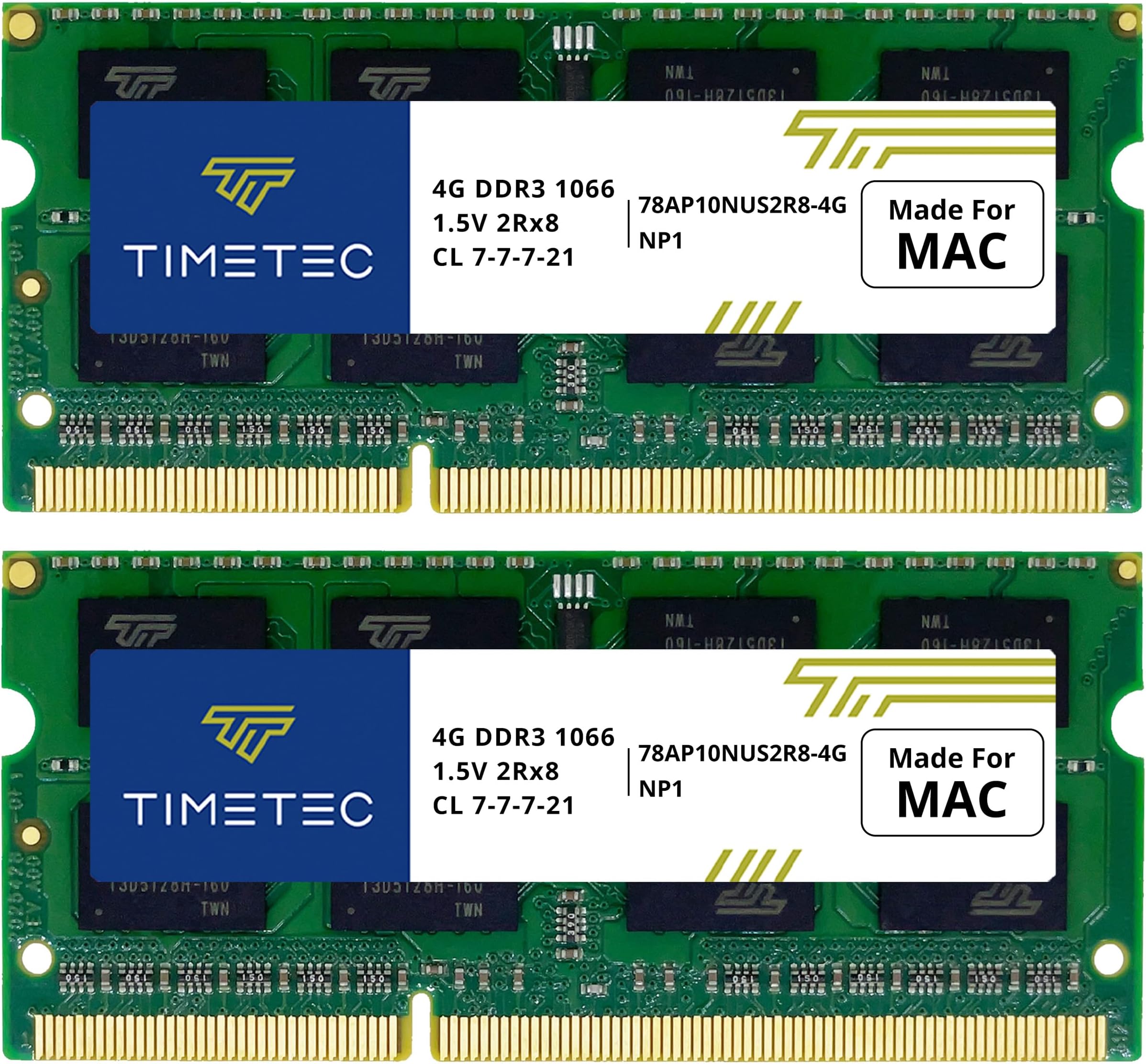
The Timetec 8GB KIT (2x4GB) DDR3 1066MHz PC3-8500 SO-DIMM memory upgrade is engineered specifically for Apple MacBook, MacBook Pro, iMac, and Mac Mini models from late 2008 through mid-2010. Featuring dual-channel 8GB capacity, low-latency CL7 timing, and a lightweight design, it delivers a significant boost in speed and multitasking capability. With guaranteed lifetime warranty and free technical support, this upgrade transforms aging Macs into efficient, reliable workhorses.


| ASIN | B01N35UIYR |
| Additional Features | Lightweight |
| Best Sellers Rank | #247 in Computer Memory |
| Brand | Timetec |
| Column Address Strobe Latency | 7 |
| Compatible Devices | Laptop, Desktop |
| Computer Memory Size | 8 GB |
| Customer Reviews | 4.7 out of 5 stars 2,625 Reviews |
| Data Transfer Rate | 1066 MHz |
| Form Factor | SO-DIMM |
| Item Weight | 1.12 ounces |
| Manufacturer | Timetec |
| Memory Form Factor | SODIMM |
| Memory Generation | DDR3 |
| Memory Speed | 1066 MHz |
| Mfr Part Number | 78AP106S2R8-8G |
| Model Name | 78AP106S2R8-8G |
| Model Number | 78AP106S2R8-8G |
| Number of Pins | 204 |
| RAM Memory Technology | DDR3 |
| RAM Size | 8 GB |
| Special Feature | Lightweight |
| UPC | 765441336155 |
| Voltage | 1.5 Volts |
S**R
A tip for late 2009 iMac
I bought this RAM upgrade after an installation on my wifeโs late-2012 MacMini greatly improved performance. In that case we were replacing the factory-installed 4GB with 16GBโa 4-fold increase. Operation went from sluggish to lightning speed. It was like night and day. I had already upgraded my late 2009 iMac from the factory-installed 4GB to 12GB about 5 years ago. But with RAM prices down, I decided to try going all the way to 16GB. That would be a 1.33-fold increase. My first try went badly. But after two more attempts I got everything right and the computer is performing excellently. Here are the lessons learned in hopes it can help others. The four memory slots on this iMac are at the bottom of the case, just under the Apple logo. You shut down the computer, unplug, spread a towel on your work surface, and lay the computer screen-down on the towel. If you lift up the adjustable base, a small rectangular plate with vent holes becomes accessible. After wrapping a grounded discharge strap on your wrist, you loosen the three captive Philips head screws on the plate, revealing the four memory cards. My vent plate and the visible edge of the RAM cards were covered in dust, so it was a good time to clean that up first. Pulling out the RAM cards is a little more difficult than on most modern computers with flip-up slots. There is a plastic tab that looks like shiny black electrical tape folded over each of the two pairs of memory slots. Finagle the tab out so one end is free, and pull. Donโt be afraid to use a some force until you hear a click and see the two paired RAM cards pull towards you about an eighth- to a quarter-inch. Now ground yourself again (wrist strap preferred but not essential) and pull out the cards you want to replace. In my case there were two 4GB Crucial brand replacement memory cards in the lower (that is front) slots, and the two original MAC 2GB cards in the upper slots. I replaced the latter with my pair of new 4GB Timetec RAM cards. After pressing in the new cards and screwing the cover plate back on, I plugged the iMAC back in for the test. Disappointment! A dark screen, and a series of very scary loud beeps that last several seconds. The beeps just keep goingโnot just three as in one of the descriptions I read. Time to Google the problem. The best advice I could find was that the new memory cards, or at least one of them, are probably faulty. Now, I wondered why I had ever gotten into this, as the computer was working fine before my attempted upgrade. But with no other options, I decided to try reinstalling the original MAC 2GB cards. I unplugged the machine, opened up the cover again, and put the old cards back in. When I turned the machine back on, the infernal beeping started up again. Now I was really cursing myself. Had I destroyed a perfectly good computer, my go-to workhorse, all for an unnecessary upgrade? Time to calm down and think it through. I shut down, unplugged, and again opened up the RAM slot. Now something dawned on me. I had had some trouble replacing the cover the last two times. Could it be that the memory cards were not fully inserted? After fiddling with them a bit, I felt one of the older replacement cards in a lower slot press in more on one side so that the front edge of the card was flush with the edge of the slot. After some more pushing and wiggling, I got the other side of this card to flush up as well. It took a lot of urging, more than I had been ready to try on the first two installation attempts. Soon, with help of a large plastic spudger, I had all the cards seated flush. This time the cover went back on much more easily, and I was feeliing good about it. Plugged back in, restarted the machine, and voila! Everything worked. . . . . Phew. Project successful. Hope this might help somebody with a similar problem.
L**I
High quality RAM pcb
Fantastic high quality RAM PCB. Worked perfectly and improved computer performance.
N**A
Great. Works well and good value for money.
Works well, super fast, and easy to install. There is not much else to say about a computer part other than it works well.
S**L
Great product, great price!
A review from one blind personโs perspectiveโฆ I Purchased this to upgrade the memory in my Mac Mini mid 2010 MC270LL/a. Unless you have previous experience taking apart your mini, you will probably want sighted assistance with this if you are blind. Regardless of vision, by searching my mini model number on YouTube, I was able to find a perfect how to video on installing and upgrading the memory. I highly recommend watching this video before and during the installation as it was incredibly helpful. My 14-year-old son was able to help me execute the installation in just a few minutes. Apple makes their products very easy. Installing the memory basically required taking off the panel on the bottom and popping out the old memory and literally popping in the new memory. It did take a couple tries to get it settled in just right, but when it was in there, the upgrade vastly improved the speed of my machine. I highly recommend installing full capacity of memory in your machine. This product has worked perfectly with no problems since the installation and for the price gets my highest rating!
T**T
Would Recommend for older Macs
Works perfectly I was able to make my early 2009 iMac run better than before hopefully, Iโll change the GPU in the graphics card soon but I thatโs for a later date but all said and done10/10
J**S
It works!
Easy to install. I upgraded my ram on my 2009 MacBook. Perfect for just simple browsing and thatโs pretty much it. Will comfortably run any old programs much smoother in your old MacBook.
D**X
Ram performance is a hard thing to distinguish.
For me the performance of Ram is hard to determine because there are too many memory factors at work. I am sure it must of made a difference. If you want to see a definite improvement in performance change out a spinning disc hard drivefor a solid state hard drive, there you will see a noticeable difference.
R**Z
Impresionante actualizaciรณn para mi viejo MacBook
Comprรฉ el kit de 8 GB de memoria RAM (2 x 4 GB) compatible con Apple DDR3 1067MHz y no podrรญa estar mรกs satisfecho con los resultados. Este producto ha sido crucial para darle nueva vida a mi antiguo MacBook, mejorando notablemente su rendimiento y usabilidad. Instalaciรณn sencilla: La instalaciรณn fue sorprendentemente fรกcil. Las instrucciones incluidas eran claras y precisas, y en pocos minutos tuve las nuevas memorias RAM instaladas y funcionando. No se necesitaban herramientas especiales ni conocimientos tรฉcnicos avanzados. Mejora del rendimiento: La diferencia en el rendimiento de mi MacBook es notable. Antes, el sistema se volvรญa lento y tardaba en responder, especialmente cuando tenรญa varias aplicaciones abiertas. Con los 8 GB de memoria RAM adicionales, el sistema ahora funciona de manera fluida y rรกpida, permitiรฉndome realizar mรบltiples tareas sin problemas. Compatibilidad perfecta: Estas memorias RAM son completamente compatibles con mi MacBook, sin ningรบn problema de reconocimiento o instalaciรณn. Funcionan a la perfecciรณn con el sistema operativo y las aplicaciones que utilizo a diario. Calidad del producto: El kit de memoria RAM parece ser de alta calidad y duradero. Desde el momento en que abrรญ el paquete, se nota que se trata de un producto bien fabricado. No he tenido ningรบn problema de fiabilidad desde que lo instalรฉ. Conclusiรณn: Recomiendo encarecidamente este kit de 8 GB de memoria RAM (2 x 4 GB) compatible con Apple DDR3 1067MHz a cualquier persona que busque mejorar el rendimiento de un MacBook antiguo. Es una inversiรณn excelente que puede extender significativamente la vida รบtil de tu equipo y mejorar tu experiencia de uso diaria. Estoy muy contento con mi compra y con la notable mejora en el rendimiento de mi MacBook.
K**R
Very good overall purchase.
The memory modules worked perfectly after a very easy installation process. Received the merchandise in very short time, good protective packaging, condition as expected of brand new products. Below are details of the 2x transactions (2 modules each trans)... Manufacturer: 0x0080 Part Number: 0x3738415031304E55533252382D3447202020 Serial Number: 0xE3C0579B Manufacturer: 0x0080 Part Number: 0x3738415031304E55533252382D3447202020 Serial Number: 0xE3C057FB Manufacturer: 0x0080 Part Number: 0x3738415031304E55533252382D3447202020 Serial Number: 0xE3C05705 Manufacturer: 0x0080 Part Number: 0x3738415031304E55533252382D3447202020 Serial Number: 0xE3C056F7
F**D
Very good product.
Very easy to install. No problems so far. Works as intended.
H**H
Quality and support at its best!
Just go for it if you way want to boost your older iMacs or MacBooks. Great quality and support!
B**T
It just works!
Took me a while to decide which RAM to use and be compatible (choose carefully depending on your model!) but in the end it was a very simple process to update my 2020 Mac mini. Best low cost investment to date. Highly recommend this product, it just works!
M**.
Value for money
Easy to install and a great way of upgrading an older Mac
Trustpilot
1 month ago
1 month ago