Buy anything from 5,000+ international stores. One checkout price. No surprise fees. Join 2M+ shoppers on Desertcart.
Desertcart purchases this item on your behalf and handles shipping, customs, and support to Macau.
🚀 Elevate your dual-PC setup with lightning-fast 4K switching—because multitasking like a pro waits for no one!
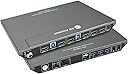
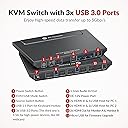
The AV Access KVM Switch 4KSW21-DM empowers professionals to control two computers with a single keyboard, mouse, and dual 4K monitors at 60Hz. Featuring a built-in USB 3.0 hub with 5Gbps transfer speeds, fast hotkey and button switching, and broad OS compatibility, it’s designed for seamless multitasking in office, gaming, or creative environments. Its durable metal build and smart power-locking connector ensure reliable, long-term performance.


| ASIN | B0B72P2DBG |
| Actuator Type | Push Button |
| Best Sellers Rank | #121 in KVM Switches |
| Brand | v AV Access |
| Brand Name | v AV Access |
| Circuit Type | 2-way |
| Color | 4K 2 monitors 2 desktops(4KSW21-DM) |
| Compatible Devices | Desktop Computers, Laptops with HDMI or USB ports |
| Connectivity Protocol | HDMI 2.0, USB 3.0 |
| Connector Type | Hdmi |
| Contact Material | Metal |
| Contact Type | Hdmi Type-a 19-pin |
| Control Method | Touch |
| Control Type | Manual |
| Controller Type | Keyboard & Mouse |
| Current Rating | 3 Amps |
| Customer Reviews | 4.0 out of 5 stars 402 Reviews |
| International Protection Rating | IP54 |
| Item Dimensions | 5.61 x 0.91 x 1.03 inches |
| Manufacturer | AV Access |
| Material Type | Metal |
| Model | 4KSW21-DM |
| Mounting Type | Surface Mount |
| Number of Items | 1 |
| Number of Positions | 2 |
| Operating Voltage | 12 Volts (DC) |
| Operation Mode | KVM Switch |
| Part Number | 4KSW21-DM |
| Specification Met | CE |
| Switch Type | Button Switch+hotkey Switch |
| Terminal | Pc |
| UPC | 795063902667 |
| Unit Count | 1.0 Count |
J**Y
Great value and solid performance so far!
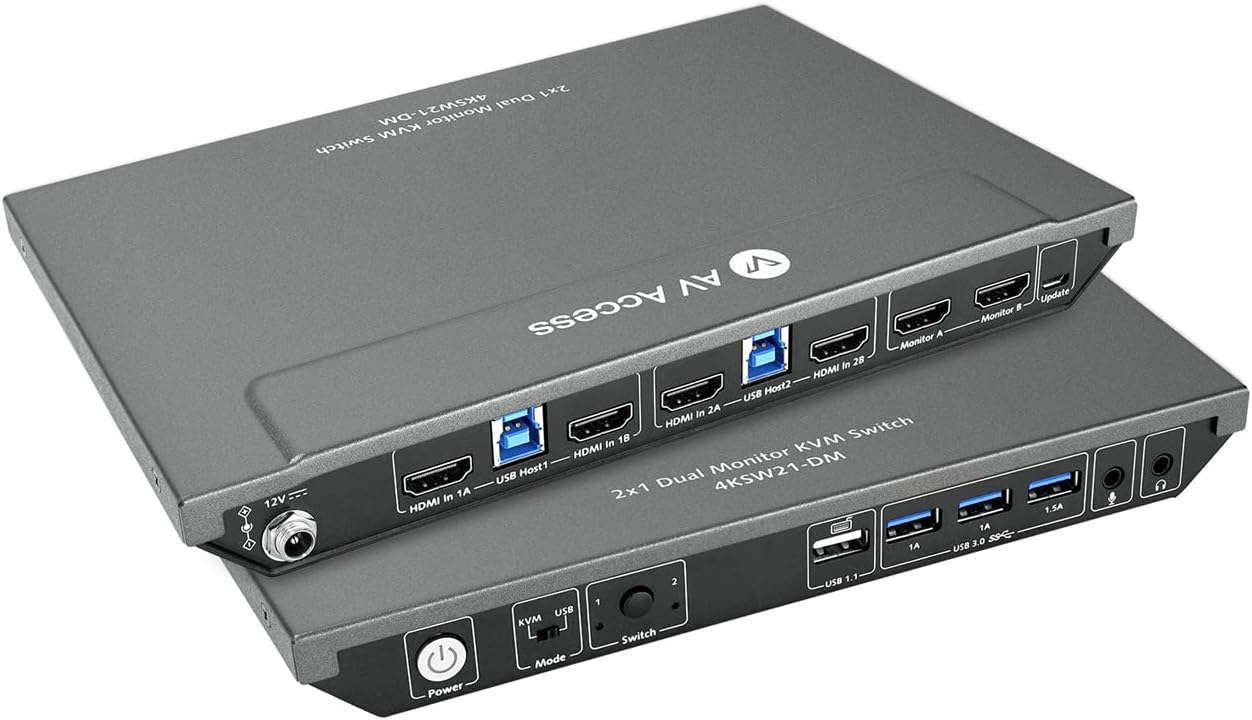
Product working as expected, the quality is great and hopefully it will perform well for a long time. I purchased this kvm for my home office, it need to be connected with 2 HDMI cables and 1 USB-B cable in PC and laptop ends. It make me easy to switch with 2 PCs, so far I'm loving it. The switch features 3 USB 3.0 ports, 1 USB 1.1 port, allowing me to connect all of my necessary peripherals including wireless keyboard, mouse and external USB drives, without any issues. Not like other switches, this unit also includes 3.5mm audio port, I don't need to long cable headset again to enjoy gaming and music. The switch is also well-built and sturdy, grey metel body making it a reliable addition to my work setup. They added a nice additional feature-locked power cord connector, which prevent power cord loose. This is amazing design. Overall, it was very nice for my application. I highly recommend AV Access KVM switch.
A**R
Works with some workable audio quirks
Overall very good. Box feels very sturdy - cables fit securely. I have this mounted with plenty of room on 1RU shelf in equipment rack. Switching hot keys make sense and work reliably. Front buttons work as well. Switching is a tad slower than my old DVI kvm, but still executes within a few seconds. Video quality good - no glitching. Icons all stay in proper places when switching - EDID appears to work flawlessly. No issues with standard dell mouse & keyboard. USB camera with mic works fine - I did have to set up laptop to select correct mic (was a bit ambiguous). One of the primary reasons I chose this KVM was for the analog audio output. The audio is transmitted via USB from the sources (not through display port as I’d expected). It pops through the speakers when booting up laptop (which runs through docking station). Once source powered on there are no buzzes or pops. This is not so bad, but would be very annoying on a headset… The audio balance was off quite a bit from both sources. I ended up adjusting the left / right balance in the pc/laptop to account for this. I’d blame the speakers, but my old setup did not have this issue. Pros: Decent price Sturdy Solid video quality Comes with usb 3.0 cables Cons: Audio pops when sources are booting Audio balance is off Not as fast switching as my older kvms
J**U
Effortless Dual PC Control and More with the AV Access KVM
This AV Access KVM switch is a fantastic addition to my home office setup! It works exactly as expected, and the build quality feels excellent, promising long-term performance. Connecting my two PCs is a breeze thanks to the 2 HDMI and 1 USB-B ports on each end, making switching between them seamless – something I'm already enjoying immensely. I appreciate the inclusion of multiple USB ports: three USB 3.0 and one USB 1.1. This allows me to effortlessly connect all my essential peripherals, including my wireless keyboard and mouse, as well as external USB drives, without any hiccups. Unlike other switches I've used, this one thoughtfully includes a 3.5mm audio port. Finally, I can say goodbye to long headset cables and comfortably enjoy gaming and music. The switch itself feels robust and well-constructed, with its sturdy grey metal body adding a touch of reliability to my workspace. A particularly clever design feature is the locked power cord connector, which effectively prevents accidental power disconnections – a truly amazing detail. Overall, this KVM switch has been perfect for my needs, and I wholeheartedly recommend the AV Access KVM switch to anyone looking for a reliable and feature-rich solution.
S**S
Thoughtfully and Sturdily Made
This is a great device for those working from home, wanting to watch two monitors and control with only one set of peripherals. The device itself is very well made, with the threaded power jack being an unusually high quality and intelligent touch. I think a design decision had to be made with the USB 1.1 port, which is where a lot of people are having trouble with newer/specialized keyboards. I'm guessing they could have made all the USB ports 3.0, but then hotkey capture would not have been possible? I have just a plain Microsoft Bluetooth keyboard that does not work with the keyboard port, so I am just going to buy a simple, wired keyboard so I can maintain the hotkey support. I do feel like one extra USB 3.0 port would have been nice, though, for a total of four. Overall, however, I'm very pleased with the design, construction, and functionality. It's pretty rare nowadays to buy something and it not be a piece of poorly designed plastic slag. This is the polar opposite. I was able to replace a Plugable USB docking station with this, which served its purpose fairly well, but now I can actually use onboard video of both sources. Update: Had an issue where it seemed like the video signal would just drop, causing the display to just blank out randomly for a few seconds. I'm not a fan of troubleshooting new equipment so just got a replacement. Could have been something else, maybe one of the supplied cables. I also took the extra step of looping the cables instead of bunching them with tight bends. I'm not really sure if signal/energy loss is a thing at these frequencies or use cases, but regardless, I no longer have the problem.
K**H
Cannot recommend - Monitor switching failed after 6 months if use.
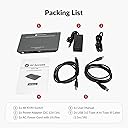
This product seems well made and comes with all the necessary cabling. It worked fine initially, but by the 3 month mark, it was apparent the product reliability wasn't there. First the USB A ports started to flake out, causing the USB headset used for audio calls to get disconnected. (Of course, audio calls are work-only events.) Then the HDMI side started causing one or of the dual monitors to go blank at random times. As Murphy's law would dictate, this would always happen on the side of the switch used for the work laptop. I've given up on this device, and have replaced it with a bi-directional USB C 3.2 2 into 1 (also handles 1 into 2) switch to drive the monitors, and a 2 input USB A switching hub for the kbd., mouse, and headset. The USB C to dual HDMI outputs is handled by 1 of the 2 adapters I had already used between the 2 laptops and the HDMI sides of AV Access switch in the original setup. Cost of the replacement setup, Under $60 complete. Cost of the AV Access switch, $140 and it failed after 6 months. You decide where the value is there.
J**R
Works as advertised!!
works as advertised. I had a little trouble in the beginning, it takes a little trial and error, but I think you need to turn on the switch before you turn on your computer, for it to work right. Anyway that's my experience. got rid of an extra keyboard and mouse, switch works well. durable, metal housing, I think it was worth the extra cost. Got it for a little cheaper on Amazon!!
R**U
Not the cord reducer I expected
I purchased this so I could easily switch between two laptops. I had hoped to reduce the number of cords. Not so. 1. I still have two HDMI cords, 2 two USB to HDMI cords, along with the USB receiver for the keyboard, mouse and camera. 2. The system struggles with messages of 'insufficient USB resources' for my headset. 3. I am not consistently able to get any particular selection of profiles to work in Teams, Zoom and the other conferencing services I use. One time I need to select 'VoIP' for headset, and then when I change nothing, I need to select 'USB device' - from the same application. This is frustrating and embarassing to start a conversation with 'can you hear me' every time....And, my Jabra does not work with this device. Frustrating to have to switch back to a wired headset, as for some reason the signal with the wireless device does not pass back through even though the base is USB connected. 4. This thing is HEAVY. 5. Picture quality is compromised. I suspect this is because I needed to switch it to VGA adapter as I didn't have multiple HDMI ports on the back of my monitor. 6. Not able to leverage extended desktop- They say on line that this is a function of the laptop, however I do have that set up with both laptops individually through a dell dock; not sure why I wouldn't have that capability through this device. Bottom line: Would I purchase again? nope. Is it worth the hassle to switch back to my docking station? probably not. I do like 'pushing the button' more than I like having the extended desktop.
G**E
USB and Switch issues
In general, the KVM works decently. But this will depend on what is your setup. Let explain. My PC 1 is a personal computer, i9, RTX2080. My PC 2 is a new laptop XPS 15, i9, RTX4080. I configured this with 2 monitors. High quality HDMI cables, 8K, 16K and different brands to be sure everything works fine. In general, I did not have issues with the image quality, resolution or refresh rates. Let me explain a little why I changed this device after some days of use. Good things 1. This is heavy and feel-good quality. 2. Enough bandwidth to have 2 monitors with 4K@60Hz and 2K@144Hz at the same time with high quality. 3. Support playing video games without issues. 4. Many options of hot keys to change between computers and the configuration is easy (we only need to press two time the key that we want to use and that it). There are many options: control, shift, etc. 5. The hot keys are not an issue if we play video games (I don’t use so much time, but I tried to test to check if this could change of computer while playing) 6. Nice USB mode to use both computers at the same time. But not the option to switch between modes using hot keys or move the mouse automatically between computers (we need to use hot keys to move the mouse in the other computer) Bad things 1. Issues with wireless devices a. In general, the USB ports do not work fine with wireless devices. b. My wireless keyboard was supported decently but sometimes I feel lag and disconnections. c. My mouse has many issues to be detected. This is Razer Viper Ultimate with Charging Dock. I am unable to use the charging dock, because the mouse is not detected through this (this has the option to connect the USB wireless directly on it). So, I had to connect the mouse directly by wire, because the wireless does not work most of the time. d. My Corsair Virtuoso RGB Wireless SE Gaming Headset is detected sometimes, but the microphone was not detected and a message in the computer was shown saying that there were not enough USB ports. Even If I connect only 2 wireless devices. e. My web cam Elgato 1080p60 wired was not detected when I had 2 devices already connected. So, after I connected keyboard and mouse this was not detected. f. In summary, if you try to use this with wireless devices then this is not a good option. The KVM has 4 USB ports, but I could use only 2 with wireless devices. I guess that this should work fine with wire devices (I am not sure, because I did not test). 2. Issues switching between computers. a. When we try to change from one computer to another this take like 3 seconds only to see any reaction on the computer and like 3 seconds more to be able to start using this. For me this is bad because I like to move between computers like many 10 times a day, and this takes much more time that I was waiting for and worst when this fail (continue reading) b. Usually, we need to press the hot key many times to change between computers, because this is not detected at the first time. c. Usually, we need to rebind the default keys because the configuration is lost for some reason (I guess if we are writing and we change the default hot key by mistake, because this is so easy to change ¿Good or bad thing?). 3. Conflict between different resolutions between the computers a. I noticed that if both computers manage different resolutions this can be a big issue with this KVM. For example, if one computer uses 2k@120Hz and another 2k@144hz, then when you try to switch between computers the image is not show and you see only distortion (like when the TV does not have signal). This is the worst thing for me, because sometimes when you need to switch you receive this bad signal and you need to switch again and again and power off the monitor or the KVM to have this working again. I changed this KVM for another option using display port and worked with all my devices without any problem and I could connect all my wireless devices.
A**E
AV Access KVM Switch 2 Monitore
Habe das Gerät vor 2 Monaten gekauft und betreibe 2 Computer, 2 Monitore, Bluetooth Maus + Keyboard und ab und zu eine externe Festplatte. Das Gerät ist zwar nicht ganz günstig, aber bisher bin ich sehr zufrieden. Alle angeschlossenen Peripheriegeräte funktionieren einwandfrei.
D**E
Works great
Works really well, the build quality is awesome. I like that fact that is has a power button and it is externally powered. I use it with my Lenovo ThinkPad and MacBook Pro M2, and it works really well on single 4K 60Hz screen. The hotkey switching could be faster but I that does not bother me much.
A**ー
問題無し
特に問題なく使えてます 発送用の外箱無く、商品パッケージにそのまま伝票貼られて送られてきます。 気になる方はご注意を
L**A
Switch between work and game on a button
I was annoyed about dealing with my work and life on a small screen. This KVM switch came to my eyes, actually at first time I thought it was too expensive until I finally set it up and use it. It is worth the price. What impressed me first is the build quality, it looks not cheap at all. It can switch between 2 PCs in just 2 seconds with 60Hz 4K resolution. I compared a lot before my purchase, and similar KVMs at the about price just support 30Hz 4K, excellent! BTW, it works great with my Mac and Logitech wireless mouse.
D**S
Guter Switch
Der AV Access KVM Switch macht mit seinem hochwertigen Metallgehäuse und sauberer Verarbeitung schon auf den ersten Blick einen guten Eindruck. Aber zum Glück sieht er nicht nur gut aus, sondern macht auch seinen Job perfekt. Ich habe den Switch an mehreren PCs, Laptops und sogar in Verbindung mit Konsolen getestet und hatte nirgends Probleme irgendwelcher Art. Von 1080p bis 4K und von 60Hz bis 144Hz lief alles ohne Probleme, genau wie die USB Schnittstellen. Ich konnte keinerlei Verzögerungen oder Einbußen in der Bildqualität feststellen. Dazu kommt die nette Optik des Switches, die bereits erwähnte hervorragende Qualität, so wie die gute Benutzerfreundlichkeit, durch die man nicht einmal eine Anleitung benötigt. Bei KVM Switches sind Bewertungen manchmal ein bisschen schwierig wenn es nichts zu meckern gibt, denn dann kann man im Grunde nur sagen "Alles töfte", aber das ist ja dann im Grunde auch die einzige Information die man braucht. Mir gefällt er sehr gut und alles funktioniert wunderbar. Und obwohl er nicht unbedingt günstig ist, ist der Preis durchaus gängig für Switche dieser Art. Von daher: Volle Empfehlung von mir.
Trustpilot
4 days ago
3 weeks ago