Buy anything from 5,000+ international stores. One checkout price. No surprise fees. Join 2M+ shoppers on Desertcart.
Desertcart purchases this item on your behalf and handles shipping, customs, and support to Macau.
📺 Elevate your screen time—because your PC deserves prime time!
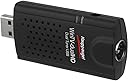
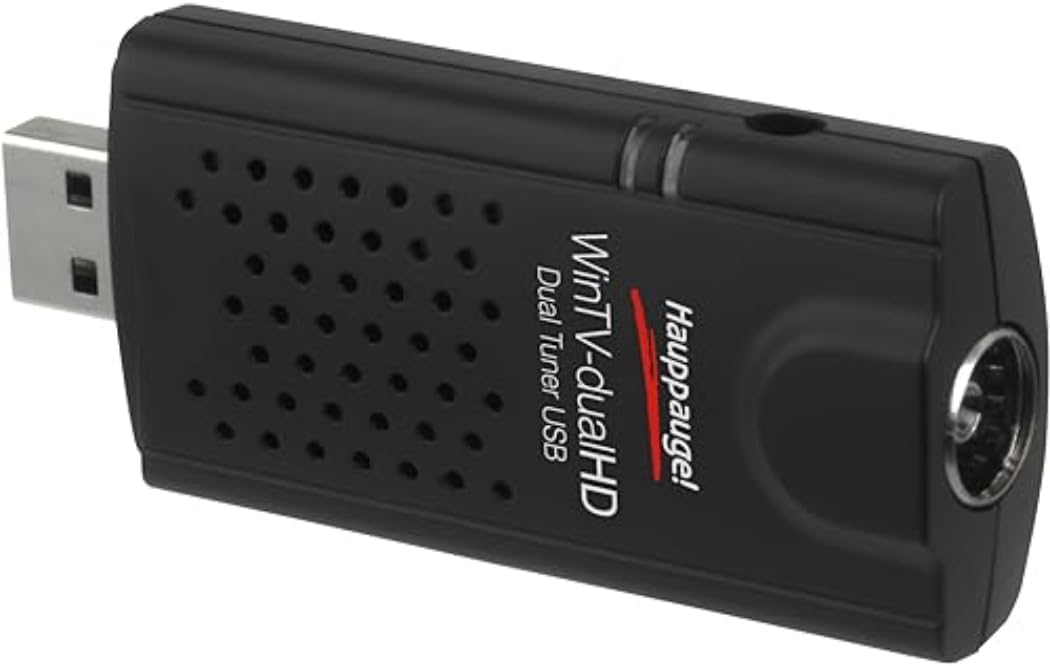
The Hauppauge WinTV DualHD TV Stick is a compact USB TV tuner featuring dual HD tuners for simultaneous viewing and recording. Compatible with DVB-T2, DVB-T, DVB-C, and analog standards, it supports Freeview, Freeview HD, and cable broadcasts. Included WinTV v8 software offers live TV pause, record, and an integrated electronic program guide. The package comes with a remote control, USB extension cable, and portable antenna, making it a plug-and-play solution for turning your PC into a versatile TV entertainment center.


| ASIN | B011Z7I0JY |
| Analog Video Format | No analogue TV |
| AntennaDescription | Television |
| Best Sellers Rank | 484 in Remote Controls (Electronics & Photo) |
| Box Contents | USB TV tuner, remote control, USB extension cable, portable antenna |
| Brand | Hauppauge |
| Brand Name | Hauppauge |
| Colour | Black |
| Compatible Devices | Computers, TVs, Set-top boxes |
| Compatible devices | Computers, TVs, Set-top boxes |
| Connectivity technology | USB 2.0/3.0 |
| Connector Type | IEC TV connctor |
| Connector type | IEC TV connctor |
| Country of Origin | Malaysia |
| Customer Reviews | 4.2 out of 5 stars 2,510 Reviews |
| EU Spare Part Availability Duration | 1 Years |
| Global Trade Identification Number | 00785428015927 |
| Includes Remote | Yes |
| Item Dimensions L x W x H | 30L x 2W x 80H millimetres |
| Item Type Name | WinTV-dualHD |
| Item Weight | 115 Grams |
| Manufacturer | Hauppauge |
| Manufacturer Part Number | 01590 |
| Model Number | 01590 |
| Network Connectivity Technology | USB 2.0/3.0 |
| Product Warranty | 2 years |
| Product dimensions | 30L x 2W x 80H millimetres |
| Tuner Type | DVB-T2, DVB-T, DVB-C and PAL/NTSC/Secam |
| UPC | 078542815901 785428015903 |
| Unit Count | 1.0 count |
S**E
Great Product
I purchased this on 1st Apr 26 and it arrived the same day. It was also a good price, £44.90. I had been using the ebay cheap type, £10 or so but the signal pickup started playing up recently and getting me frustrated, so thought I would invest in a good name one. Set it up on my pc first, decent cpu, 32 gb memory, ssd drives. Took some time to set it up after downloading the software (as per the web address in the box - make sure you go to the .com not .uk site). It installed ok, the main setup time was channel scanning (keep the defaults all areas). I was using a usb powered ariel and amplifier. Got more channels including HD. Picture quality is v good, much better than old stick and thats the non hd channels, the hd ones are marvelous (the old stick did not get them). I then plugged in the small ariel that came in the box., I expected problems, but mostly it just buffered a bit before showing. The activation key is per tv stick, linked to that stick (I checked it out first). You can go through the same setup process with every laptop/pc you have if you like. So I also set it up on a small Medion touchscreen laptop I use on camping holidays, unusual in that it can charge/run from a 5 voltt powerbank so its ideal). The difference in specs is massive small slow cpu,4gb ram... v the pc and I installed it with the came with ariel I was not expecting much but was pleasently surprised (I will take the small amplified ariel when I camp though). The channel scanning/ software and components are far superior than the other cheapy ones. A big bonus is that it comes with the sottware to watch the tv unlike the cheapy ones that only come with a trial version program. It might depend where you are and how far from transmission towers etc, But I would recommend it. Since the above review I have used this tv stick with my old SichboPVR tv stick player/recorder program. Works like a dream including with HD channels. Best thing is that using the sichbo program it will wake the sichbo program from hibernate to do scheduled recordings whereas the hauppauge program will only allow schedules from sleep mode.
P**N
Almost Perfect, but not Hauppauge's fault...
It works reasonably well, however it does have it's issues with newer versions of Windows (Blame Microsoft, Not Hauppauge) which can lead to the drivers hanging/crashing. Works well with SichboPVR, and works very well on Linux (LinuxTV Kernel Patches). Easy to use, provides the ability to record two channels at once, including HD ones which makes this good value for money.
S**R
Works great as long as you have a good aerial
I bought this specifically to watch live TV broadcasts without the latency of streaming, which for me on the BBC is about a minute and it didn't disappoint as long as I used a proper aerial. The supplied tiny aerial found about a dozen channels with OK but not great reception, but plugging it into the aerial feed in the wall found seemingly hundreds of channels and all the BBC HD ones. You have to download the Windows software to use on a PC which is clunky, but easy enough to use and there's a supplied license key to type in to register. All in all I'm very happy with the purchase even if I'll only use it a few times a year.
J**R
The Best One
I have previously owned the PCTV 290e (roughly same price) and August TV (cheaper) USB sticks, so can compare it to those items. The PCTV operation was clunky with the unintuitive TVcentre software , so I always used manual record mode and the results where good, This was a good unit and worked fine for four years, but it always ran hot and eventually died (due, I suspect, to the high running temp). I replaced it with the August T-210 and what a waste of time this has been. It was extremely hard to load and get my PC (I'm running Win7 64bit pro) to recognise the drivers. Then its tuning list was a jumbled mess and the EPG was always in Chinese, in spite of me selecting "English" during installation. It then decided to not work (twice) having software conflict problems that Windows asked to "shut down"! I then had to re-install it again (twice), still getting the software conflict problems (and Chinese EPG!), so eventually I gave up and binned it. Oh, and it ran very hot. I then bought this unit, which installed with no problems whatsoever and when installing the channels, it even asked me which transmitter I wished to use. It picked up and listed all the stations (incl all HD, using rooftop aerial) with their correct UK channel numbers. Note that it records in the *.ts format (good) and even lists the program name as the file name - the others didn't. The EPG works and records with no problems. Whilst I never thought I'd use it, to have two channels, with one on each of my twin HD monitors, so I can watch them both (shades of "The Man Who Fell To Earth") and even record one of them is brilliant, so if you want the bees knees in TV tuners, just buy it.
A**E
Works with tvheadend on libreelec
Arrived today and my first thought was "it's massive". It is replacing an older PCTV 292e that just stopped working one day and this adapter is twice the size of the old one. But this is dual tuner and it comes with a decently long USB extension cable so there is no problem with clearance where multiple USB ports are close to each other - looking at you raspberry pi. Plugged in to my rpi4 and was immediately detected as a dual tuner and various firmware files were upgraded. Was pre-set to bulk transfer mode out of the box. I'm running libreelec 11 on the rpi with tvheadend server and client installed and enabled and it did take an hour or two to get tvheadend to do the right thing with them but I got there in the end. That's more a tvheadend configuration problem though, not this device. I had tvheadend recording up to 8 different programs at the same time and using both tuners, writing the recordings to NFS mounted shares over the network and writing around 30MB/s to disk. I did have to pick 8 channels that were all on the same 2 MUXes but 7 of those channels were the HD ones. Rpi4 was running at about 20% cpu during this. All recordings played back successfully and other than right at the start of each recording, all seem to be unpixellated and of excellent quality.
A**Y
A good piece of kit
I've been using the WinTV-soloHD for a couple of weeks now and am very happy with its performance. I have it connected to a Win10 computer and outside aerial. The initial scan found over 120 channels, all the main ones and many I would never want to watch - but that's the nature of Freeview. I'm using it successfully with PLEX and, unlike another reviewer, it has scanned the HD as well as SD channels. The picture quality is good with a noticeable improvement when watching HD. If I was using the Hauppage + Plex setup as my only way to watch TV, I'd go for one of the more expensive models which allows watching one channel while recording one or more other channels, but I don't need this so this model works well for me. I've dropped one star because the included software, while quite capable, is not as good as commercially available programs. I haven't used the included small aerial as I can't imagine it would pick up and the remote control seems superfluous as I'll normally be sitting close enough to the computer to manually change settings.
W**R
Works but software isnt great
I purchased the single-tuner Solo model. This is to replace an older PCIE TV card, which I don't have a usable slot for now I have upgraded my PC. Plugging this in with the included USB lead adapter to a USB 3.0 port worked, and my Windows 11 PC picked up the TV stick, but the drivers need to be downloaded with the WinTV10 software. All installed ok. I do find the WinTV interface rather clunky, even with the included cheap remote control pad. The software also doesn't seem to be able to cope well if you have some low signals; the picture breaks up far too easily. I therefore switched to NVPR software, and this works and produces a much more stable and reliable interface. I also find that the stick gets quite warm in use. I hope this doesn't cause any long-term issues. For the moment, all is OK. I give it a 3-star rating as it doesn't seem to match up to the quality of an internal PCIE TV card, but then I guess it has more versatility as you could use this with a laptop. You do, though, need a good external aerial to connect to. The provided small antenna, I think, is a bit of a token gesture, but it isn't going to give you any strong signal reception.
S**N
Works great on Kubuntu/Ubuntu 16.04 using the Hauppauge drivers and Kaffeine Video/DVB player
Works great in Linux. Prior to plugging the device into a USB socket I installed the Hauppauge Linux drivers that are available from the Hauppauge website. Search for Hauppauge Linux support from your search engine to find the link, sorry Amazon rules. As regards the remote that is provided with WinTV-dual HD, I also got some functionality out of it, e.g. selecting channels by number. To do this I installed LIRC and configured for Linux input layer as this model of Hauppauge device wasn't listed. I would think with a little work by me I could get this much slicker. However I don't tent to use a remote on my PC as it's located in an office not a lounge so not a problem for me. To view the the DVB broadcasts I ran kaffeine (for viewing digital broadcast TV) and from the menus selected 'television', then 'configure television' , noted that there was a device 1 and device 2 tabs with the name Silicon Labs Si2168, clicked on the first device tab and selected 'autoscan' for the source. Repeated this for the second device. Then back to the menus, selected television again then 'channels', selected terrestrial as the source and clicked start scan ... it found about 160 channels including the HD channels, then click on one of the channels in the right column, CNTRL A to select all then click add filtered. All the channels then move to the left column which is where you want them if you want to view them. Click OK to get back to the main dialog and you should see all your channels. Overall, if your running Linux this works well with kaffeine. SD & HD broadcasts are view-able but you can't view what my Samsung TV calls 'Data' channels. These are channels that point to multiple internet channels. That may just be a failing of Kaffeine and maybe works with other viewers like Kodi, however I don't tend to watch the data channels so I'm not concerned about that. System details: OS Kubuntu 16.04, KDE Plasma 5.8.9, KDE frameworks 5.36.0, Kernel 4.4.0-131201807270420-generic. 64bit, CPU 8xAMD FX8350 8 core, 23.5GB memory. .. Kaffeine version 2.0.12
I**A
vinTV
Po zainstalowaniu programu vinTV i sterowników ściągniętych ze strony producenta, a także anteny, tuner zadziałał bez problemu. Początkowo nie odbierał wszystkich dostępnych kanałów, ale to ze względu na prymitywną pionową antenę. Po zakupie 5-cio elementowej anteny Yagi wystawionej na parapet zewnętrzny uzyskałam odbiór wszystkich kanałów w pasmie UHF oprócz MUX-8, które jest w pasmie VHF i wymaga anteny o większych rozmiarach. Nadajnik TV jest oddalony około 35 km, a okno "wychodzi" w jego kierunku. Najczęstszą przyczyną słabego odbioru, lub jego braku jest stosowanie prymitywnych anten w postaci pionowego kawałka drutu w wyszukanej czasem obudowie oraz dodanym wzmacniaczem, który przy słabym sygnale wzmacnia także szumy i nie daje poprawy odbioru. Z kolei najlepsza nawet antena nie poprawi odbioru, jeżeli jest umieszczona w miejscu, gdzie sygnał nie dociera. To tak, jakby chcieć łowić ryby najlepszą wędką na bezrybiu. Najpopularniejsze i bardziej skuteczne są anteny Yagi. Są kierunkowe i dają spory zysk, co przekłada się na dobry odbiór, szczególnie, gdy nadajnik jest daleko. Antenka dołączona do tunera vinTV to zabawka, która z pewnością odbierze sygnał z nadajnika TV, który znajduje się w zasięgu wzroku, ale w sumie miły gest.
M**4
Buena Tarjeta. Buena calidad de Imagen.
Siempre he usado Tarjetas TV PCI y era reacio a usar una USB. Pensé que iba a ir "a tirones", con problemas de imagen pero va bastante fluída y tiene buena calidad de imagen. Incluye extensor USB de muy buena calidad: muy sólido para aguantar bien la Tarjeta y que no quede "colgando" y con mucha holgura. Incluye mando también. Incluye Drivers hasta Windows 10, por lo que la podrás usar y reusar en diferentes Equipos con Sistemas Operativos diferentes (yo actualmente la uso en un Equipo con Windows 7) Puedes usarla a tamaño completo, con un tamaño más pequeño con los diferentes controles de volumen y demás o en un tamaño más pequeño todavía en plan "minimalista" sin niungo de los Botones de Volumen y demás. Por ponerle algún "pero": - El cambio de Canal es muy lento (no entiendo porqué). Creo que debería mejorar esto en el Software. - Para descargar el Software tienes que introducir el número de Serie que trae la Tarjeta. Ignoro si por ejemplo cambias de Equipo, Formateas, etc y tienes que descargar de nuevo el Software puedes tener problemas por el tema de ya haber usado ese número de Serie...
D**P
Obsługuje HEVC H.265
Świetny tuner, odbiera programy HEVC H.265. Polecam ten tuner TV.
C**N
Livraison rapide, parfait
Le WinTV-soloHD fonctionne bien sous Linux (Raspberry Pi) en DVB-C après avoir suivi les instruction sur leur site. Mon but est d'explorer ce qui se trouve sur le câble. J'en suis entièrement satisfait.
J**R
Helt ok
Ledsen fel köpt tänkte att den är sat men fungera bra
Trustpilot
4 days ago
1 day ago