🚀 Scan, translate, and conquer your reading list like a pro!
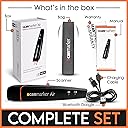
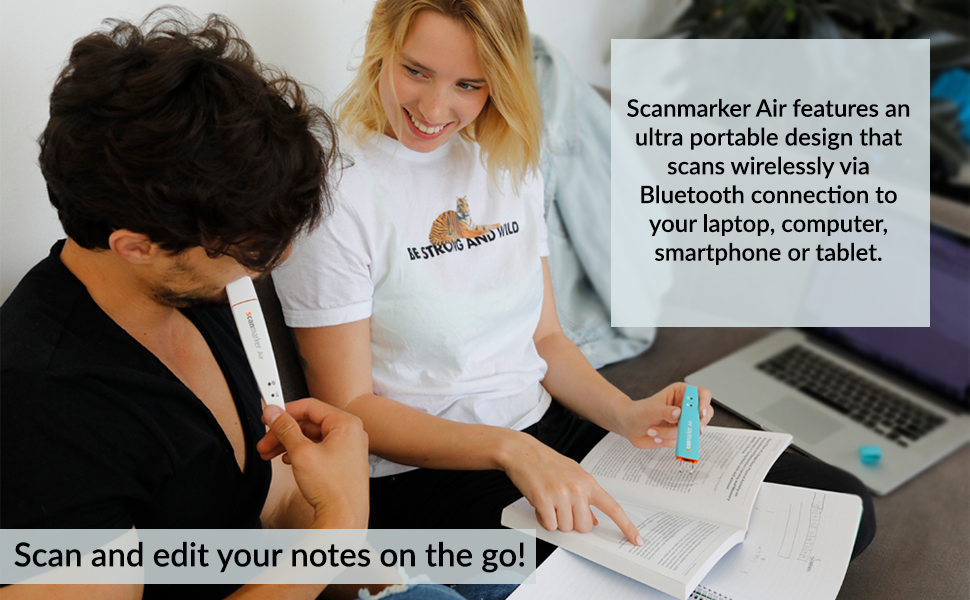
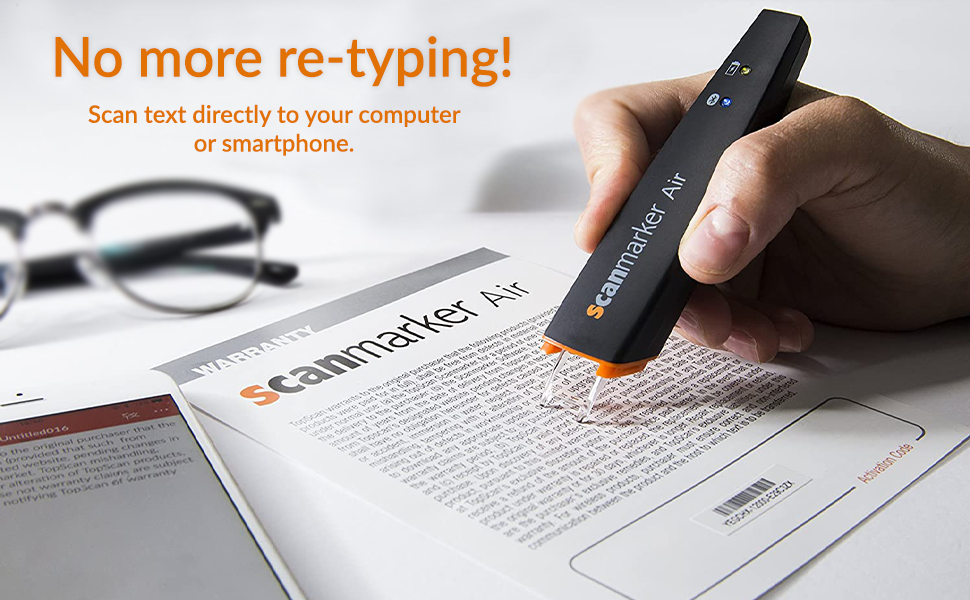
The Scanmarker Air Pen Scanner is a sleek, Bluetooth-enabled handheld device that scans up to 3000 characters per minute and translates text in over 40 languages. Designed for students, professionals, and those with reading difficulties, it offers real-time text-to-speech functionality and wireless compatibility with Mac, Windows, iOS, and Android. Lightweight and portable, it comes with free lifetime software updates, 24/7 support, and a 1-year warranty, making it an indispensable tool for efficient reading and research on the go.


| ASIN | B01N07J2AE |
| Best Sellers Rank | 64,109 in Computers & Accessories ( See Top 100 in Computers & Accessories ) 75 in Document Scanners |
| Brand | Scanmarker |
| Brand Name | Scanmarker |
| Connectivity technology | Bluetooth |
| Customer Reviews | 3.8 out of 5 stars 5,224 Reviews |
| Global Trade Identification Number | 00798304391268 |
| Item Dimensions D x W x H | 127D x 23W x 18H millimetres |
| Item Weight | 27 g |
| Manufacturer | Scanmarker |
| Media Type | Slide |
| Minimum System Requirements | Mac OS X 10.8 or later, Mountain Lion, 10.11 El Capitan, macOS 10.12 Sierra, 10.13 High 10.14 Mojave, 10.15 Catalina, Windows 7 8, 8.1, Vista Business, Home Basic, Premium, Ultimate, 2000 Professional, XP Home, Android 4.3 higher higher (with BLE 4. 0), iPhone 4S higher/iPad 3 Linux |
| Model Name | Scanmarker Air Pen Scanner |
| Model name | Scanmarker Air Pen Scanner |
| Network Connectivity Technology | Bluetooth |
| Optical Sensor Technology | [CCD, CIS, CMOS] |
| Product Warranty | 1 Year Manufacturer |
| Product dimensions | 127D x 23W x 18H millimetres |
| Resolution | 300 dpi |
| Scanner Type | Text |
| Scanner type | Text |
| Standard Sheet Capacity | 1 |
| UPC | 798304391268 |
R**G
Simple, accurate OCR pen
I take study notes using progressive summarization (HT Tiago Forte). This device is perfect for those books that aren't available on Kindle. It works really well with my Android phone and setup is quick and simple.
D**R
saves time!
I recently purchased the Scanmarker. I'm academic (and dyslexic) and this helps saves a lot of time of coping/re-typing quotes out of publications - it is so awesome it types/scans straight into word document so no cutting and pasting. I'm still learning all that it can do but seems great with translation and reading aloud words i'm unsure how to say. (foreign ones particularly). It seems to translate well and has different voices for different languages. Like any tool it does take a bit of time to learn how to use it correctly but once going it works a treat. I had a wee issue with activation (my own fault) and they got back to me sorting it within 5 mins. Great, customer support. I'd highly recommend this scanmarker!
N**R
Be aware of the drawbacks
I have just purchased ''Scanmarker'' and I am not satisfied. Scanning text: The scanner’s tip is done of hard plastic. Consequently the scan process does make marks on soft paper pages even if you apply the ''minimum'' pressure to operate the scanner. That is definitely not acceptable when scanning text on very expensive books. To start the scan you have to press the surface with the scanner’s tip and continue pressing during the scan of the text. At the end of the scan to document if you like to insert a line return such that the next scan will be inserted on a new line you will have to click the scanner’s tip one more time at the end of the scan. Consequently it is not surprising that you will get marks on the pages due to the pressure that must be applied several times with the hard plastic scanner’s tip to operate the scanner. This is a wrong design. The pen shall have two buttons on the side: one to press during the scan and a second button to press to insert a line return (eventually it could be programmable to perform other actions). Then it will be possible to have a ''soft'' touch of the pen on the paper during the scan and not leaving any pressure marks on the paper. But please no hard plastic tips to be press on the paper! Translation and Read aloud: The modes ''Translation'' and ''Read aloud'' do not work without internet connection! I have downloaded a file of 1/2GB and I still have to be connected to internet to have the full functionalities of the product! That is also not acceptable. ''Scanmarker'' could have at least provided the possibility at the time of installation to download the additional code required for one or more particular languages of my choice. The fact that you must be connected to internet is not mentioned in the description of the product. And it is also not mentioned on the paper User’s Manual which is delivered with the product or on the User’s Manual that you can download from the manufacturer! It is only when you try to use the ''Translation'' or the ''Read aloud'' function that you discover that you must be connected to internet to have it working: this is very tricky from the manufacturer to hide that requirement to the buyer. I do not like to be permanently connected to internet and I do not like that somebody else is monitoring what I am scanning: it is a PRIVACY issue! The Widget: ''ScanMarker'' is placing a widget on the left side of your desktop. But you cannot move it where you want: you can only move it vertically. Consequently if the left side of your desktop is fully occupied with icons the widget will hide some of them. It is not really very convenient. I should like to be able to place the widget where I want on my desktop. Trial Period and activation (registration): In addition you must be aware that after you purchase that product you will be able to use it ONLY for a TRIAL period of 30 days! The software requires to be activated (registration) via internet. Although the scan process itself looks to perform in an acceptable manner you have to be aware of all the above drawbacks before buying ''ScanMarker''.
T**N
Not quite the answer but has been a great time saver
I have been a researcher since the mid 1970's at a time when my research notes were written long-hand, eventually taken over by word processors and finally in 1997 by Word documents. Since using Word I've carried on my work whilst at the same time converting older research notes into the same format. I purchased Scanmarker Air based on the promises of it being easy to use and accurate. Once I installed the software the scanner was very straight forward to use. Being able to scan sentences at a time I have been able to edit my original notes as I've gone along and have found the product fantastic in this capacity. The area where I feel a little let down is that despite what I would call a good, consistent scanning technique on my part, it would occasionally do any or some of the following: a) not acknowledge that I had scanned anything at all b) pick up only the first few words from the line I had scanned or miss the last few words. c) send a load of gobbledygook to the screen (which seemed to be based on something but absolutely nothing to do with what I'd scanned) So, it is definitely a lot faster than typing up the notes from a page with a ruler sitting on it indicating where I'm at but I haven't been able to trust that it's done its job and the scan is 100% correct. If this was the case, I could scan line after line without having to make sure of its accuracy. It's still a useful tool for my needs but............
A**R
Waste of money as they don't work
This item is a waste of money for anyone who is de lexic or partially sighted as the pen does not work if you can't read the stupid instructions or if you can't see the words so waste of money buying something that doesn't work because you can't read or see the instructions to get it to work and when you push ring me nobody Rings back so you're left with an item that is waste of money
N**E
A few tweeks here and there
The scan marker pen is very easy to use and works really well at translating foriegn languages and when volume on its really clear to hear. One downside, the app appears on your laptop screen is very small so if they tweak that to work on full size screen it will make this an extremely great pen to use.
I**A
Not iOS compatible
This is a good product in principle, although it feels plasticky in the hand. Despite stating otherwise, this digital highlighter does not connect on iOS using the provided apps - the apps simply don't worry. They install fine but the functionality ends there. It works as expected with a MacBook if you're using the software, but please be aware there is no iPhone or iPad compatibility, certainly for the iPhone 13 or iPad mini 5. I expect there was previous compatibility several iOS updates a go but we're talking years not months here. Disappointing to be honest. In terms of scanning, the accuracy is fairly good but I worry about the longevity of the product due to its light and flimsy feel. I would recommend the C-Pen Reader 2 over this hands down, even with the price difference.
T**E
Very Good Timesaver
My Scanmarker arrived 10 days ago. While I had spent some hours online looking at comparable products and reading customer reviews I was apprehensive since customer responses seemed so uneven. I needed it for transferring short quotations from books into a MSWord based text file. Having had nearly two weeks of pracice I can say it is a very good product and saves me lots of time. Some people complained abut accurracy. I have found only two sources of problems: 1) user skill. It works best when moved in a swift smooth straight line across the printed page. My skill in doing this is very good after a week or so of practice. 2) If the page cannot be laid flat, sometimes the end of the text line won't scan perfectly. This is mostly an issue with softcover books which won't lie flat when open.Most hard bound books can be laid almost flat and scanning is very easy. Even with softcover , with a little effort the book can be placed on the desk and held firmly with one finger while scanning with the other hand. I didn't buy it for translation but I have amused myself scanning some of President Trump's tweets into Spanish and Italian and the result is, to my eye, quite acurrate and interesting! I have not done a thorough check on other langugaes.
A**P
Kablolu versiyonuna göre daha hatalı okuyor
Windows'a kutu içinden çıkan dongle ile bağlamak gerekiyor. Dizüstü windows bilgisayarımın dahili bluetoothu ile bağlanamadım (Win10). Mac Mini bilgisayarımda ise dongle işlevsiz ille de dahili bluetooth ile bağlamak gerekiyor ancak ona da tanıtana kadar akla karayı seçtim. Bir kere tanıttıktan sonra ise hiç bir sorun çıkmıyor. Tarayıcıyı çalıştırıp yazılımı açtığınız an kullanıma hazır. Lazerinin rengi beyaz, kablolu olanınki kırmızı idi, kırmızı lazer çok göz alıyor yoruyor ağrıtıyor, beyaz lazer çok çok daha iyi. Hatasız okuma oranı kablolu versiyona göre düşük. Bataryayı tamamen boşaltacak kadar denemedim ancak günü kurtaracak gibi görünüyor. Bir paragrafın tümünü taratmak istediğinizde genelde sonlara doğru yavaşlıyor ve uzun bir süre boş bekleyip sonra bir anda aktarıyor (Word). Kablolu şekilde kullanımda süre kısalıyor tabi ki. Bazen normal bir yazıyı saçma sapan harfler ve semboller şeklinde aktarsa da genel olarak çok güzel bir ürün. Ciddi manada zaman kazandırıyor. Çeviri özelliği güzel çalışıyor. Seslendirme özelliği de gayet güzel, ki zaten işletim sistemiyle alakalı bu durum. Uzun metinleri tararken düzeltme yapma ihtiyacınız oluyor illa ki. Mesela çocukların kelimesini çocuklann şeklinde matematik kelimesini ınateınatik gibi okuyabiliyor. İtalik yazılarda hata payı artıyor. El yazısı okuma neredeyse hiç yok ya da benim el yazım kötü bilemiyorum. Barkod okuması zorlayıcı, gerçi kim niye bununla barkod okutma ihtiyacı duyar bilmiyorum. Narin bir alet fazla zorlamaya gelmez, yine de kalitesiz gibi durmuyor. Yazılımı IRISPen yazılımı ile birebir aynı. IRISPen yazılımı ile de kullanılabilir. Zaten yükleme ekranının sonunda ereşilebilirlik izin isteği soruyor orada da IRISPen şeklinde pencere açıyor (Mac Os). Fiyatı biraz tuzlu ancak değer mi? Bence değer.
C**T
Wish I had found this earlier - AMAZINGLY Product
I am absolutely blown away with the ease and simplicity of this pen scanner. It is a purchase I really see as time saving and work efficient. The ability to scan written text, save, forward and upload and convert into a document is time saving. You can edit, add correction and save work progress. I am left handed it is an asset to have a product that caters to my needs. Highly recommend !!! It really does everything it says. I use in on my iPad - but to have the availability to connect to my phone (android) makes this purchase even sweeter.
H**S
Reliable, targeted product.
I'm an academic and this is a great device. Caveat: when I got mine, it would not stay connected to my computer. I filed a request for assistance on their web page (as per instructions) and they got back to me within a few hours. We set up a phone appointment, and in less than 10 minutes they corrected the problem, and I've had zero difficulties since. Now, with that caveat, here is my review: this is a very targeted device. It has one primary job, and it does it splendidly. That job is to copy text from the book or paper you are reading (or from a Kindle: it works flawlessly with kindle paperwhite reader) from the page, into your notes. It will scan into Scrivener, into Word, into Pages, into plain text. It does so quickly and accurately and reliably. Why would you pay to have that done? Why not just type the quotes in yourself? Well, you could, but this is so much faster and more accurate. And when you are doing initial research on a project, your first weeks involve little more gathering quotes and possible notes from others. You can spend an entire day in the library doing nothing but collecting relevant snippets for your paper, and during those long hours, this device is a godsend. You get so much more done in so much less time. You scan in your quote (maybe even a paragraph or two) in no more time than it would take you to highlight it. Then type in your comments and cross-references and the whole thing is already sitting in your notes, and so what, in earlier days would have been your highlights and your marginalia are suddenly already filed away and they are both searchable text-- so you can actually find that quote again when you need it. Brilliant. Especially if you are working with library texts that you cannot highlight, this is great. Pros: speed, accuracy, battery life, workload reduction, faster research and writing: all plus plus plus. The only con, and it's a reach: This is not a device for older texts-- I am thinking here of anything 18th century or before--even some 19th century. Like any OCR scanner, the software simply cannot read the older fonts. Additionally, you should be aware that the pen lights up strongly as it scans and transfers text, so any text the library will not let you photograph with a flash will not be available for use with this pen either. Also, this is a text only device. It will not scan formulae or images. But even with that sort of very limited limit, this thing is worth its weight in gold to any academic or student. I've a dear young man in my life who is headed off to university this year, and I will absolutely be purchasing a second one of these to send with him. I don't doubt he'll put some miles on the thing.
M**.
Works flawesly
I bought it despite of bad reviews. I discovered that it works fine...scanning, recognizing and translating phrases. The first Bluetooth dongle had no so strong signal but the company immediately send me another replacement. The stand for my mobile phone works great but it would be better if it can be folded to carry on my pocket together with the pen. It works flawsle in all my machines (MacBook, Pc, iPhone, iPad). A nice buy!!!
B**N
Att den fungerar att läsa OCR-nummer som jag var i behov av.
Att läsa OCR-nummer och det gör den bra.
Trustpilot
4 days ago
2 months ago