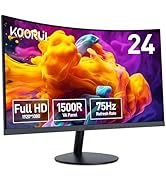
Desertcart purchases this item on your behalf and handles shipping, customs, and support to Macau.
🚀 Elevate your workspace anywhere with KOORUI’s sleek, powerful second screen!
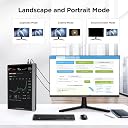
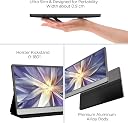
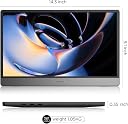
The KOORUI 15.6 Inch Portable Laptop Monitor delivers crisp 1920x1080 Full HD visuals on an IPS panel with a 178° viewing angle. Featuring dual USB-C ports and a Mini HDMI port, it supports plug-and-play connectivity for laptops, phones, and gaming consoles. Weighing just 2.5 lbs and only 0.35 inches thick, it’s designed for ultimate portability. Enhanced with built-in dual stereo speakers and Eye Care technology, it ensures immersive sound and reduced eye fatigue. The included protective cover doubles as an adjustable stand, making it perfect for professionals seeking a versatile, travel-ready second screen.


| ASIN | B0B6DQT72C |
| Adaptive Sync | FreeSync |
| Additional Features | Built-In Speakers |
| Aspect Ratio | 16:9 |
| Aspect ratio | 16:9 |
| Best Sellers Rank | #83,037 in Computers ( See Top 100 in Computers ) #2,168 in Computer Monitors |
| Brand | KOORUI |
| Brightness | 200 Candela |
| Color | dark grey |
| Color Gamut | 100 |
| Compatible Devices | Laptop, PC, MAC, Tablet, Smart Phone, Switch |
| Connectivity Technology | HDMI |
| Contrast Ratio | 800:1 |
| Customer Reviews | 4.2 out of 5 stars 1,750 Reviews |
| Display Resolution Maximum | 1920 x 1080 |
| Display Technology | IPS |
| Display Type | LCD |
| Hardware Connectivity | USB Type C, mini HDMI |
| Has Color Screen | Yes |
| Image contrast ratio | 800:1 |
| Included Components | 1.5m Type-c cable, user manual |
| Item Dimensions D x W x H | 36.3D x 23.6W x 1.6H centimeters |
| Item Weight | 2.5 Pounds |
| Manufacturer | KOORUI |
| Model Name | 15B1 |
| Model Number | 15B1 |
| Mounting Type | Desk Mount |
| Native Resolution | 1920x1080 |
| Number of Component Outputs | 2 |
| Picture Quality Enhancement Technology | HDR rendering technology |
| Pixel Pitch | 0.12 |
| Refresh Rate | 60 Hz |
| Resolution | FHD 1080p |
| Response Time | 5 Milliseconds |
| Screen Finish | Glossy |
| Screen Size | 15.6 |
| Screen size | 15.6 |
| Screen surface description | Glossy |
| Shape | widescreen |
| Specific Uses For Product | Business, Desktop, Entertainment |
| Total Number of HDMI Ports | 1 |
| Total Usb Ports | 1 |
| UPC | 655746157053 655746157749 |
| Unit Count | 1 Count |
| Viewing Angle | 178 Degrees |
| Voltage | 240 Volts |
| Warranty Description | This item is eligible for 1 year of warranty provided by the Manufacturer /Brand from the date of purchase. You can contact Manufacturer/Brand or Seller for more details |
O**I
Bad
It's ridiculous that after two weeks it broke, and I can't change it, you know
N**Z
Excelente prodcuto
Me parece un excelente producto que cumple muy bien su function, las instrucciones no son del todo claras, pero después de entenderlas es muy fácil de usar. El Producto me parece de buena calidad por su precio y sin dudas lo volvería a comprar.
M**W
Easy
Really handy second screen for my mac. Brightness settings are annoying as you have to adjust each use but this screen is great for travelling or even when u need to use in boardroom etc. great value too.
K**G
well designed monitor well integrated with windows 11
Out of the box the fit and finish and magnetic flap/stand all feel very high quality. Without reading the manual (which wouldn't have helped anyway), I figured out how to plug it in and get it up and running in Windows 11. Pretty intuitive and well integrated process. My 13 inch HP spectre has 2 USB-c ports. This monitor also has 2 USB-c ports. A single cable between them will work with any pair of ports. however in that case the brightness is limited at 50% due to power limitation. By connecting the laptop charger to the Koorui monitor, and with a single USB-c cable leading back to the laptop, there's no longer any power limitation and I can get 100% brightness and 100% volume. The pleasant surprise for me was the single display cable, also *back charges* the laptop, although at a low wattage. I can leave the laptop in high performance mode, and the battery drains only very very slowly and can last at least 2 days. I bought two of these Koorui's, the second one used HDMI to mini HDMI with Windows 10, on an eight year old laptop. That also worked flawlessly. However, a second USB-c power source was needed to turn on the monitor at all (which it would do at full power), because HDMI doesn't deliver power. These Koorui monitor feel more comfortable to read than either of my laptops (one of which is a high end 4k screen). It has a matte finish and nice looking black to white transitions, making photos look very natural. I really like the colors and reading experience. The only downside I found was the manual. It repeats hazard warning in six languages, but doesn't tell you you need to hold down the power button for a few seconds to turn it on, because the power button doubles as menu and select button. The entire monitor settings UI is handled with only 3 buttons. It work well once you figure it out, but the "manual" doesn't have a single mention of any of this. Nor does it discuss compatibility and power requirements. Why try so hard at making a great product, but remain at such an amateur level writing the manual? That's the thing that bugged me. For gaming you only get 60hz refresh, so I haven't tried it for gaming and don't plan to use it that way. For remote learning and remote meetings, a highly portable second screen is a really nice thing to have. Overall for the extremely friendly price, I really appreciate being able to purchase this product.
J**H
Plug n play, no need to setup anything
The best part about this display is plug n play feature no need to setup anything, just plug using USB type c cable and it will work. Contrast is not the best but it's pretty good for office use on the go. Have not used tis for gaming and I doubt anyone will as the refresh rate is capped at 60 so no point it trying. If you are buying with set expectations of using this as secondary monitor for office use you will be pleased with it. Works well with hdmi as well but you will have to plug in external power source. I have read reviews stating evertime you plug in the brightness needs to be adjusted, I have not seen that for me it has saved my previous brightness settings. One last point if you want to use it at max brightness you will have to plug it in separately for power via additional type c cable. Overall I'm really pleased with this display it comes with protective cover/Stand. I would recommend this to anyone who is looking for a second display for office use.
M**T
It doesn’t work
I only used this a few times and plugged it into my PC to get my second screen which it was intended for and now it doesn’t work. The name of the company comes on the screen and it just completely turns off and I keep hitting the on and off switch and I get nothing. My PC doesn’t even recognize this screen at all. I probably wouldn’t purchase it again. It’s a great concept if it worked for What it was intended for.
Trustpilot
1 month ago
2 weeks ago