Desertcart purchases this item on your behalf and handles shipping, customs, and support to Macau.
✈️ Take control of the skies with precision and style—don’t just play, pilot like a pro!
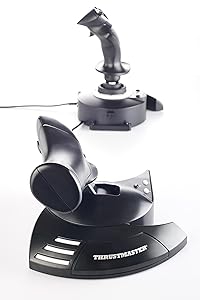
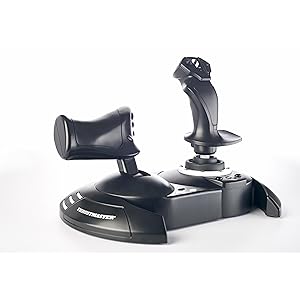
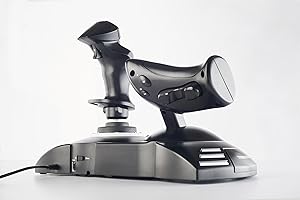
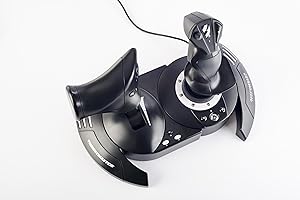
The Thrustmaster T-Flight Hotas One is a versatile, officially licensed flight stick and throttle combo designed for Xbox and PC. Featuring 14 programmable buttons, adjustable joystick resistance, and a detachable throttle, it offers ergonomic, realistic flight simulation control. Compatible with major flight sim titles and plug-and-play ready, it’s perfect for both casual flyers and serious sim enthusiasts seeking immersive, precise control.


| Additional Features | Ergonomic |
| Asin | B07643TW2V |
| Best Sellers Rank | #915 in Video Games (See Top 100 in Video Games) #2 in PC Game Flight Controls #23 in Xbox Series X & S Controllers |
| Brand Name | Thrustmaster |
| Button Quantity | 14 |
| Color | Black |
| Compatible Devices | PC, Xbox One, Xbox Series S, Xbox Series X |
| Compatible Video Game Console Models | Microsoft Xbox One, Microsoft Xbox One S, Microsoft Xbox One X, Microsoft Xbox SERIES X |
| Connectivity Technology | USB |
| Controller Type | Flight Stick |
| Customer Reviews | 4.5 4.5 out of 5 stars (5,503) 4.5 out of 5 stars |
| External Testing Certification | Não Aplicavel |
| Global Trade Identification Number | 00663296421005 |
| Hardware Platform | Xbox Series X |
| Included Components | Instructions manual & flightstick |
| Item Dimensions | 20.47 x 11.42 x 22.24 inches |
| Item Type Name | Flight Stick |
| Item Weight | 1644 g |
| Manufacturer | Thrustmaster |
| Manufacturer Part Number | 4460168 |
| Model Name | Thrustmaster T-Flight Hotas One |
| Model Number | 4460168 |
| Package Quantity | 1 |
| Power Source | Corded Electric |
| Upc | 734130217037 663296421005 |
| Warranty Description | One year |
M**E
Great Value Flight Stick
Great budget flight stick. The controls work well and are very responsive. I use the stick for Elite Dangerous and it makes the game so much more fun. It is actively supported by Thrustmaster so the firmware is always up-to-date and it works well with Windows 10/11. The buttons on both the throttle and the stick are well placed and configurable. There are better sticks out there, but if you don't want to spend over ~$100 this is the one you want.
C**R
It disappears. What every good controller should do. (Xbox One User)
You get so into using the device that it ceases to exist. You aren't thinking about it being there. It just melts away because the actions you perform with it become so natural, that belief is suspended. You get these easy muscle memories for actions. "Oh, there's a star. Hard bank right, throttle up, turn out, wait until you hit 1c, then throttle back and tap the system map to pick dock." You think that. Then your hands just do it and you aren't thinking about it. Because it's such a good controller. It feels cooooooooooool using it. I can't put it any other way. It's not good for shooters. I tried to use it to drive tanks in War Thunder, but that's a twitch shooter's world. Not a stick world. Not unless you are flying the planes. Perfect for that. But it will take a lot of TIME to get the stick to play nice with War Thunder. Their default settings aren't just bad, they are dangerous. No rudder control to speak of. You have to remap it off the stick because it's way too high, even if you set it to 0 in settings. Remap it to the toggle button on the back of the throttle. But Elite Dangerous? It's like they sat down with the folks behind the game and made SURE it would just be perfect out of the box. Because it was. I haven't changed a single button, setting, or mapping. I adore the default setup for this stick with Elite Dangerous on Xbox One. This alone, for me, is enough of a reason to buy this thing. It's one of the most rewarding gaming experiences I've ever had. "Throttle up to engage light engines." Sure thing. And you slam that throttle forward and start hurtling through fields of stars.
J**P
MUCH better than the "HORI Ace Combat 7 Hotas Flight Stick for Xbox One"!
These are a quality flight stick setup! Accurate and with very little dead zone or "wobble" around center. I am enjoying playing Ace Combat 7 with them very much! They are huge upgrade compared to the "HORI Ace Combat 7 Hotas Flight Stick for Xbox One" - which I had pre-ordered first, at more than double the cost of this! Those are unbelievably bad - go read my review on them for a comparison. Pros: I love the twist stick rudder on these, very useful. Also very happy with the detent at 50% throttle. The buttons are quality though a little "clicky" like microswitches. The bases are heavy and the rubber feet are nice and sticky - I play with these on an oversized lap pad for 17" laptops and they work great on that. As someone who plays in a pitch black home theatre, I really appreciate how dim the little white power/connection light is! Neutral: The ability to attach them together is... a neat idea, though probably much better suited for children. I have them about 6" apart when I play. There is a joystick tension knob on the bottom, but I find that I want it all the way to max which is how it is out of the box. In fact I wish you could add a little MORE tension if anything. I also wish the throttle had such a tension knob. Also what is up with the weird "wings" at the bottom of each base that extend toward you? They limit how close you can move them to yourself. Why not just make the base a little wider? Looks like this was done for looks. Cons: There is no headset connector, which is a real bummer. Have to use Kinect voice chat, or have another controller turned on so you can plug a headset into that, and I'm not even sure how that's gonna work with multiplayer yet. Not sure how that got overlooked. Also, there is vibration/rumble on these, or force feedback. I would have gladly paid more for that. Overall the feel on these is bit... cheap. Lots of plastic, no rubberized finish or rubber pads for comfort. Very little visible metal. All buttons are plastic. The movement of the joystick has a bit of "clunk" near the top of full travel that you can hear/feel. All in all, these feel a bit cheap and not like the Thrustmaster of old that I'm used too from the PC days. They feel like they should be maybe $20 less, which appears to be how much the PC version is! As usual it appears we're paying the "console tax" with a more expensive product just for licensing probably. However, considering I was willing to shell out $200 for the Hori sticks (Which ended up being garbage) - I would gladly have spent 2x this much, on an "Elite" version like I did for the Xbox One Elite controller which is far better too. I would love to see a version of this with metal trigger, metal bases, rubber pads and rubber grips for comfort, better joystick motion/smoothness, better quality buttons, higher quality materials all around. All in all though, considering how long we waited for a real HOTAS setup on Xbox One, I'm happy enough with these, especially for less than half the cost of the garbage HORI ones.
H**X
Good value
Works good, good value, little stick drift after a few years of use but that can be adjusted and fixed.
K**N
Amazing for Ace Combat / Star Wars Squadrons. Xbox One / Series X/S Works on PC too!!
Ordered two, one for myself and one for my best friend who loves flight simulator games as a birthday gift and took a little bit to make sure it was all set up and configured correctly at first and is still taking some getting used to as I haven't had a joystick in the better part of almost 20 years all the way back since my wingman days on PC, but thrustmaster has always made great joysticks or HOTAS setups. The throttle control in Ace Combat is amazing and all of the axis controls, targeting options, etc. are really perfect for games like that and the level of customization is unlike anything I've ever seen on previous joysticks that I've owned. I haven't had the opportunity to use it on PC yet and I don't own Microsoft flight simulator as I prefer like actual aerial combat dog fighting games however I have heard that it can be configured for several games involving space combat. Definitely makes a huge difference over using a regular controller... I really don't get what is up with all of the negative reviews that people have made about this flight stick but as far as I've seen it's great. It even comes with its own miniature Allen hex wrench to be able to securely screw the throttle base to the joystick base so you can have it as one giant unit like I do for either setting on a table or your lap while playing or you can also detach them depending on your preference although the wire connecting them is not detachable so it's wise to be mindful of that but overall it is an amazing flight stick and for people who've had issues using it with their XBox you have to make absolutely sure that you've turned off your controller and have the joystick itself plugged in via the USB port before you actually start the game even once you've got it loaded to make sure that the joystick is being recognized as your player one controller.
J**N
Nice joystick !
Works great for the price! 5 star value for sure , got me playing flight simulator easily
B**Y
Works with Mac!
I bought this for X-Plane 11 on Mac OSX 10.13 High Sierra. When the program launches you simply have to manually map each aspect to your controller. Pitch, roll, yaw, throttle, then add what you wish to the controller. Save it as a profile and select it each time you launch. This has a selector switch to toggle Windows or Xbox. Select Windows and calibrate. It has an external connection for rudders, but the joystick rotates allowing you to assign yaw to the joystick without a rudder. Don't try a helicopter without an additional rudder. All axis are reversible in X-Plane, so if you want to reverse the thrust you may. This controller will work with Xbox Flight Simulator 2020 when released. The controller comes in two pieces. The Xbox buttons, A B X Y are located on the throttle. I had trouble attaching the throttle to the joystick. The USB cable is short, as others by noted. This is no problem on a desktop, but for an Xbox, you'll need an extension. Both components, joystick, and throttle are of substantial mass. You must take the time to adjust the detail in settings for smooth operation or the joystick will seem unresponsive. X-Plane has more assignable options than the controller has buttons. I assigned gear, flaps, nav, and com to the controller. You will still need a keyboard and mouse to use this sim. Amazon delivered this next day and it replaces my Logitech 3, with no yaw control. If you own a Mac, this controller will work well. I am a licensed pilot and the controls, once your frame rate is configured in the sim, will work realistically. I caught myself "chasing the gauges" on my first flight. Every other review mentions Elite Dangerous. I have not tried this on that game. Read other reviews if interested in that game. I bought this for X-Plane on a Mac, using Stream. It works well.
G**H
Transforms Ace Combat 7!!! (Hotas One for XBOneX)
This really makes Ace Combat 7 a much more fun game -- flight control is so much more intuitive with the Hotas One. I hope this helps anyone wondering if the Hotas One / Ace Combat 7 combo works well. As I write this, it's about 2 weeks after AC7 release, and there hardly any reviews on this combination I could find. Pros: 1. Flight control in Ace Combat 7 is so much more intuitive and enjoyable. With the standard XBOneX controller, I have a tough time pitching down and rolling. Hats off to people who can ace this game with the standard controller, but I'm not the greatest with the left thumbstick as flight control. I was a few missions into the convict squadron when my Hotas One showed up. I restarted the Campaign, and missions got much easier, playable in Normal mode. 2. With stick and throttle joined together, it's a stable enough to put in your lap while you play. 3. Best deal I could find was on Amazon. Cons: 1. My particular unit sometimes needs to be disconnected, reconnected at the round plug (?) section for the XBOneX to see the rudder and stick, though it always sees the buttons. (The USB cable has a short, round connector about 8" up from the USB port connection, so it's a 2-piece USB cable). I imagine I need to call Thrustmaster support to sort it out, which I'm really not looking forward to. This seems more of a problem with when it's connected to the front USB port, than the rear. A bit of an odd problem, since when this occurs, Ace Combat 7 still sees the Hotas One when you go into Options in the main menu. 2. The USB Cable between the flight stick and the XBOne is 5' long. It's a bit short for me, and 6' would have been about perfect, but remedied easily with a cheap USB extension cable (I hope, I just ordered one). 3. I use my stick/throttle as a single unit. However, the interconnecting cable between the stick and throttle is a bit short if you want to use them on either side of your lap (i.e. throttle left, stick right). I've read about a couple of people buying a longer cable, but haven't really looked into this. 4. It will take a few missions to get used to the button layout - some buttons are automatically remapped on the Hotas One. More than a few times in a dogfight, instead of firing a missile, I switch targets by mistake, but that's on me, I think - this is only my second day playing with this :) Small, precise control movements area also easier, I think, with the standard controller than a fight stick 5. To my knowledge, you can't remap buttons on XBOne. But I believe you can if you use it with Windows.
T**S
My son is happy with the result and uses it daily! Easy to use and great quality. Thank you
Easy to use, qreat quality and just what he wanted
M**E
Excellent, configurable, basic HOTAS setup
Great basic HOTAS setup. Very configurable with the Thrustmaster software installed. Don’t forget to download the drivers and update the firmware, although mine was up to date. The one thing I wish was that you could toggle the throttle detent in the middle of the throttle action. It’s great for reverse thrust but would be nice to be able to turn it off.
A**A
Excelente
Excelente! Jugar Elite Dangerous, con estos controles, es otro pdo!
J**C
Un joystick davvero eccellente
Un joystick davvero eccellente e intelligente ... pienamente soddisfa la mia modalità di gestire gli strumenti di vari aerei per volare in MSFS 2020. Grazie
T**N
Good price for quality product
Cant find any HOTAS combo for under 100 SGD, i would say this is a good product for anyone trying to get into flight sim as it is very affordable and customisable.
Trustpilot
2 months ago
2 weeks ago