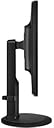
👓 See More, Strain Less – The Smart Monitor for the Modern Pro
The BenQ GW2765HT is a 27-inch WQHD IPS monitor delivering sharp 2560x1440 resolution with advanced eye-care features like Low Blue Light and ZeroFlicker technology. Designed for both home and office, it offers dynamic contrast, built-in speakers, HDMI connectivity, and an ergonomic height adjustment system, making it the ideal choice for professionals seeking productivity without compromising eye health.


| ASIN | B00KYCSRSG |
| Additional Features | Built-In Speakers, Height Adjustment |
| Aspect Ratio | 1.78:1 |
| Best Sellers Rank | #821,470 in Electronics ( See Top 100 in Electronics ) #15,488 in Computer Monitors |
| Brand | BenQ |
| Brightness | 350 cd/m2 |
| Built-In Media | DisplayPort cable - 5 ft, HDMI cable - 5 ft, LED-backlit LCD monitor - 27", VGA cable - 5 ft |
| Color | Black |
| Color Gamut | 100 |
| Connectivity Technology | HDMI |
| Contrast Ratio | 1000:1 candela |
| Customer Reviews | 4.1 out of 5 stars 535 Reviews |
| Display Resolution Maximum | 2560 x 1440 |
| Display Technology | LED |
| Display Type | LED |
| Global Trade Identification Number | 00840046030742 |
| Hardware Connectivity | HDMI |
| Has Color Screen | Yes |
| Image Contrast Ratio | 1000:1 candela |
| Item Type Name | BenQ GW2765HT 27" 1080p Full HD LED-Backlit LCD Monitor - Black |
| Item Weight | 15.21 Pounds |
| Manufacturer | BenQ |
| Model Name | GW2765HT |
| Model Number | GW2765HT |
| Mounting Type | VESA Compatibility - Mountable: 100 x 100mm |
| Native Resolution | 2560x1440 |
| Number of Component Outputs | 1 |
| Picture Quality Enhancement Technology | ZeroFlicker & Low Blue Light, IPS |
| Refresh Rate | 60 Hz |
| Resolution | QHD Wide 1440p |
| Response Time | 4 Milliseconds |
| Screen Finish | Glossy |
| Screen Size | 27 Inches |
| Screen Surface Description | Glossy |
| Specific Uses For Product | personal |
| Total Number of HDMI Ports | 1 |
| UPC | 840046030742 |
| Viewing Angle | 178 Degrees |
| Voltage | 120 Volts |
| Warranty Description | 3 years |
A**.
Perfect Monitor & "Signal Not Found" Fix
Amazing monitor! I'm a colorphile and pixelphile, high pixel density and perfect color reproduction are what I look for in a monitor. I had bought the GW2765HT believing it was just a 1440p IPS monitor that had 100% coverage of the sRGB spectrum, but I was wrong, the monitor is also includes 10-bit color depth support. Albeit, it's 8+2 and not true 10-bit, but it is still better than 8 bit by a long shot. I had the luxury of playing Alien: Isolation, the only game that I know of that supports 10-bit color depth, and was greeted with amazingly bright and deep colors, especially in the blacks, I had streamed game play and what they couldn't see on the stream I could. Of course, to take full advantage of a 10-bit desktop you'd need a GPU that supports 10-bit depth on OpenGL and on the desktop, which is a feature only professional/enterprise-class GPUs have, but there are compelling offerings for such a GPU at $250, so it's not that hard to obtain. I have experienced the issues with "No Signal Detected," and with my extensive analysis since February, I can conclude that the reason this happens is not because of the cable or ports, it is because of the BenQ Drivers and NVIDIA Drivers. In order to obtain 1 billion colors and 10-bit depth, the DisplayPort connection has to meet a high enough bandwidth connection state in order for the monitor to recognize the connection as stable enough, whether you use 10-bit or not it is still a driver-level limitation. When idling on the desktop, NVIDIA Drivers cut down bandwidth on all ports as a power-saving option on the kernel level, so when the monitor first connects to the port on the computer, it is not running at a high enough speed to detect a stable signal. There are 2 options to fix this: 1.) Reinstall or install a driver for NVIDIA GPUs. Whether it's older, current, or a newer driver. The reason this helps is because when installing the Driver, the NVIDIA installer has to reinitialize the GPU cores, memory chips, VRM, etc. to recognize the new driver at the BIOS level. That's why you hear the "Device Disconnected" jingle in Windows and shortly later the "Device Connected" jingle. When the GPU is reinitialized, it tests each available external video port at the highest possible bandwidth speed and power output to verify the integrity of each port and notify the user of port malfunction, this usually takes place with the motherboard making a beep or some other program popping up. These links to the video ports stay at the highest possible speeds for a time before the GPU detects the computer's current power state and adjusts the power and links to the appropriate values (I.E., power-saving mode on idle) 2.) (READ THE PARAGRAPH DIRECTLY BELOW THIS BEFORE ATTEMPTING) Go into "Device Manager" in Windows, then to "Display Adapters" in the list, right-click on your GPU and click "Disable." Then after you hear the "Device Disconnected" jingle in Windows and the Device Manager has refreshed to show the disabled GPU, right-click it again and click "Enable." Make sure to connect your monitor immediately after you here the "Device Connected" jingle. When you disable the GPU, Windows notifies the GPU at the kernel-level to shut down and effectively cut power to the device, whichever comes first. It has the same effect that a driver install does when it is enabled at initializes. Keep in mind that when you do this, external video support WILL NOT be available on desktops, on a Laptop the CPU can take place of a GPU temporarily even without an iGPU because all the video ports and the display are interlinked with the CPU AND the discrete GPU. On a full-computer, pre-built or custom or any desktop, this usually isn't the case. I recommend you connect your Monitor to the VGA/DVI-D/HDMI port on the motherboard itself, because you won't be able to access Windows disabling the GPU. I am not responsible if you do not read this before attempting this fix. I hope these fixes helps anyone. It has proven effective 6/7 times that I have tried this in the past 5-6 months.
A**R
Great for the price.
This is a really great monitor, colors are bright and vivid, there's a ton of screen real estate to play with and, out-of-the-box, you really don't need to mess around with configuring it all that much. Being a gamer I was a bit worried about using an IPS monitor but those worries were unfounded as I've noticed no issues during gaming. It has all the inputs you'll need and they supply all the cables for them too, which makes things so much easier. So, all in all, it is a really good monitor for a fairly low price given what else is out there. But there are some downsides. - First problem I encountered was the display port connection, in and of itself it works fine ... but when I tried using multiple monitors things changed. I couldn't get both monitors to work at the same time whilst this monitor used display port, I ended up connecting to it via HDMI instead (I would have liked to have had that port free for another device, but oh well). From what I can find out this is a known problem with either no fix, or no easy fix. - Second, I do have some dead pixels, I don't know how many of them there are but there is a small cluster at the lower left of my screen. Thankfully it's not too big and noticeable and doesn't interfere with my day to day use. - Third, the monitor control buttons are a joke. There are 5 nice dots and a power icon on the right had side bezel, but absolutely zero indication of what each of the 5 buttons actually do. Once you have things set up how you want them you will never need to touch them again, so it's really a minor issue. The issues aren't deal breaking for me, just a little frustrating, so I still think this monitor is an exceptional buy for it's price and give it 4 stars.
D**S
Great monitors for an all purpose user!
I love these monitors! Overall the experience has been excellent though there are a couple of issues I will go over. I bought two and have now had them installed for a few days of casual use (gaming, internet use, bluray watching). On time: as a Prime member this came within the two day delivery window. Perfect as usual Amazon! Packaging: Fine - no worries of damage to the monitor, it was snug in foam within the cardboard. The BenQ boxes were placed in slightly larger amazon boxes with a random slip of brown paper on one side (in one box it was on both sides)... the purpose of this paper is not clear. One of the BenQ boxes had a small ding in the corner but the monitor was completely fine. Unboxing/assembly: Very easy. The cables and paperwork were easy to see/find, there were only two pieces of foam so it was super simple. It was a little awkward putting the stand base on the monitor since 27" monitors are a little big to just prop wherever. I'd suggest laying it on a bed but I propped it in my office chair. There is one single screw to attach so that's awesomely easy. Don't forget to slip the cable clip on first though. That slid on super easy and feels like it'll stay where I put it without trouble simply through friction. Rotating the monitor from portrait (as it was in the box) to landscape was super easy, I think you have to have it tilted to rotate... not sure I tried with the stand fully extended though. I like how the full stand rotates on top of a small disc on the bottom of the stand. Made it easy to place the monitor and rotate it to the exact angle you like. Quality/looks of build/hardware: This monitors feel solid, both the panel and the stand have a good heft and don't feel cheap. There are obviously plenty of plastic parts but nothing is light or worryingly wimpy. The plastic on the stand is matte and the bezel is glossy so you could get fingerprints but so far I don't see them. I definitely have not had an issue with the glossiness of the bevel somehow messing with the monitor image quality... I think I saw that as a gripe on some other review site. The rotation (portrait to landscape) is free though it feels like it might sort of have a small groove that it sits in when you get it perfectly level which is nice, the movement up and down on the stand is also free. However there's enough friction that you feel they will stay exactly as you put them (and so far they haven't moved at all). They also don't shake much if I bump the desk. There were no dead pixels on either monitor!! Yahoo! Image quality: I didn't even check but as I write this (from work so I can't check) I believe the panel is matte... but I don't have a strong preference between the two and it clearly didn't make a difference to my viewing. I love the sharpness that the extra resolution adds. Granted it makes things a little smaller than some people may like but for me after just a couple days the extra screen real estate has been amazing. The colors are very vivid, the darks are very dark, and it is plenty bright. I'm using the low blue light setting and I do like that it seems a little easier on the eyes that way. I am no expert and I'm certainly not picky on this but my subjective feel is that there is not a lot of backlight bleeding... I notice no issues while playing games or watching movies with dark areas. I also don't notice any ghosting or tearing. However, I only played civ 5 and starcraft so far... which both look incredible but aren't exactly your crazy first person shooters. Mission Impossible Ghost Protocol looks perfect via bluray. Connectivity: This is where I had my issues. I am hooking up to an NVIDIA GTX 770. Two issues: 1. I connected the first monitor with HDMI while leaving my old monitor connected via DVI. The computer recognized the monitor but the monitor said "no display connected" or something similar. I was at my wit's end... until finally I simply tried changing the input on the monitor via the in monitor menu and buttons. Call me crazy but I would have assumed it would auto recognize an input. But no biggie at all. Phew. 2. I had one monitor hooked up to the Display Port and one to HDMI and both were working totally fine for a few days. Then for some reason the display port went totally dead on one monitor. I have swapped them so that monitor is HDMI and the other is DP (and it worked last night). Will update the review if that one goes too. So here's what supposedly happened: my wife arrived at the computer which was off, turned it on, (at this time she says both monitors were on), then turned off the monitors, then came back later to try and turn them on and one would not be recognized by the computer. All she knows is she pressed one of the menu buttons other than the power button while trying to turn it on. Not much to go on but if that somehow broke a monitor input then I'd be extremely surprised. Looks like the DP issue people have been seeing is still a problem. I bought DVI-D cables as a backup in case the other one goes so I obviously will have no issues using the product. I'm just annoyed a new monitor would have such an issue. Overall rating: 5 stars since the monitors have been so great except that DP issue. It is one of three good connection choices so I'm not going to remove a star for that. I still heartily recommend these excellent monitors! 10/4/2015 Edit: The second monitor's display port connection dropped today, however I had a trusty DVI-D cable waiting and upon plugging that in I'm back in action. Not a huge surprise after the first one, so anyway just thought I'd mention it in case a future purchaser finds this important. As for monitor quality and happiness with the product, I am still extremely happy. These monitors look amazing whether I'm flying around the universe in star citizen, floating over lush alien landscapes in endless legend, surfing the web, or building lego designs in LDD. Still highly recommend!
M**R
Very good monitor. Might need to buy two more :(
Arrived quickly. Packing of the unit was a little odd. The arm comes pre-attached to the display and base gets attached to that. Very easy to assemble. The plastic/foam cover did not fully enclose the display and arm. This lead to tiny bits of Styrofoam, lots of them, stuck to the stand and some to the display. Not a big issue but odd that it was not better wrapped up. The pieces blew off and I did not get too light headed. They include HDMI, DP, and VGA cables (can VGA even support this resolution without looking like distorted garbage from the analog signal interference?). I tried a non-dual-link DVI cable that was hooked to the previous monitor. That appeared to produce only a black screen with no image. I eventually got it up and running with a HDMI cable, but again there was some trouble getting the display to show the desktop from that input. The screen stays black when powered on and the logo disappears. None of the buttons show any menus and nothing shows on the screen. Since then it's been running fine coming in and out of sleep without issue. Screen is semi-matte so it does not reflect light like glossy, but it can still add a light haze in places due to bright lights in a room; especially on black. Very bright by default, but beautiful even in a room with light. I eventually had to turn down the brightness to around 60% (from 100) to be comfortable. Unfortunately, this monitor replaced an old failing TN panel that was not looking great. The other two monitors that I use to flank it, which are much newer, looked great in comparison. Now they look like washed out crap compared to this. That will be the case with most TN vs. IPS. The monitor is pixel perfect with no stuck or dead pixels. Text is very sharp and the screen is beautiful to look at. Whites, like this review page, are still a little harsh in a darkened room. Kind of wishing that it had one of the external switchboxes to change mode presets quickly. I will need to play with settings to make text more appealing. Not much else to say. Work great. Looks beautiful. I did notice lag when gaming in GW2; spinning and looking around. I'm using a 280X and it was producing full 60FPS (FRAPS). I locked the vertical sync since I was noticing annoying tearing without it. I don't think it's the resolution since the frame rate never dropped below 60; ok 59 once in a while. I think that it's just lag from mouse/key movement to display on monitor. I did read that this is not the best gaming monitor obviously, but they did often state that typical gamer would not notice. I consider myself barely a gamer so I'm surprised that would have noticed. I will check the action against my 1920x1080 120Hz to see if that eliminates the lag. It's kind of moot since the QHD monitors don't really support high frame rates at this time. Less lag would be good, and there are better monitors for lag; but not priced as well. All in all a very good to great monitor that hopefully will last me for some time to come. It's certainly better cheaper, and lighter than my $1600 21" CRT from the late 80's.
.**.
- Colors are beautiful and vibrant
Updated 3/10/14 after a replacement (4 stars instead of 3): Pros: Same as below. New con and why I'm hesitant on giving it 5 stars: I had an initial issue getting the displayport connection to work. It didn't want to recognize it as the input even when selecting it from the menu buttons on the monitor. I had to reset my system and it finally recognized. I've read issues with the displayport input going out and it got me a little worried. I made sure connections where firm. Other thoughts: Text and some web based content is on the small side as I figured. This doesn't bother me as my eyesight is great and/or I can easily scale most things. It's amazing going through photos and seeing much more detail. I've logged some hours gaming and I don't notice the input lag (though i'm no hard core gamer by any means). Might be worth the few extra buck for a 2 year Square Trade warranty just for piece of mind of that displayport. Edit: Going to research further, but, it looks like this monitor has a three year warranty from BENQ. I was wondering why the SquareTrade plans are so cheap for the first 3 years then jump up on the forth. The manufacture warranty supersedes Squaretrade so I doubt you'd need one from SquareTrade as there warranty is not extended it starts from the date of the product purchase. Old review: Pros: - Colors are beautiful and vibrant. - The stock stand is sturdy. Cons: - Two dead pixels mid screen (One red found on black screen test and another black found on blue screen test) - Noticeable light bleed on the left side. Other thoughts: Use will be for CAD work and some gaming, video, and web browsing. I don't mind the light bleed as it's not too much of a distraction, however, the dead pixels are mid screen and the red one is extremely noticeable and focus is immediately drawn to it (possibly a cluster of dead pixels didn't bust out a magnifying glass) ... Will return for a replacement and update. Expected more for the cost.
K**L
Could be a great monitor, but has issues switching between inputs
I like BenQ monitors, have several of a different monitor. I needed reasonable monitors for work and grabbed these. One of my setups has 2 computers that I have going to these monitors and I need the display to auto detect which inputs are live and go to it, well this display has issues with even figuring out which input to grab with just one computer attached. Once you fight with it long enough you can get it on the desired input, but it does not auto detect. Picture is great, but versatility sucks if it can’t auto detect a single input and switch to it. Updated: So it seem these monitors do not auto detect signal to switch inputs. Which is fine except the monitors were difficult to switch inputs if the input that was currently selected did not have an active signal. I had to keep trying to hit the menu button then quickly select the input selection before it dropped the menu saying no signal detected. The input selection should come up on the screen and stay for a reasonable amount of time regardless of whether a device is connected.Also the location on the back right means putting 2 monitors next to each makes one of them difficult to get to the menu buttons. The menu button should be located along the bottom or front. Other than the usability quirks these are awesome monitors and no visible light bleed in office environment and PQ is top notch. Updated: While disappointing that they don;t auto-detect, both monitors struggle to change inputs it is a fight every time, menu come up you hit a button and menu drops and when you hit input button it is back where it started, very frustrating monitor. Every few week sit si a fight to get the secondary monitor to work, does not matter what I hook these up to. Lowered rating to a 1 as I regret keeping these. When I can afford it I will look for alternatives.
M**E
Great Monitor Once You Get The Right Cables
Solid monitor for anyone's needs. Nice big screen, 1440p looks amazing, and the quality of the picture is something I've never experience before. It's not without it's faults, but unless you're a die hard monitor enthusiast or "pro" gamer, I don't believe you'll notice them. I had a bit of trouble getting the 1440p to work on my system, but once I did some digging and learned about what you need to get 1440p to work, I haven't had any issues since. I mostly game/watch videos on the monitor to help frame where I'm coming from. Pros- *Great Picture quality, and easy to tweak settings to get the image you want. (Very slight back-light bleed in the bottom left corner, but isn't noticeable in day to day use) *Easy set-up (Caveat here, need the right cables/inputs on your computer to use 1440 p) Other than the cable/inputs decision to get 1440p, actually getting the monitor to display is easy as plugging it in. *Menu buttons are very responsive, menu is easy to navigate *A lot of inputs so that you can plug in whatever you want. *The price as of writing (~$350) is unbeatable for a monitor like this. *Stand is very adjustable, and feels study once you screw it together. Easy to move the monitor to where you want it. Cons- *Display has higher "lag" than the fastest monitors out there, meaning if you're a pro gamer you may want to search elsewhere. For everything else it's hardly noticeable, no ghosting or anything like that. If I didn't look up a review about the lag I wouldn't even have known it was slower. *Speakers - They're bad. Don't expect to use them to pump your jams or anything like that. *Set-up - If you're new to 1440p(Like I was), you may want to do some research on your computer before purchasing. Can your graphics card actually output to 1440p? Do you have the right cables to push 1440p? I had a single link dvi cable that I thought would work, but it didn't. I then moved to hdmi, but my computer had mini-hdmi which couldn't output to 1440. So i had to buy a dual-link dvi cable, and now it works fine. Just some considerations to put in before you think it will work as advertised right away. 5 stars from me for looking amazing, working as intended, and meeting or exceeding all of my expectations.
E**E
"No Signal Detected" Nightmare
PACKAGING: The initial presentation as soon as I opened the box was horrible, the screen has finger prints and smudges all over. It is not covered other than the foam to protect it. Some other people have review the same issue, very unprofessional of BenQ. SET UP: I'm connecting the monitor to my 27" iMac (2015). I've spent hours setting it up because "no signal detected" is all I've gotten. After about 5 hours of research and a massive headache- I come to find that the screen doesn't support turning your computer on and off. I have to let it fall asleep in order for the "no signal detected" problem. And fixing the issue is a huge pain that a monitor with this price point shouldn't have, be ready for hours of research to fix this, iMac has to do with NVRAM and I have to reset it every time this happens. PICTURE QUALITY: The quality is the only reason I gave it 2 stars. It's good for the price, doesn't compare to the iMac quality but does its job well, and I like the vertical option. OVERALL: If I have boughten it at a physical store I would of returned it immediately, but shipping back is a pain I don't want to deal with. The monitor is good enough to keep, but the experience has been horrible. One more "no signal detected" issue I might just throw it out my window with extreme pleasure!
M**S
Absolutely Fantastic!
This is a fantastic monitor. So far I have had zero issues with my macbook air or my macbook pro retina. The colours are bright and vibrant as expected, and everything is solid and crisp. Like others have said, the screen is very bright. This is not an issue, it's a good thing. Just need to turn down the brightness if it effects you. Overall, this is a great monitor that I would recommend to anyone who is looking got a great product for a good price. Small Update to original Review: Like others have said, I have recently had some issues with the display port connection. I did some research and it appears that the issue actually has more to do with the display port cable and not the monitor or OS. I bought a mini DP to DP cable, so it's not even the one the monitor shipped with. A fix that seams to work for now is to just leave the monitor on. It will go into standby when the computer is asleep or turned off. Hope this helps for anyone who plans to buy, or already has the monitor. Still a great monitor either way.
L**U
configuración RGB
Me gusto mucho la calidad de la pantalla y su posibilidad de configuración RGB
A**L
A great 27 inch 1440p for casual and productivity use. But needs some tinkering before its useful.
Purchased for learning programming for college, gaming and casual everyday use such as web browsing and watching movies on Windows 10. Pros + The stand is excellent it has swivel, tilt, pivot and height adjustment. It is very sturdy and can easily pivot to and from the vertical position. + Price for this size and resolution is great + Great viewing angles + Useful pre programmed display modes such as low blue light and user mode. + The size and resolution is perfect. It is not too big where individual pixels are noticeable and not to small where everything is overly sharp. + Supports a variety of display connectivity options, + Has built in speakers +/- Colours look good but will need some calibration to get there +/- Menu provides a-lot of customization options but because the menu buttons are placed behind the monitor it could take some time getting use to the positions Cons - There seems to be a common problem with this monitor if you use the display port. At random times the monitor would no longer recognize the computer and lose signal. A hard reset by unplugging your monitor provides a temporary fix until the monitor inevitably loses signal again. Turning "DP Auto Switch" Off in the system settings did permanently fix this for me but according to others online it did not. - While you can have a comfortable gaming experience with the size and high resolution, the response time is quite noticeable compared to other monitors. If you plan to game alot on this monitor consider a monitor with a lower response time.
G**D
Great Monitor, Highly Recommended
I originally received a unit that had some stuck pixels, but Amazon took care of that with a speedy replacement. I've been using the new one for a little over two months now and it's been working fantastic with no stuck/dead pixels. Fantastic colours and viewing angles (thanks to that beautiful IPS panel) and very little backlight bleed along the edges (only visible on completely black or extremely dark screens). Build quality is fantastic and there is absolutely no screen wobble when typing and gaming on a mechanical keyboard placed inches away from it. The stand is solid. Adjusting the monitor is smooth and doesn't require much force, but once you leave it alone it won't budge from it's set position. The adjustment options are tilt, swivel and height adjust, a must-have for any half decent monitor in this price range. 1440p is a big upgrade from 1080p in terms of screen real estate. As a student I find it extremely useful having two full size webpages or word documents open side by side. It has plenty of inputs and the OSD is decent. The built in low blue light mode is great, I even uninstalled f.lux as I stopped using it. I do use this for gaming as well, and I can't notice any additional latency over my old TN panel. I do play competitive multiplayer games, and the experience is pretty much the same compared to my old TN monitor as well as my on my laptop (also has a TN panel). Note that I'm not saying there isn't increased latency (since it's unavoidable with IPS panels) but I'm saying I can't notice a difference while actually playing, YMMV. No noticeable motion blur or ghosting either. In I would definitely recommend this monitor to anyone looking for an upgrade over 1080p but don't feel like shelling out the premium for a 4k monitor (and a rig that can push the needed pixels).
A**N
Exceptional value for a very ergonomic display
This monitor is quite impressive. The colours are great and the presets are nice, but the OSD will allow for fine tuning to your preferences. The backlight is fairly even and adjustable across a wide range, but unfortunately mine exhibits a small amount of light bleed in the lower right corner, not enough to be distracting but it is noticeable with dark scenes in games or movies. The response time is great, with no noticeable ghosting or artifacts, but the display lag (i.e. picture processing time) is a bit higher than many other options, so for hard core FPS players it may not be up to their standards. I play a lot of games, including FPS, and I don't notice any display lag unless I'm specifically testing for it, and even then it's barely noticeable. However there are many faster monitors out there, but be prepared to pay more for them. One minor gripe would be the glossy, not-so-thin bezel, it's not the worst, but I wish all companies would ditch glossy bezels entirely, and thinner is always better. Finally the unsung hero of this monitor would be the stand, with tilt, height, swivel, and rotation adjustments, I've never seen a more functional stand on a monitor in this price range. It's obvious that ergonomics are a priority with BenQ, with the great stand and the low-blue light and zero flicker features. If you're looking for a 1440p monitor on a budget and don't want to take a risk on a Korean off-brand with a crummy stand and essentially no warranty, I fully recommend this monitor.
Trustpilot
3 weeks ago
2 months ago