Desertcart purchases this item on your behalf and handles shipping, customs, and support to Macau.
🚀 Triple your screen, triple your impact — work smarter, anywhere!
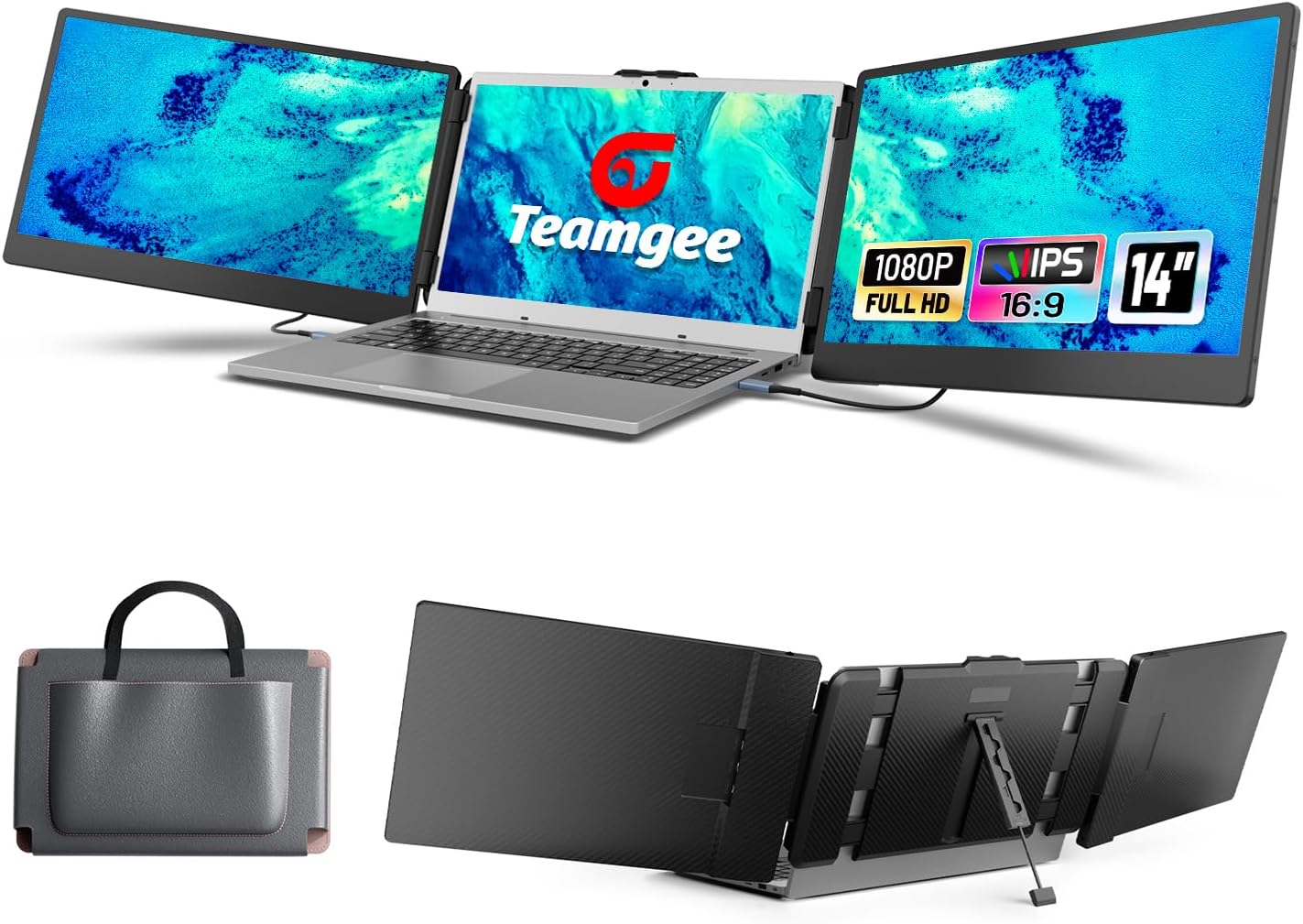
The Teamgee 14" Laptop Screen Extender transforms your laptop into a powerhouse workstation with three crisp Full HD IPS displays. Designed for professionals on the move, it offers plug-and-play compatibility across multiple platforms, vivid anti-glare screens with adjustable settings, and a sleek, portable design complete with built-in speakers and a sturdy kickstand. Perfect for multitasking, remote work, and travel, it’s the ultimate upgrade for maximizing productivity without the bulk.


| ASIN | B0CDGFXHV7 |
| Additional Features | Adjustable Kickstand, Built-In Speakers |
| Aspect Ratio | 16:9 |
| Best Sellers Rank | #20,924 in Electronics ( See Top 100 in Electronics ) #563 in Computer Monitors |
| Brand | Teamgee |
| Brightness | 1027.8 lm |
| Color | black |
| Compatible Devices | Laptop |
| Connectivity Technology | USB |
| Contrast Ratio | 1000:1 |
| Customer Reviews | 4.3 out of 5 stars 1,338 Reviews |
| Display Resolution Maximum | 1920 x 1080 pixels |
| Display Technology | LCD |
| Display Type | LCD |
| Hardware Connectivity | USB Type C |
| Image Contrast Ratio | 1000:1 |
| Item Dimensions D x W x H | 9.61"D x 15.36"W x 3.42"H |
| Item Weight | 1.62 kg |
| Manufacturer | Shenzhen Baijiayoupu Technology Co., Ltd. |
| Model Name | S2 |
| Model Number | S2 |
| Mounting Type | Plug and Play |
| Native Resolution | 1920x1080 |
| Number of Component Outputs | 1 |
| Picture Quality Enhancement Technology | Color enhancement, Anti-glare treatment |
| Pixel Pitch | 0.23 |
| Refresh Rate | 60 hertz |
| Resolution | FHD 1080p |
| Response Time | 3 milliseconds |
| Screen Finish | Matte |
| Screen Size | 14 inches |
| Screen Surface Description | Matte |
| Series Number | 2 |
| Shape | Rectangular |
| Specific Uses For Product | Multimedia |
| Total Number of HDMI Ports | 1 |
| Total Usb Ports | 1 |
| Unit Count | 1 Count |
| Viewing Angle | 160 degrees |
| Voltage | 5 volts |
D**S
Best travel product purchased yet! But Triple Check Your Laptop To Match!!
If you’re like me and you work off of three screens at the office, this is the perfect travel companion when working away from the office. I travel a lot for work and can’t stand only using one screen on the laptop. I set everything up in my hotel room and I’m now better able to be more productive with my work tasks. I’ve owned these monitors for over two months now and have used them plenty. I haven’t had a single issue with them. The only challenge I had initially was getting them to be compatible with my laptop. Even after I did a lot of research to ensure they would fit my laptop and plug into my laptop, I still ran into a challenge. What I didn’t understand was that while I had a type C port on my laptop I did not have a “full featured” USB port. So with some troubleshooting by my awesome IT husband, we figured out a way to hook the monitors up to my laptop, using a port replicator, this is the one I use https://a.co/d/j9MKSVg. I also use a travel extension cord that has USB ports. Then I plug the HDMI cords that come with the monitors into the monitors and the port replicator and then the USB cords that also come with the monitors into the monitors and the extension cord. It takes me less than 10 minutes to set everything up and then when I meet with clients, I leave my monitors set up in my hotel room and just take my laptop off and reattach the monitors when I get back. They’ve also been useful when I’ve had to work on something with someone else sitting next to me. I also travel with a wireless mouse that I also plug into the port replicator. I will also add that my laptop monitor is not the best, I need to replace it but when the two screens are attached, it works perfectly so they actually make my laptop even better. :-) I definitely recommend this product, just make sure you do your research before purchasing. I purchased the 14 inch S2 triple screen laptop screen extender. My laptop is a 15.6 inch Gateway ultra slim notebook.
J**Z
Monitor extension for the laptop
We bought the Teamgee Portable Monitor extension because while I work remotely with my work laptop, we wanted to have another setup with multiple screens for our personal laptop. We use it mostly in our motorhome and works great. After looking and reviewing dozens of extension products, most really all looked like the same product. We chose the this product because mostly pricing, and for that price the quality of the display output that was advertised, and reviews were popular on the positive as well. Many other units were much higher priced advertising the same results and lower ratings, so we took a chance. Overall we are pleased with it. It is our first time owning some kind of laptop display extension so had no idea how they actually worked. The setup is relatively easy, with our laptop we use two C-USB ports, but can use HDMI as well (cables for each method are included). They are a little heavy but no means a terrible thing to attach to the laptop. The extension screens do not weigh the lid down too bad, as it has a stand in the back for support. The display quality is not bad, and we have a 17" laptop but the 14" extensions are not that small to not see or cause any issues. Setup is just a few minutes to plug each screen in to the laptop and viola, you are off with three screens. The product comes with a nice storage bag that holds the screen extensions and cables. The construction also does not feel really cheap, more like the materials of the laptop itself. So far in 3 months use, we experienced zero issues and are happy of the purchase. We will likely re-evaluate further in the year after much more use.
A**W
Three Screens Possible On A Laptop - Who Knew?!
Been working from a laptop ever since March 2020. Eyes have really taken a huge beating over all this time. I recently bought a single screen extension and it works amazing. Husband saw it, loved it and then immediately stole it for his laptop! Since he stole it I had to “One Up” him. This dual screen portable monitor has proven to be an extremely huge game changer in my daily activities because I now have three screens to spread out work. Images are extremely sharp. Setup was a bit confusing but after rereading the instructions, it was super easy and extremely quick. Since it was now three screens, I had to force my laptop settings to get them to display correctly. Otherwise, once correctly set up, everything works perfectly. I don’t use the volume on either of the extension monitors but what I heard was fairly good, I decided to just use my laptop speakers instead. Monitor comes with all cords and a wonderful carrying case to keep the screens protected! Honestly think I scored the better option since I lost my single screen! Something to keep in mind, since it is a little wider when folded up than a single monitor, it did fit a little snug in my laptop backpack. Otherwise, I indeed highly recommend the three screen option if daily laptop work is the “new normal” for people working from home these days!
T**S
It's worth it!
First let mw start by saying I'm a tough grader, with that being said i want to paint a picture of what it's really like with this product and not just a generic description. 1. The packaging was good. The product itself feels sturdy and of sound quality. The wires were neatly packed away, it includes 4 wires 2 type-C to type-C wires and 2 type-C to USB wires. The carrying case is sturdy and definitely seems like it will last long. 2. The when it come to plugging I'm the screens and making the connections. You do need an external power source. Your laptop CANNOT power the screens on its on. I have a Dell laptop and only one screen came on. (When i get home in will try a HDMI to type-C wire and see if the second screen comes on). I had to use an adapter to be able to plug everything in as my laptop did not have all the ports needed to make plug everything in. I don't believe any laptop made today has enough ports to support all the ports needed. 3. The screen visual was a good quality, I did not adjust the resolution on the screen which I believe should be done to work efficiently. 4. The installation is very easy its stretches to hug your laptop screen and the plugs are labeled clear enough for anyone to read and set up the screens. (Again buy an additional adapter to plug in all USB and Type-C ports and power plug. 5. I waited for this product to go on sale for roughly $220 and for that price i do believe its worth it for my needs. 6. I will post pictures when i get a chance and update my review once i make sure the second screen works with an HDMI output. Update - after using this product for another few weekends working remotely. i have to say that this is a great product. It gets the job done. i don't know how else to relate it's effectiveness. My only complaint and it really shouldn't matter is I'm a big guy and i have 27+ inch screens at home but while on the road this products allows me to get the job done more effectively than using just my sole laptop screen.
P**.
What's not to like? They thought of almost everything.
I have the larger version of this product and I wanted a second set for my non work laptop so as to stop having to disconnect my setup to switch PCs so I ordered the smaller version. I can't say enough good things about the product. The clarity and vividness of the screen leaves nothing to be desired. In the pic I have blurred out the screens for privacy, but trust me, everything is sharp and detailed. Also, there are multiple ways to connect to your PC . If you have two powered USB-C ports on your PC, that is ideal as it is the simplest setup, just plug and play with one cord to each monitor. However, if you don't have that, you can also use HDMI (provided in the package) or a non powered USB-C to your computer coupled with with a USB-C wall plug (not included, but you can just use a phone charger) and you're set. All cables needed for connection are provided, if you only have USB-A you may need a signal converter but that depends on your PC. When not in use, the product folds up beautifully and a storage pouch is also provided with a pocket for all the required wires. They really have thought of everything. The build quality is also quality, these things do NOT feel cheap. I already knew this with the larger version but it's great to see the smaller version matches that. It's a great product that is easy to set up, easy to transport, and easy to store away when not in use. I'm a fan.
N**D
Burned Out Laptop Power Supply in Less Than One Week!
Cool idea for a digital nomad. But there's just ONE MAJOR PROBLEM. When powering on for the first time, the monitors showed an error message that they were not receiving enough power. So I used the included extra USB-C cables to power from an external USB-C hub power strip plugged into a wall outlet. That seemed to do the trick. I noticed, however, my laptop was now running hot. Side note about picture quality. As a photo editor, the color balance out of the box is WAY OFF. It took a lot of adjusting to get it somewhat close to accurate, but still off. So these monitors are fine for extra real estate for communications and documents. But these monitors are DEFINITELY NOT OK for any kind of critical color work for professional photo or video editing. So here I am, less than a week after delivery, and my Dell XPS 17 9720, purchased in July, prompted me on boot up that my now 10 watt power supply, formerly 130 watt, was insufficient. So I unplugged the monitors and restarted the laptop. Same prompt. Okay, maybe it's a glitch. So I shutdown the laptop and restarted from a cold boot. Same prompt. Next, I ran Dell Diagnostics, which said everything checked out fine, as I'm running out of power. That's because, evidently, being plugged in overnight didn't charge the laptop battery. I tried one more cold boot, just to be sure. Same error prompt. And now only 17% power remaining. So here I am, in another country, with a live event to edit on December 1, and hoping the laptop will trickle charge over this next week so I can work. I've ordered 2 replacement power supplies with a rush delivery ... to arrive on December 11! Moral of the story ... If you're a digital nomad and require uninterrupted use of your computer in order to do your job ... DON'T BY THIS PIECE OF POO!!!
R**D
For under $250! Portability on a budget.
I can't say enough good about this 2-monitor system. It has a very small footprint and is easy to travel with. I can set this up on my patio and enjoy being outside instead of stuck inside my office. All the proper cable connections are included. One monitor connects via USB C to my laptop's USB C port. The other monitor uses the USB C to HDMI connector PLUS the USB C to my laptop's USB A port. This was super simple to hook up and get running. Some settings in my Windows 11 Displays setup page made it easy to extend my desktop for multitasking. I never realized how simple it would be to have 2 more monitors added to my laptop without purchasing cheap monitors and purchasing additional hardware to run them. This all-in-one kit made it painless to get organized and running. All of this was inspired as I was teaching a class and one of the students brought this in and sat in the first row with it. Another friend was telling me how she purchased a similar system and it helped her be more productive from her laptop as well. So glad I ordered these. Works great on my 15" HP Envy Laptop. Thanks you!
B**E
A Game-Changer for On-the-Go Productivity
The Teamgee Laptop Screen Extender is an incredible addition to my portable workspace setup. Featuring a 14” Full HD display, dual speakers, and an adjustable kickstand, this monitor extender offers everything you need for a versatile multi-screen experience on the go. After using a similar product that required a dedicated desk or table, I'm thoroughly impressed by how this one directly attaches to my laptop, making it far more adaptable to different environments. Portability and Setup One of the biggest advantages of the Teamgee Laptop Screen Extender is how seamlessly it integrates with your laptop. Unlike previous models I used that had to be propped up on a stand behind the computer, these monitors attach directly to my laptop. This allows me to use a simple laptop tray rather than a bulky desk setup. Setting it up was surprisingly easy – plug it in, and it's ready to go. Plus, it comes with a handy carrying bag, which includes a pouch for all the necessary cables. This makes transporting it incredibly convenient, whether I'm moving around the house or working from a coffee shop. Display Quality The display quality is excellent, with the Full HD resolution offering clear and vibrant visuals, which is essential for my productivity. Whether I'm working on spreadsheets, presentations, or multitasking between various applications, the extended screen space makes everything more efficient. The dual speakers are also a nice touch, providing good sound quality without needing separate audio devices. Productivity Boost Overall, this screen extender has significantly boosted my productivity. With my previous setup, I always felt limited by the need for a dedicated workspace, but the flexibility of the Teamgee Screen Extender lets me work comfortably from almost anywhere. If you're looking for a portable monitor solution that combines great quality, portability, and ease of use, this is an excellent choice.
M**S
Great value, works well
I'm impressed, this extension is so clever and easy to set up. Works as expected. Great value for money. Now I actually enjoy my work from home
M**R
Perfect
I was going on a business trip and would be working remotely from my hotel room. I was looking for something that would allow me to extend my laptop screens. They were fairly easy to install and connect to my laptop. The only issue I really had was the chords that plugged into the back of the screens, sit flush, and they were a little bit of a challenge to get pushed in all the way. Also lettering was difficult to read. It would be nice if it was a contrasting color. I had to take a picture of the back of the screen and blow it up so I could see what I was looking at. Since that trip, my husband has also used them when he travels. They also work as a nice backup when he works from home. They travel well and pack nicely.
F**A
Reliable
I just received and I've been using it for a while. FIrst than anything, I'm an instructor who needs to prepare presentations and workshops.. and also a manager who needs to keep an eye on the new emails or messages. So this setting helps me to have a "primary" working station on my 2 left screens and in the right 3rd screen I can keep track of any incoming emails. Is a relieve and it's making my life way easier. Only "downside" that I need to connect: 1st creen USB-C to USB-Standard for power + USB-C to HDMI for video. 2nd creen is simple USB-C to USB-C. If you have spare USB-C in your computer then you are set with less cables. Also, if you don't connect your computer to the power, then the battery will last way less than normal, as expected because of so many devices connected together. But anyway, it makes the job, easy to transport and is making a good difference for me.
A**R
This is a great product for students or working on a laptop.
I’m doing my PhD, and this Teamgee laptop monitor extender has helped me a lot with my research and study. It’s very easy to set up and works great with my Windows laptop. I use it every day to manage multiple tasks, like reading papers on one screen and writing on another. It saves me a lot of time and keeps me focused. The picture quality is very clear, and the colors look great. I also like that the screens are bright enough even in a sunny room. It’s light and folds nicely into my bag, so I can take it anywhere. The stand and frame hold everything steady without scratching my laptop. At first, I had a little trouble connecting the cables, but after checking the instructions and plugging in USB-A before HDMI, it worked perfectly. I haven’t needed any extra software or drivers, which is nice. The support team is also helpful and quick to reply.
M**D
It is definitely travel friendly and with good quality storage bag
Flexible and portable Laptop Screen Extender, FHD Triple Portable Monitor with built in speaker. adjustable built-in kickstand and a stretchable fixing frame.it comes with a good quality storage bag, allowing to carry anywhere. It is definitely travel friendly. one with dual-monitor support multiple USB-A/USB-C ports and HDMI. Note; my laptop is bit old not have c-type ports. For dual screen support need some extra power so I used proper docking station USB C hub, it run without issues C Hub Triple Display Docking Station Dual HDMI, 1 USB C&A Data Port Type C Dock. Screen sizes are good.
Trustpilot
2 days ago
2 months ago