Desertcart purchases this item on your behalf and handles shipping, customs, and support to Macau.
๐ Command your workspace with the ultimate MacBook Pro docking powerhouse!
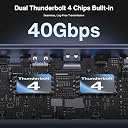
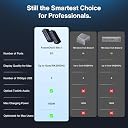
The iVANKY FusionDock Max 1 is a premium docking station designed for MacBook Pro M1 to M5 series, enabling up to six extended displays (quad 6K@60Hz + dual 4K@60Hz) via dual Thunderbolt 4 chips. It features 40Gbps data transfer speeds, a robust 180W power adapter for up to 96W laptop charging, and a 2.5Gbps Ethernet port for stable connectivity. With 7 USB 3.2 ports, SD/TF card slots, and a DisplayLink adapter for expanded display support, it offers a professional-grade, plug-and-play solution backed by a 24-month warranty and dedicated customer service.


| ASIN | B0FQJ3Q5ZB |
| Additional Features | Plug and Play |
| Best Sellers Rank | #5,287 in Computers & Accessories ( See Top 100 in Computers & Accessories ) #444 in Laptop Docking Stations |
| Brand | IVANKY |
| Color | Black |
| Compatible Devices | MacBook series(2016 and after) |
| Customer Reviews | 4.2 out of 5 stars 443 Reviews |
| Data Transfer Rate | 144 Hz |
| Hardware Interface | Ethernet |
| Manufacturer | Shenzhen Velocity Technology Innovations Co., Ltd. |
| Minimum Required Operating System Version | Mac OS 13 Ventura |
| Number of Ports | 11 |
| Operating System | macOS |
| Special Feature | Plug and Play |
| Total USB Ports | 7 |
| Total Usb Ports | 7 |
| Warranty Description | 24-month Warranty |
E**G
Works well. Runs a bit warm. Customer support was fabulous.
Update: The issue with the monitors constantly losing their settings when I reboot/undock, etc... has worked itself out. I've had two MacOS updates since I got the dock, so maybe one of those fixed it. +1 star. Ivanky customer support reached out to me almost immediately after my review. They made multiple offers of either a full refund or a replacement, and sent me a replacement (the monitor issue had worked itself out before the replacement arrived). They have been fabulous to deal with. +1 star. Original Review: This dock replaced my Satechi dock, which only supported two monitors, and whose network port was super flaky and constantly disconnecting. This dock works well. All of the ports / functionality have been solid, and I haven't had any hardware issues yet. It's great to be able to plug all 4 monitors into the dock. The network port has been rock-solid, and the dock has no disconnection issues. The USB-C ports connected to a 4TB SSD have great copy speeds. Like other's have said this item runs pretty warm 100% of the time. Given that, I'm not expecting a long lifetime from this device. Hopefully their support is good. The only technical issue I have is that every time I reboot my M1 Macbook or disconnect it from the dock I have to re-setup the monitors in the display settings panel as the computer seems to forget which monitor is which, even when they don't get unplugged. I didn't have this issue when the monitors were plugged directly in to the laptop. I am also making sure the cables go back into the same ports with the same side of the cable facing up (I assume this is why they include the funky cable, since moving the cables around was the issue I had in the past with the monitors getting mixed up). This item is expensive for what it does. I bought my own Thunderbolt 4 cables because of the issues people reported with the included cable, which added even more expense. However, it has worked extremely well so far, other than the monitor 'forgetting' issue. I'm hoping a Mac OS update may fix that. So, overall, a good piece of hardware that runs too hot and will likely have a shorter lifetime than it should (-1 star) and whose only technical issues seems to be not correctly reporting the same monitor IDs each time so you have to resetup your desktop layout each time you reboot/redock (-1 star).
J**T
๐ UPDATED AGAIN: From 1 star to 5.
Final Update: The product I originally received had issues. That is clear now. iVANKY replaced the original dock for me and the new one is NIGHT AND DAY better. No more random disconnects. No more screen flickers and distortion. Nothing but excellent performance and so many ports that I don't even use them all! Customer support was great: They addressed my problems, sent a new one FAST and FREE and the issues are resolved. NOTE: If you order this and get the cable with a block on both ends, send it back immediately. They upgraded the cable to split into two JUST like I suggested and it is night and day better. Don't even THINK about using the v1 cable. First update: I contacted the seller who sent me a new dock speedily! Time will tell if it is better, but so far so good. They even updated the cable JUST as I had wished. Apparently I was not the only one who found this problem. So far so good with the updated cable. If you buy this and get the cable with a block on BOTH ends, return it immediately and re-order to get one with the split cable. (See updated photo โ split cable is circled) Updating to three stars for exceptional service. If this one is reliable, it will go to 5 stars. - - - - - - - - - - - - - - - - - - - - - - - - - - ORIGINAL REVIEW: 15 days past my return window, it failed. Need I say more? Ok, I will . . . What's to love? Lots. โข More ports than anything else out there. Nicely balanced between front and back. Ethernet, audio, Thunderbolt, USB, it's got it all. (See photo for just how many of the ports are in use on a regular basis here.) โข It's even nice looking. This is one well thought out unit. What's not to love? โข The price. It's insanely expensive. โข The cable. Put this thing down and don't touch it. The two-connector cable is a bad bad idea. It should have a split cable with two separate connections because the block connectors (two prong) comes out with the slightest bump. I've learned to handle with extreme care when plugging and unplugging because you WILL bump it loose. What's to hate? (Here's what you came here for) ๐ 15 days past my return window, one of my Thunderbolt ports stopped working. Plug into the port above: all good. Plug into the port that quit: nothing. Dead. Sigh. If I'm down a port this quick, how long before the whole thing is junk? My advice: Get two hubs and deal with two plugs. The idea of one two-connector plug sounds nice, but it's a big flaw (you can learn to deal with it, but I promise you, you WILL bump the plug loose). This would have made it a 4-star product... But now with a port failure, game over. One star. Stay away.
A**H
Works great on a M4 Max.
When I received the package, I thought for sure there was a brick in the box instead of a dock. This thing is SOLID! It's an all metal enclosure with a very solid feeling power supply. The thunderbolt cables supplied are very high quality and long enough to give you room to place the MacBook where you need it. I very much like the look of the dock and the rear ports are adequate while placing enough ports on the front to make it easy to use without having to reach behind it during normal daily use of plugging and unplugging various devices I need to test (I'm a mobile app developer). The dock gets very warm, hot even, to the touch. Do not place anything on top of it. It does have an internal fan, however I do not normally hear it running, but I also have an air purifier running 24/7 in my office, so I probably wouldn't hear it unless it was loud. I worry about the longevity with it running so hot, but we will see how long it lasts. For the price, I hope it doesn't burn out, especially since I like it so much. I have a MacBook Pro M4 Max and it is driving 3 external monitors with no issues so far. For testing, I did try it on a Mac Mini M2 Pro and it would not drive more than 2 monitors from the dock, no matter what configuration of cables I used. This isn't designed for Mac Mini's, but I thought I would note that in case anyone was wondering. The only weird issue I had was this morning. I had taken the MacBook into the other room and when I came back in, I just put it on my desk and didn't connect it. I let it go to sleep on it's own. I connected the thunderbolt cables and when my external keyboard lit up, I moved the mouse and my monitors came on, but my MacBook screen did not. It stayed black. It was showing up in the display manager, but I could not get it to turn on. I tried unplugging the cable and it was still off, even after shutting the lid and re-opening it. I had to plug it back it, shut it down completely, and turn it back on to get the screen come back on. I am up to date on the latest OS. This might be a Mac bug, or it might be a dock bug, hard to say right now. Overall, I would definitely recommend it.
P**E
Really nice product, great performance, great support
The FusionDock Max 1 is a great product and IVANKY "does support right" My experience was so good that I ended up getting a second product variant for my wife. Anyway, the Max 1's performance was perfect for my M1 based Macbook Pro application since it enabled me to get two screen support (using DisplayLink) plus support a bunch of additional ports including a high speed external M2 SSD for my photo library. With the awesome bandwidth both from the Mac and to the SSD, it's like working with a local SSD. With the I/O that's supported I can hook up all the peripherals I have or imagine to have. Although this product is more expensive than other products, it was worth it to me to be assured that I was not going to experience any I/O bottlenecks. I did have a problem with the first item shipped. One of the HDMI ports was intermittent. It didn't bother me since these things happen. Customer support was awesome and sent me a replacement unit right away which made all the difference to me Build quality is solid for the unit itself, cabling and power supply. Very happy with this purchase.
S**M
Legitimately the dock that Apple should have made
Preface: I bought FOUR docks prior to this one. I purchased a M4 Max MacBook Pro and wanted the ability to run 3 monitors. Many docks claim to offer this but all rely on DisplayLink or other third party software. iVANKY took an excellent and unique approach by utilizing dual thunderbolt 4 chips, which is the only way to support more than 2 monitors without 3rd party software. The dock is truly plug and play, built well, has all the ports you'd expect, and is RELIABLE! This truly feels like an Apple product. Let's be clear -- this is an expensive dock. But if you need it, just already dropped $3k plus on the machine. Suck it up and buy this dock and don't look back. It's what your machine deserves.
M**N
I *REALLY* wanted to like this
If you are like me, the appeal of this device is it's versatility and convenience of having a single connection to a swath of peripherals. A lot of information online will brag about it's many ports and capabilities and they even go as far as to test it, reporting no issues. However, once you start to push the device a little, it's clear it starts to become extremely unreliable. I connected this device to a new M3 Max Mac Pro laptop, connected to 2 5k UltraFine thunderbolt monitors, 1 HDMI TV, and several USB devices (keyboard, mouse, backup drive). And just to be clear, the device is at fault, because I can successfully connect all of these things straight to the laptop without any issues, besides having a ton of cables all over the place. The issues I encountered were the device intermittently losing connection with some of the devices. Sometimes power cycling the device would resolve the issue temporarily. Sometimes the mouse would stop working, sometimes a screen would go blank and turn off, then back on. Another issue I noticed was the 2.5ghz ethernet. When connected through the device, I was only getting 100-200mbps. Using another 10gbps thunderbolt ethernet controller I was able to get 2000mbps. Same ethernet cable, same everything. The only difference was connecting through the iVANKY port vs the thunderbolt adapter. The device also gets VERY hot. Like really, really hot. This may be the cause of some of the issues for sure. I really feel like the neat "suspended in air" design they have may have actually been an afterthought. When I first noticed the ethernet issue I contacted customer support via their website and they responded with...nothing. Nada. So yeah, I'm done.
P**N
Design, functionality, quality
I've tried a lot of different docks. I like a clean desk with easy access to ports when I need them and cables all where they should be. First of all the design of this dock is correct. So many docs have on odd port or two on the wrong side. Some ports should be on the back and other ports should be on the front for easy access. iVANKY gets this right. Secondly the ease of use is a game changer. With a single cable, most docks struggle to provide enough power and enough video at the same time. Either the MacBook Pro is barely charging or the video isn't at the highest resolution. This dock solves this issue with a simple two in one cable. A single cable connects to two ports on the MacBook and two ports on the dock ensuring plenty of bandwidth for both power, video, and data. Over all, of all the docks I've tried, and it's a long list. The iVANKY Max1 fits in the Apple ecosystem the best, by far. Not only design, but functionality, quality, and ease of use.
D**N
Ethernet not working any port to iOS iPad Pro M2, My less expensive hubs shared ethernet no problem
Ethernet does not seem available through any port to thunderbolt 4 iOS 17.01 iPad Pro M2, 2022 . with other hubs that include ethernet. It is generally passed through to the iPad. Power does pass through and it does charge the iOS device, but I am unable to get thumb drives and SSDโs to stay mounted successfully on any iOS device. I will be contacting Support to see if this is a known problem. Thunderbolt four to thunderbolt for should just work. seems to work fine on my M1 Mac, 13 inch. however, my other hugs allow my iPad Pro to connect to my ethernet system and my OS X machines which is a big deal. I look forward to finding out a solution. I have used $39 hubs that have achieved this but I need more hours since I run a professional recording studio. Needed the optical and a lot of USB 4. the build quality is very good. The external case and materials are very high-quality. It is built like a brick and does not generate much heat when functioning. If I can get Support to work out the ethernet sharing, I would say this is the best hub on the market. I will revise this review after Support contact me with their opinions. If they are able to make the two machines share ethernet through fire wire, this is a five star, and I will write an entirely glowing review. Update: Support has been very helpful and seemingly upgraded. They have sent more directions and suggestions and they have offered to refund if there are any problems. I will mount the new cameras and test gave them one more star because of the Support communication which was greatly appreciated, I still have not gotten the hub to share ethernet with an iPad Pro other than using the sharing from my MacBook. I will be trying a few more things to make this happen. Will update. Update: I must say their effort for Support is very good. I have not been Able to work out ethernet support for this interface. However. I was sent another interface of a different model. It worked great but the speed was only five GB and I need 40 GB Ports everywhere. The new interface works great if 5Gb USB-C is good for you.
M**N
Docking station thatโs made for Apple
I recently acquired this docking station that feels like it could have been designed by Apple itself, given its superior build quality and aesthetic appeal that perfectly complements Apple products. Setting up the docking station was a breeze; it truly embodies the plug-and-play spirit. Within minutes, I was up and running with a triple display setup, alongside multiple other devices connected seamlessly. The performance has been flawless, with no lag or connectivity issues. Each component, from my keyboard and mouse to external hard drives and monitors, integrates smoothly, making it an essential accessory for anyone looking to enhance their workspace efficiency. Overall, this docking station is a must-have for Apple enthusiasts looking for a reliable and stylish solution to expand their connectivity. It makes the multitasking experience effortless and efficient, which is a testament to its excellent design and functionality.
C**N
Se siente de muy buen calidd.
Se ve de buena calidad y me esta funcionando a la perfeccion con todass las coneccionesss que trae. El unico problema ess que no tiene boton de apagado, tuve que comprar un multicontactos para poder tener un boton para apagarlo cuando no lo utilice sin tener que estar apagando todo el ups que tengo.
M**A
Good quality and as advertised.
Good quality and as advertised, but missing DisplayPort to Thunderbolt cable, had to buy that separately.
V**F
Well made docing station.
It works well with the M1 MacBook Pro MAX. The Thunderbolt components are well-designed and work great. The card readers are OK, but there is nothing to write home about. The readers are older design Type 1. The front RCA headset plug is not working, at least for me. I have not tried a different headset yet. What I like about it is the speed of the T-Bolt ports. That makes for the RCA. As a designer, I would switch some ports for better cable management. Overall, it is a great product, albeit a bit expensive, but it offers a lot of ports and high standards.
P**H
So far, so good...
Bought this to let me use my Macbook Air M3 as a desk-focused workstation, and so far it seems great. Build is exceptional (it feels like it's milled out of a solid block of metal), plenty of ports front and back, and it's driving my two screens (1 via HDMI, one via a DisplayPort adaptor) and 2Tb Thunderbolt 4 external drive with zero issues. Next stop is to see if I can run my work laptop off it as well. We'll see how it continues over time, but for now it seems like a winner. I just wish it were cheaper...
Trustpilot
3 weeks ago
1 month ago