Buy anything from 5,000+ international stores. One checkout price. No surprise fees. Join 2M+ shoppers on Desertcart.
Desertcart purchases this item on your behalf and handles shipping, customs, and support to Macau.
🎨 Elevate your digital canvas—create, teach, and inspire without limits!
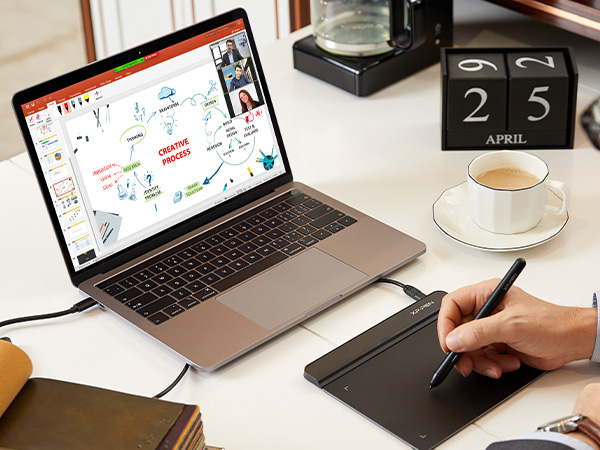
The XPPen StarG640 is a sleek, 6x4 inch digital drawing tablet featuring 8192 levels of pressure sensitivity and a battery-free stylus for uninterrupted use. Compatible with Windows, Mac, and Chromebook, it supports a wide range of creative and professional applications from digital art to remote teaching. Ultra-portable at just 2mm thin and 170 grams, it’s designed for on-the-go professionals and students seeking precision and versatility in one compact device.


| Active Surface Area | 6 inches x 4 inches |
| Additional Features | Battery-free Stylus Pen |
| Asin | B078YR2MTF |
| Best Sellers Rank | #5 in Computer Graphics Tablets |
| Brand | XP-PEN |
| Built In Media | Battery-free Stylus Pen, USB Cable, Quick Start Guide, Power Cord |
| Color | StarG640 Black |
| Compatible Devices | Windows 7 and above, Mac OS X 10.10 (or later), Chrome OS 88 (or later) |
| Connectivity Technology | USB |
| Customer Reviews | 4.3 4.3 out of 5 stars (21,288) 4.3 out of 5 stars |
| Display Type | LCD |
| External Testing Certification | Não aplicável |
| Item Dimensions L X W | 6.38"L x 7.48"W |
| Item Weight | 170 Grams |
| Manufacturer | XP-PEN |
| Mfr Part Number | StarG640 |
| Model Name | Star G640 |
| Model Number | G640 |
| Native Resolution | 8192 levels |
| Operating System | Windows 7 and above, Mac OS X version 10.10 or later |
| Pressure Sensitivity | 8192 Levels |
| Screen Size | 6 Inches |
| Specific Uses For Product | Drawing, Painting, Writing, Teaching, Editing, Designing, Animation, Remote Work |
| Target Audience | Teacher |
| Unit Count | 1.0 Count |
| Upc | 758232357569 758232357163 |
| Warranty Description | One-Year Warranty |
User
Great option for beginners and pros!
Works great! One of my favorite things about this tablet is the size. it’s small enough to fit comfortably in my workspace, which is a huge plus, especially for screenless tablets.The pressure sensitivity works really well, but just a heads up. you do need to download the driver first or it won’t function properly. The instructions make it easy though, so it’s a quick fix.I also like the surface texture. It’s not overly smooth or slippery, which gives it a bit of grip and makes drawing feel more natural and controlled.Bonus points for the warranty. it seems to come with about a year of coverage from xppen, which is always nice for peace of mind.Overall, a solid tablet that’s easy to use and fits well into a smaller setup.
User
Easy to Use and Great for Beginners
I bought the XP-Pen StarG640 drawing tablet as a beginner-friendly option, and it’s been really easy to use. Setup was quick, and it worked right away with my computer without any issues.The tablet size is perfect for drawing and editing without taking up too much desk space. The pen feels smooth and responsive, and I like that it’s battery-free, so there’s no charging or interruptions. Pressure sensitivity works well for sketching and line work.It’s great for drawing, digital art, photo editing, or even taking notes. For the price, it feels solid and reliable, especially if you’re just getting into digital drawing.Overall, a great starter tablet that does exactly what you need it to do.
User
It's alright, gets the job done
I got this as a temporary replacement for my Surface Pro (5th Gen) as its having phantom touches and I'll probably need to replace the screen. The StarG640 is kinda smaller than I expected but that's just on me for not understanding the measurements I guess but the USB-C port came slightly bent and when I plug it in It leans to the right, which is a slight problem as my PC is to my right so it's just halfway sticking out (Kinda scared it'll break or cause smthin to bend that isn't supposed to). The overall feel is pretty alright, I rlly like the grips at the bottom of the tablet, don't rlly like the pen. I just wish the pen has a little more weight to it, it just feels like cheap plastic but that might just be me as I'm pretty heavy handed but if the lightweight feel is for you it's honestly perfect. Given the budget and size it would be perfect for beginners, I started off with a $70 wacom intuos about 3-4 yrs ago and it was great, the weight and size felt amazing but this would have honestly been better since that $70 was rlly an investment for a 14/15 yr old in a low income household and $70 is kind of a lot of money to just put away in a closet when you think about switching to a display or if you don't think digital art is for you try it. All in all, it get's the job done and is great for the price, the only real complaint I have is the cable being bent and the cursor has a kind of slight lateness to it, it might need to be calibrated.
User
Improve Your Online Teaching Life and Look Like You Know What You're Doing
I ordered this drawing tablet almost a month ago and the tracking information suddenly ended 5 days after I made the purchase, yet the new arrival date kept getting extended. Finally, after 23 days had gone by with no tablet, I was told to contact the seller. (If you need to contact the seller, be sure to contact them by clicking through your order so your message is automatically tied to your invoice.) XP-Pen customer service set up a replacement delivery, which arrived 2 days after I first contacted them. Apparently, I was one of the lucky few whose package got lost in transit, but they resolved this issue quickly.Moving on to the product itself. At first (with my tech savvy confidence), I just thought that I could simply download the drivers from their XP-Pen.com website and install everything as I normally do. No luck--I got signs of life, but I couldn't make accurate marks and the tablet wasn't exactly responding to the stylus as it should. I completely started over by uninstalling the drivers, and actually reading their directions for installing on an iMac with Catalina 10.15 OS. (Wow--what a difference following the directions makes! I think that I was just impatient after waiting for this thing for almost a month. :P ) Once I correctly reinstalled the drivers and went through their set-up steps, everything worked perfectly! This is great for annotating, screen casting, drawing in various apps, and more, which I have yet to discover. It's comfortable to use, whether you're right or left handed. You can configure how you want to orient your tablet in your settings. It's responsive, and this Star G640 model weighs in at a very teacher budget friendly price. I was waffling between purchasing this model or making the stretch for a higher end one that has a larger active space. The Star G640's 6" x 4" drawing area has been sufficient for working with elementary-age students. I've never owned a drawing tablet before, so this was an affordable way to try this out. So far, I am very pleased with this purchase. I just wish that it had arrived 3 weeks earlier, because it could have saved me from additional online teaching headaches!
User
good tablet for digital illustration/painting. perfect size for travel!
Came in perfect condition and well-packaged.I really love this tablet. I feel like its the perfect size: not to large, not to small.The drawing performance was excellent and its very responsive, yet my hand doesnt trigger any artifacts like with a previous drawing tablet i owned (palm rejection is vitally important when drawing).I really love the pen hoop at the side since it makes sure i dont lose the stylus.I use it with Krita and Clip Studio Paint and found that it was so easy to use, it was easy to make my illustrations. Of course, I installed the driver it comes with first (and I heavily reccomend people do that, since it makes your lines more stable and makes sure your palm is rejected well).Overall, a great drawing tablet.
User
Obnoxious learning curve
The positives: This was easy to plug right into my laptop, open my favorite art program and start drawing immediately.The negatives: The user manual included explains nothing about what the buttons on the pen do. Had to discover that through trial and error. Even then, the pen and pad have a horribly obnoxious learning curve. Getting used to using a digital pen after drawing on paper for my whole life is a nightmare in and of itself, but the tapping sensitivity is a project too. Sometimes if I tap a millisecond too late, the pen REFUSES to draw and I have to lift the pen, click elsewhere on screen with my mouse to make the little menu that popped up go away, and start again. Sometimes I can draw while pressing a button and other times I can't at all. It's horrendously unpredictable.I know that eventually with trial and error I will have this thing figured out, but over the past week since I started testing this thing out I haven't. My feeling has always been that if something has a learning curve, in other words I cannot take it out of the box and use it right away with zero roadblocks, then it is not designed well.
User
Exactly what I needed
Purchased this in particular for better use of Windows handwriting keyboard. Plugged into the computer, downloaded the driver and it was all good to go. Instructions were very clear. Product came in factory sealed packaging so that was a big plus. Easy to use and if you are like me who is using a Windows PC without a touchscreen monitor and wants to utilize the handwriting keyboard, this one is for you. It’s very simple and basic, and compact, without all other fancy features which was what I wanted, and the price was right. In my opinion after watching several videos and testing it myself, if you are intending to do any art work, you might want to invest in another model with more features and functions. Once again, this model is very basic, but serves my needs perfectly.
User
it sure is one of the tablets i've ever used
ignore how greasy my tablet looks omg i think it's just really easy to get dirty but the all black pen is the one that comes with this tablet, but the silver/black one is my deco pro pen.okay so!!!! i'm an xp pen user til the day i die hehe i'm so loyal. i used to use the deco pro mw and small, but then the ports cracked in both of them which made them basically unusable. then in the middle of my sleep deprived delirium, i decided that i'd get a baby xp pen tablet as a temporary replacement. i hopped on amazon, found the star g640, and bought it on a whim. it arrived on the same day bc i'm a ✨ prime user ✨ so i started using it immediately after i woke up.it's very small, and i have it connected to my laptop. it's okay if you wanna draw in bed, but if you're at a table, the tablet's corners are a bit sharp (?) so it might scratch your forearm rubbing against it. it's also extremely light so if you have it laying on your body then it won't put a lot of pressure yay. also the tablet doesn't have buttons at all unlike deco pro, but the pen does have the typical left/right click buttons. speaking of the pen...here is the make or break: the pen is REALLY uncomfortable?? maybe it's bc i've grown so used to the rubber on the deco pro pens, but this pen really reminds me of the wacom intuos pen but significantly cheaper (which i guess is what you'd imagine for a $40 drawing tablet but that doesn't mean i can't be disappointed LOL). and for some reason, the strokes feel slower and less precise? maybe that's my own skill issue but it seriously felt super wrong and i was beginning to get kinda exhausted from drawing. i was contemplating returning the tablet altogether and rushing to get another deco pro, but then i had the idea to try and use my deco pro pen on it and IT WORKED????? 💃💃 so now it actually doesn't physically hurt me to use!!!!!! which is good bc i REALLY didn't wanna get another tablet LMFAOOOO. if it weren't for the pen compatibility, i would honestly have given this either three or even two stars, but i'd say it bumped it back up to a four. which technically is not this product by itself, i just got really lucky i've already used xp pen, and i appreciate the fact that you can cross over the pens between different xp tablets, so it can have the extra star <3tl;dr the tablet is okay, the work space is small but reasonably so. if you aren't a beginner then you'll recognize how awful this pen feels to hold. if you're buying from xp pen then just get a deco pro i'm so serious 😭😭 but this tablet really is as much as it's worth and i'd definitely recommend it for BEGINNER artists, especially kids.
User
Enough for office work task
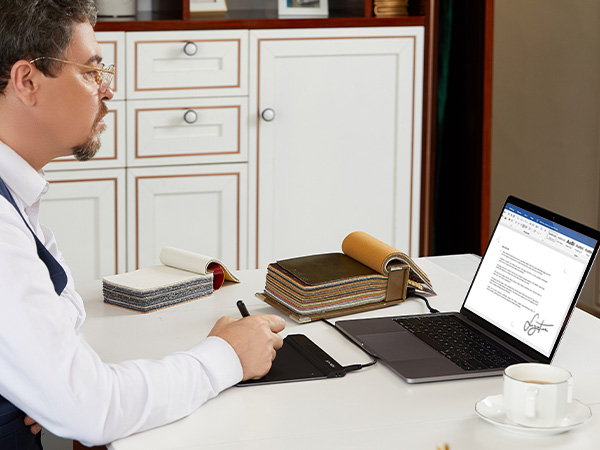
I bought this for my task during working from home as sometimes my digital signature is required for approval. This digital pen and pad are good enough for the purpose. Additionally it supports WINDOWS INK app which is very useful for the meeting via Zoom/Webex as it allows to visualize your idea and what you talk about on MS Word, Excel and Powerpoint. I love to use it during my meeting.
User
Muito boa!
Foi ótima para meu início na arte digital, apesar de ela ser menor!Mas responde bem, vem com várias pontas. Coloquei um papel por cima para que ela não arranhasse tanto e deslizasse menos, me deu mais estabilidade. No mais, uma boa mesa para iniciar.
User
Lo recomiendo y es accesible en cierto punto.
La medida real es de 19 cm x 14 cm que es todo el espacio donde podrás utilizar la pluma. Se siente de buena calidad por el precio es increíble y asumo que es mi primera tableta que compro. Es fluido fácil de instalar y claro lean las instrucciones antes de realizar cualquier movimiento o sacar puntas. Es ideal para dibujar procedimientos matemáticos o químicos, dibujo casual o profesional y en ciertos casos para principiantes como yo.
User
It works perfectly
This tablet is perfect for just starting out in digital art and perhaps long time use, if you can't afford a more robust upgrade.I have been steadily using mine for 3 months since it arrived. The box it came in had all components packed snugly so it wouldn't be damaged from getting jostled during shipping.The tablet is powered via the Android USB cable it comes with and works as soon as your desktop recognizes the connection but you should still install the latest drivers from the XP-Pen website, especially if you are using this for digital art.The pen is very responsive I don't notice any lag and don't feel as if it's not doing what I want it to. It has 2 programmable buttons that you can set the functions for in the driver. The driver has pressure sensitivity modifiers. I have not needed to use it but it's nice that it's there. The default pressure sensitivity is perfect. You don't have to press too hard to get the brush to it's full size.The manual it comes with says to avoid dropping the pen, obviously to avoid damaging it. One day I did accidentally drop it on the cement floor of my work space but fortunately it still works perfectly. Of course you should avoid dropping it but the fact my pen survived such a fall is a plus for me.It comes with a decent supply of spare nibs. I have been using this tablet steadily for 3 months and the first nib isn't even close to being half worn down yet.The tablet itself is fine. the size is comfortable and doesn't feel cramped. The matte surface allows for a semi rough texture that decently simulates the friction of paper. There are noticable scratches on the surface after frequent use but it doesn't affect the functionality at all. if the scratches are a problem, I'd recommend placing a layer of wax paper over the surface.I mostly use Krita and Gimp (free software) but I can still produce quality artwork with this tablet. So I imagine higher end paid software will cause no issue.Overall this tablet is a quality product and I have yet to experience any severe, deal-breaking issues or any issues in general. For such an affordable tablet I'm impressed and look forward to one day getting my hands on one of XP-Pen's LCD Screen Tablets.
User
It has osu drivers for the pen than the normal drivers
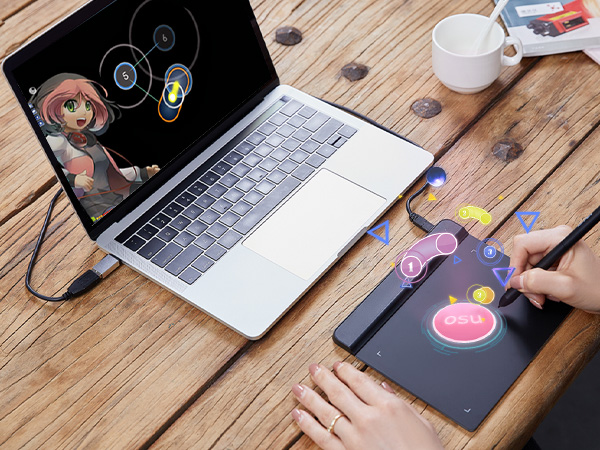
I like it , its amazing i first downloaded the normal drivers then i realized they had osu ones (which is the whole reason i bought the xp pen for)
Trustpilot
2 weeks ago
2 months ago