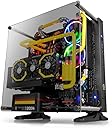
🔥 Elevate your PC game with a case that’s as bold as your ambition! 🖤
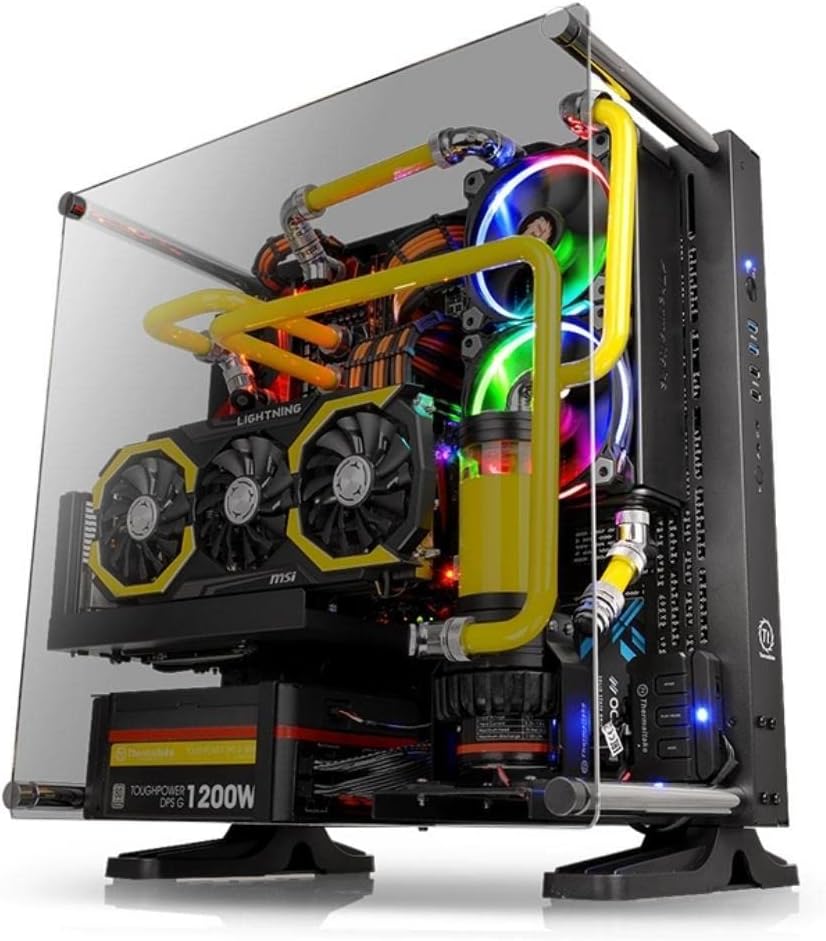
The Thermaltake Core P3 is a mid-tower open frame gaming chassis featuring a 5mm thick tempered glass panel for panoramic viewing. It supports Mini ITX, Micro ATX, and ATX motherboards with flexible 3-way placement options including wall mount, vertical, and horizontal orientations. Designed for enthusiasts, it includes a PCI-e riser cable for vertical GPU mounting, supports advanced liquid cooling setups, and offers a modular design for easy customization and upgrades.


| ASIN | B07BFGB8Z6 |
| Antenna Location | Gaming |
| Best Sellers Rank | #936 in Computer Cases |
| Brand | Thermaltake |
| Case Type | Mid Tower |
| Color | Black |
| Compatible Devices | ATX motherboards, gaming motherboards, processors, graphics cards, power supplies |
| Cooling Method | Water |
| Customer Reviews | 4.7 out of 5 stars 2,421 Reviews |
| Enclosure Material | Tempered Glass |
| Fan Size | 120 Millimeters |
| Global Trade Identification Number | 00841163001745 |
| Hard Disk Form Factor | 3.5 Inches |
| Internal Bays Quantity | 3 |
| Item Dimensions D x W x H | 18.5"D x 13.1"W x 20.2"H |
| Item Weight | 27 Pounds |
| Light Color | RGB |
| Manufacturer | Thermaltake |
| Material | Tempered Glass |
| Mfr Part Number | CA-1G4-00M1WN-06 |
| Model Name | Core P3 |
| Model Number | CA-1G4-00M1WN-06 |
| Motherboard Compatability | ATX |
| Number of Fans | 1 |
| Other Special Features of the Product | Open Frame Design, 3-Way Placement Layout, Vertical GPU Mounting, Vertical PSU Mounting, Dismountable Modular Design |
| Power Supply Maximum Output | 500 Watts |
| Power Supply Mounting Type | Rear Mount |
| Recommended Uses For Product | Gaming |
| Supported Motherboard | ATX |
| Total Expansion Slots Quantity | 8 |
| Total USB 2.0 Ports | 1 |
| Total USB 3.0 Ports | 2 |
| Total Usb Ports | 1 |
| UPC | 841163001745 |
| Warranty Description | 3 year warranty |
C**1
Quality made case with tempered glass and PCI-E x16 Riser included.
I have been looking for a PC case that was wall mounted and I found this product on my first search. After looking at pictires I decided this was the one for me and ordered the product. Once it arrived, I ws suprised how heavy it was even without my parts installed. Now while while putting the case togrther wasn't difficult, it did not come with any instructions which left me confused on what screw goes where and so on. But a quick Google search helped a lot as there are videos everywhere regarding installation. Now regarding the pros, this case is very well game. Everything is metals and even comes with a tempered glass front which is much better than acrylic. Everything I had for perfectly and jt even allowed me to use a 360 AIO for my CPU. Once put together, this case looks amazing and really allows you to show off your expensive parts. The only con I had was the powdercoating was not as good as other cases which cause it to be easily scratched, but if you sre careful you will not have to worry. Regarding a wall mount, make sure you get one that can handle heavy weight. Since there ismy a big price difference, I ordered a 100lb wall mount just to make sure this stays on the wall. Last thing yih want if thousands of dollars hitting the ground at mach speed lol. Other than that, this is a a great product if you are looking for a wall mounted PC case. It even comes with a PCI-E x16 Riser so no need to order one ! I would recommend this product to anyone as I have high trust in Thermaltake products. Pros: Quality metal frame Tempered Glass PCI-E x16 Riser included Easily wall mounted Cons: No instructions regarding setup Powdercoating isn't as tough as others
D**I
Really want to like this case
***UPDATED REVIEW*** Okay so I originally gave this case a two star review, but now updating it to a 5 star. Original issue I had with the case was that the PCIE bracket does not hold a PCIE 4 cable, only the pcie 3 cable that came with the case. I reached out to their support, and got a message almost instantly. The issue I had was that I was using a PCIE 4 with a 90 degree angle. They pointed out that I need a normal pcie with no angle, and should fit. Haven't ordered the new cable yet, but thought the case deserves an updated review due to the stellar customer service from TT, and the case is very pleasant, and appears to be of good quality (the cable was the only irratant for me). I will update again if I have any further issues with the new cable I am going to order. Previous review: I really really want to like this case. Quality is good, and case looks really good. By and large, everything went together smoothly with no issues, until I got to the pcie riser cable for my GPU. Here is the problem, the case came with a pcie 3 riser cable but I wanted to use a pcie 4 cable instead. Ordered two sets of pcie 4 cables and both will not fit on the included pcie bracket. Holes don’t match up. First cable I ordered was by linkup and wouldn’t work. Then I returned it and order a thermaltake pcie 4 riser cable thinking it should work (you would think) on their cases, but nope same issue. Pcie 4 cable holes will not match up. The original pcie 3 cable that came with the case works perfectly, but what about the people that want to use pcie 4 or even 5 in the future for future proofing? Seems really dump that they can’t provide a bracket that supports pcie 4. This is a big deal for me. I will try to get a hold of the manufacture tomorrow to see if they have a workaround, and I will revise my review when I hear from them.
A**9
Great case, easy and flexible build
Great case. I finally went with an open air case and I'm not disappointed. Construction quality and aesthetic are phenomenal (I bought the black version). Currently mounting this to the wall next to my desk with a single-stud TV mount (It's an Amazon Basics item, cost about $30, model number 7851B). The wall mount look is as good as expected, and the TV arm is plenty strong enough to hold this case. Fastened very securely, and I moved it a few times to reassure myself it wouldn't break or fall off the wall. Good: case quality and looks are great. Airflow and spacing is great. Cable management was easy, and mounting the GPU horizontally let me keep a minimal look. Thrilled with how this build is coming along. Cons: there isn't many places for fans, so if you want to run a large radiator for cooling one component you limit what you can do to cool another component. I'm using a large radiator for the CPU and will stick with stock cooling on the GPU. Not a huge con, but know that you can't put multiple radiators on here. Also, I'm not using any of the 2.5/3.5 drive bays, but there are more than I expected with five in total. Placement of some of the drives might be less than ideal though, with three of the slots completely blocking where the radiator will be mounted. That's a serious choice to make if you wanted to shove a bunch of drives on this. Not worth complaining though, I knew before I bought it that I was going full NVME. Finally, putting the feet on is a pain in the butt until you get the first screw in place. It's not you, it's just super irritating. The other 3 screws for each foot are easy though, and I'll be taking the feet off once this is permanently wall mounted. Strongly recommend this case for an unusual, minimal look that showcases the components.
L**Y
If There Are ANY Problems Just RETURN IT FOR A NEW ONE!
First let me start by saying that I love this case. I have 3 of these and the ability to mount them on the wall has been an amazing way to utilize otherwise wasted space. They look great. They're sturdy. They're a fun little project to construct. They're good cases. Here's the issue. 1 out of 3 was a little..."temperamental". Yeah, that's a reasonable way to describe it. So, I constructed these cases back to back. The first 2 cases were fine. No problems at all. Love them. This third case gave me issues removing the rear cover. So I got my flat head and tried to use it as a lever to help me slide it back out of the "latches". This was after doing some basic checking to ensure I wasn't trying to slide it the wrong way. I got it to slide back and off after a few minutes of elbow grease. It felt extremely "tight" and didn't slide freely even after I got it to move though. I constructed everything and continued thinking to myself "it's fine, it's cabling only so no major components to get to so I don't expect to have to open it up often." Well, sure enough after about a month I decided I wanted to build a Hackintosh and I needed to remove one of the SSD's I installed. To do this required me to remove the rear cover. I never was able to get the rear cover off. I tried for 2 hours before finally giving up and channeling my inner Incredible Hulk to rip it open. So take a look at the pictures to see what it looks like. I thought I read about someone else having a similar issue and wishing they had returned their's for a new one instead of keeping it but I could be projecting. That's what I hope to convey in this review though. If you have any issues with this thing whatsoever just return it for a new one. Here I am about to purchase 2 more of these because they're such great cases but seriously, do yourself a favor and return it for a perfect one. @Thermaltake Please get the QA situated so this doesn't happen. The material quality is great. The case is great. However, when something like this happens it is a serious problem. I still haven't got the back off this thing and am considering taking my angle grinder to cut it apart. I am still going to get more of these because they are great cases but be on the lookout for any issues like this. Overall I'm happy with the ones that are mounted and functioning! Have already and will continue to recommend these cases with this caveat.
R**D
Build quality
Big pro here the quality of this case is amazing. I have a atx build with more than ample room for working. Cable management is pretty good has plenty of routing options for clean looks. Also this case come with more than enough hard wear (screw, standoffs) Big con this is not a beginner case as the instruction manual does not identify which parts are for which items. There is no clarity when placing parts. Overall I would recommend this case on sheer quality and visual appearance. I would not recommend for beginners. As the instruction are unclear and a lot of guess work.
T**T
Rugged & Beautiful case. So many customizable options. Why not build into a desk or table?
I'm absolutely in love with this case and for the low price it's a steal. Especially with the tempered glass. It's truly one of a kind and will display your goods in style. This thing is soo sturdy, albeit heavy. The bolts on the glass are plenty strong to keep this thing suspended under my table I built it into. The options for placement and being able to vertically display a GPU are great. I have had no issues with the PCI-e riser included for my MSI GTX-1080. I wound up buying a second PCI riser for my wifi card. Cons - Instruction manual doesn't cover much for assembly. I had a really hard time figuring out which of the 10 screw varieties were the right one to attach each piece (had to trial and error). - I wish there was some kind of L bracket or something to mount my 5 old noctua fans for more airflow around the outside of the case. Thermals are 2-4ish degrees better than in my corsair spec-01 enclosed case. - i wish the back cover wasn't a crappy metal slide in style which 1 notch always gets missed. Can't complain though since they would have had to raise the price otherwise. What I learned assembling it - install GPU prior to PCU if mounting with the riser. Use thumb tighten screws for all 4 GPU bracket connection points. - remove the heavy wall mount plate on the inside before anything else. Helps bring the weight down if you don't plan on wall mounting it. - attach the big feet and small rubber ones so you can rotate it while installing.
C**U
Amazing Case and With Minor Flaws and HORRIBLE Instructions
This case is a very well thought out design, with some minor flaws. I primarily bought this case as I wanted a new AIO now, but want to go custom loop later when I build a new system. This case seemed perfect for my current needs. PROS: - Great build quality: The entire case and glass is very well packaged to protect everything, and I didn't have a single flaw in my case. No scratched paint, dented sides, blemishes, bad threads, or anything like this. - Great cooling: I was worried that not having airflow across my motherboard VRMs would become a problem, but my temps have dropped a bit from my last case with a Cooler Master T4 Heatsink with Noctua NF-F12 120MM Fan that was paired with 4 120MM Rosewill case fans. Those four Rosewill fans are not longer used, so the heat just rises out with my setup. Mind you I am currently only cooling a 7700k at 4.5 GHz and a GTX 1080, but are not overclocked. - Design. Standing up this case looks great, but you could easily take off the side panel and metal rod mounts and set the case on its back and use it as a test bench. You can also mount it on a wall or to a desk with a VESA mount, but considering how heavy a full build is, I would never try it. - Glass: The smoked tempered glass is perfect. Acrylic is too cheesy for such a nice a build. - PCI-E Riser Cable: It works flawlessly with my GIGABYTE GTX 1080 WindForce 3X OC. I was no difference in 3DMark scores with it installed directly to the PCI-E slot or using the riser cable, so it appears I got a newer cable or got very lucky, as they are known to be a huge problem online. CONS: The Thermaltake website and spec sheets list full 420MM radiator support. While my Arctic Freezer II 420 mounted fine, the radiator cannot be mounted perfect. There is a support piece in the upper right front of the case that slightly blocks the top right radiator screw just enough that it forces you to drop the entire radiator down slightly. Once I got to the bottom I could not thread in the bottom two screws for my radiator as the holes didn't line up. They are correct on the case, but because the radiator had to be shifted down slightly it won't line up. I also had one screw right behind a USB 3.0 front header that I couldn't mount because the cable was perfectly in the way. I have 9 out of 12 screws mounted though, so I have no fear of the radiator coming off or sliding around. - Cable management: This case has so much room in the pack I was able to fit 2x 3.5" HDDs in the mount and randomly stuff 3x 2.5" SSDs in to the back with room to spare. - Pointless dust filter: If you use this thing for water, the dust filter in the back of the case becomes 100% useless. It would only protect the cable management area where drives are mounted anyways in an air setup, and that is with the flow backwards from looks the best. - Instructions: My god are the instructions useless. The diagrams are horrible and don't explain anything. They are useful for checking you got all your necessary hardware as it has a parts list, but beyond that they were more harm than good. I STRONLY suggest you watch multiple YouTube videos for the install, as I watched over 5 and not a single one got everything right. Watching those, along with the following tips will greatly help. ASSEMBLY TIPS 1.) If your motherboard has a CPU power connector up on the top of the board like most you need to remove the bottom HDD mount bracket from inside the case to run the cable behind it for better cable management. There are 4 screws for this on the motherboard side of the case. You don't need to remove the motherboard for this, there are two each side and that panel removes. I ran the cable underneath this bracket and reinstalled it. You can also do this without removing the bracket BEFORE you install your motherboard. 2.) If mounting GPU vertically, make sure you don't mount the power supply sideways, there are two PSU brackets included in the kit. You can install the PSU with the fan facing towards the glass, but only with a Micro-ATX board and no vertical mounting. The case has hardware to do it both ways. 3.) Make sure to attach the small support post to the power supply bracket BEFORE you install a power supply if you are going to install your GPU vertically with the riser cable. The power supply will block you from making this install. Use the flat screw designed to go into the recess on the PSU bracket so it mounts flat to your PSU. 4.) Be very careful with the threads. The case is very thick, but case steel tends to be very soft. Some of the powder coat is in the threads, so if you feel any resistance at all, back your screw out and check them. I ended up just slowly backing the screws out and back in a few times when I had this issue, and it only happened 2-3 times across the entire build. 5.) Carefully go through the hardware. There were 4 rubber plugs and washers that I thought were supposed to be anti-vibration mounts for a custom water pump, but they are actually rubber bushings and washers for the tempered glass panel. The plugs go into the glass to protect it, and the washers go on the thumb mounts for the glass. Totally protects the glass from any damage or vibration. Also make sure you are using the right screws for the right threads -- the manual is actual nice for this on the inside front pages, it lists how many of each screws or parts there should be -- but more importantly it lists exactly what it should be used for. You don't want to strip out a thread on this nice case. This case is my favorite I have ever had, and it is probably close to my 20th or so. I don't see myself needing a new case for a long time, and if I ever did change to a new one for any reason, this case would make a very good test bench, or maybe even a good closet wall mounted media server!
T**.
Awesome case but....
Awesome case with unique design for 3 different orientation. You can have it standing, laying down or wall mounting it which I did. My entire order came in one piece and no damages like how other reviews were posted so I got lucky I guess. All the hardwares are included but the only down fall is that the instructions sucked so I had to watch a YT video on the assembly. 2 things to note for anyone interested, this case comes with a PCIE 3.0 BUT if you have 3000 series GPU and above, I would recommend getting a separate PCIE 4.0 with a length about 25 cm which will give enough room to connect to motherboard AND won't have a long slack of the cable. Another thing to note is when you're routing your cables in the back, make sure to route them behind the center metal black housing so that you can actually close the back panel of the case and wall mount it. Otherwise you will end up pinching your cables. The wall mount I used was a flush fixed wall mount that is rated for large TVs up to 90in with the weight max of 165lbs from BestBuy. I will say that the left side of the case will be heavier due to the GPU and the PSU so just be aware when you try to mount it, have that side as close as you can to the wall mount that is mounted to the beam rather than the drywall side. Other than that, awesome case.
A**R
Lots of space and easy cable management.
Been using the case for years. Great open-air case and the vertical GPU mount is the best part. Fits a 420mm aio cooler is a bonus.
D**X
Excelente gabinete, top tier!
Me fascina el gabinete, un estilo de primera. Pros: -Materiales y acabados de primera calidad. -Suficiente espacio para instalar las tarjetas de video y disipadores mas grandes sin problemas. -La posibilidad de montar la tarjeta de video de manera vertical. -El acabado de vidrio templado se ve excelente. -Se siente muy sólido. -Posibilidad de montarlo en la pared o de manera horizontal en una mesa. Cons: -El instructivo es terrible, debido a la estilo del gabinete es diferente el armado a la mayoría de los gabinetes cerrados y las instrucciones incluidas dejan mucho que desear, tengo 15 años armando máquinas y este me.dio trabajo, recomiendo ver algún vídeo de armado de este modelo, ayuda mucho. -Es un gabinete para tenerlo fijo, el peso es alto por lo tanto moverlo puede ser complicado. Lo recomiendo ampliamente!!
W**D
Buy all rgb parts.
It is a good chassis. Nice built. The funny thing is that it forces you to buy all the RGB parts. One thing is annoying; it is cumbersome. After adding the M. Board, the CPU cooler, the GPU, and the power supply, I couldn't lift it. I wonder why other colors are much more expensive?
A**R
Beautiful case for the right price
This is a great panoramic case, not sure what else to say,it is amazing
G**E
Termaltake P3
Perfetto grazie
Trustpilot
4 days ago
2 months ago