🎉 Elevate your workflow with precision, comfort, and wireless freedom!
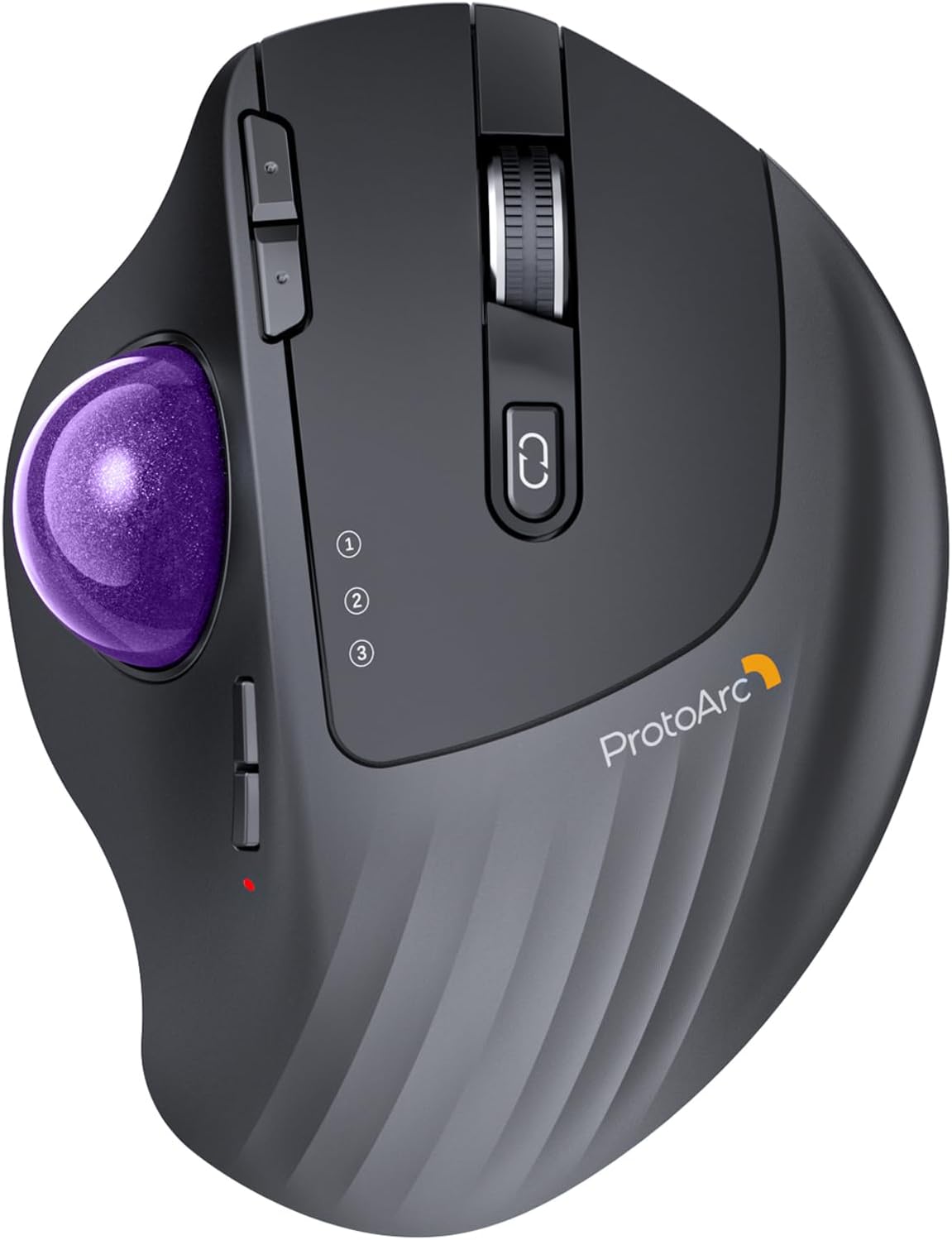
The ProtoArc EM01 NL is a rechargeable, ergonomic wireless trackball mouse featuring 3 adjustable DPI settings for precise cursor control, an innovative adjustable angle hinge for personalized comfort, and triple wireless connectivity modes (Bluetooth and 2.4G) allowing seamless switching between three devices. Designed to reduce wrist fatigue and optimize tight workspaces, it offers up to one month of battery life per charge, making it a smart, stylish upgrade for professionals seeking efficiency and comfort.


| ASIN | B0CWV4X9ZZ |
| Antenna Location | Office |
| Are Batteries Included? | No |
| Are Batteries Required | No |
| Battery Average Life | 0.98 months |
| Best Sellers Rank | 4,543 in Computers & Accessories ( See Top 100 in Computers & Accessories ) 3 in Trackballs |
| Box Contents | A Type C Charging Cable, A USB Receiver, A User Manual, An Ergonomic Trackball Mouse |
| Brand Name | ProtoArc |
| Button Quantity | 8 |
| Colour | Purple Roll |
| Compatible Devices | Laptop, Personal Computer, Tablet |
| Country of Origin | China |
| Customer Reviews | 4.3 4.3 out of 5 stars (3,173) |
| Enclosure Material | Plastic |
| Hand Orientation | Right |
| Hardware Platform | Laptop, Personal Computer, Tablet |
| Item Dimensions L x W | 11L x 7.5W centimetres |
| Item Weight | 0.31 Kilograms |
| Manufacturer | ProtoArc |
| Model Name | EM01 NL |
| Model Number | EM01 NL |
| Mouse Maximum Sensitivity | 1600 Dots per Inch |
| Movement Detection | Trackball |
| Network Connectivity Technology | Bluetooth, USB |
| Number of Batteries | 1 Lithium Ion batteries required. |
| Operating System | MacOS, iOS, iPadOS, Win, Android |
| Power Source | Battery Powered |
| Product Features | Ergonomic Design, Portable, Rechargeable, Soundless, Wireless |
| Product Finish Type | Glossy or Matte |
| Product Warranty | 1 year |
| Range | 10.0 meters |
| Style Name | Modern |
| Theme | Video Game |
S**R
I really like this mouse, said Sylvester.
This is a brilliant mouse. The ball has a nice smooth glide action coupled with accurate pointer movements. It is very comfortable to use and the tilt action makes it even more comfortable. I thought it was a bit of a gimmick when I read it in the advert, but having used it for a month or three now, the tilted angle is the most comfortable way to use the mouse. The connectivity is good and you can still use the mouse whilst charging. So there shouldn't be any down time.
W**D
Great Quality, and value - would recommend.
I have to say, I love my Logitech MX Ergo. I have one at home and in the office. But when I saw this, and it was on Prime Day deal. I had to try it. ProtoArc have taken the MX Ergo and made some subtle but very good improvements. The Logitech is paired with my favourite K860 keyboard, but there's a slight design flaw. The keyboard can switch to 3 devices, the mouse only 2. The ProtoArc mouse not only solves this, it provides a nice way of doing so. Use option 1 with the 2.4MHz Wi-Fi dongle it comes with, or use option 2 or 3 with Bluetooth. This is awesome. Bluetooth switches so easily that it's pretty much an infinite selection, but with two favourites. Then there's a very simple but overlook feature on the Logitech. You have to take it off the magnetic plate to pop out the ball to clean it. ProtoArc made a simple change, put a hole in the plate aligned with the ball removal hole - genius. There is ONE thing I don't like. The roller has teeth, feels a little to rough on my baby smooth fingertips. But other than that, I can't fault it. For the £28 it cost me, a big saving over the £89 Logitech it's a great bit of kit.
M**.
Solid Performance, But Falls Short of the MX ERGO
The ProtoArc EM01 NL Wireless Bluetooth Trackball Mouse pairs easily with Windows and looks great next to the ProtoArc keyboard, creating a cohesive, stylish desk setup. The trackball itself isn't bad and provides decent control, but it does require frequent cleaning to maintain a smooth experience. I got it as an alternative to the Logitech MX ERGO, but unfortunately, it doesn't quite match up in terms of precision and overall smoothness. While it’s a good option for basic use, if you’re looking for something that can rival the MX ERGO’s performance, this may not be the best fit. Still, for its price, it’s a solid choice for casual use.
B**9
A really nice comfortable mouse replacement.
I've been using this daily now for almost a year and I find it much more comfortable to use and easier on the wrist than a regular mouse. I bought it to try because I was feeling strain from clicking and holding the middle mouse button whilst also moving the mouse which you have to do a fair bit in Blender and other 3D software. This type of mouse solved my problem as I'm no longer fighting my own grip. It's also a space saver as you no longer need to move the mouse around the desk. This is my first trackball mouse but I quickly adapted and within a couple of days I was just as accurate at moving the ball as I was pointing with a regular mouse. I don't have much to compare to but the build quality feels solid. I've not had any connectivity issues or issues with glide or smoothness, and it works well switching between different devices. The battery lasts a few months between charges and you can use it while charging too. The buttons are all nice to click in both orientations (flat or tilted) and the sensitivity is just set once and forget. You do have to pop the ball out to remove dust occasionally but it appears that's just expected maintenance with this kind of mouse. There's a handy hole you can push something through to help with popping it out. I'm really happy with this purchase and it has become part of my every day setup. I'm not sure how it weighs up against more expensive models but I'm happy enough and not looking to upgrade any time soon.
A**K
Nice trackball, but not perfect
I had high hopes for this trackball and when it arrived, I wasn't dissappointed. The packaging, as one comes to expect with ProtoArc products, was robust with a well made exterior box. Once opened, contained within the box was the usual product, in this case the trackball mouse, an envelope containing warranty and quick reference/installation guide along with a peel off contact sticker to stick on the underside of the mouse, and a further box which contained the 2.4Ghz USB receiver, a more complex manual and a USB lead for charging. As specified within the items description, the trackball has 7 buttons and a mouse wheel, which I presume also acts as a middle mouse button. There's the primary and secondary, back and forward, DPI plus and minus and the connection button which you click to switch between one of 3 connections; 2.4Ghz wireless, BT1 and BT2. Placing the mouse on a smotth table top, the mouse had a tendancy to slightly, very slightly slip such that every few minutes you needed to bring it back to where it started. This I'm sure would easily be solved by a cheap, rubber based mouse mat. The trackball moves smoothly and freely, perhaps a little too freely, but with the numerous DPI settings (5 if I recall, not 3 as it says in the description), more on this later, you can adjust the movement speed to your liking. Personally, I found a mid setting to be the most comfortable and manageable. The primary and secondary buttons are comfortable to click and you can actually "feel" them, rather than "hear" them with very little to no click sound. I'm not one for using back and forward buttons as I prefer the keyboard shortcuts so I can't really comment on them except to say that they also had this definitive "feel" rather than "hear" scenario, although a little less perfected than the primary and secondary buttons. The mouse wheel, which I never tested for "middle mouse button compatability" is nice to the touch although I found it to be a little too far down the mouse (too close to the palm) to be comfortable to use in relation to the primary and secondary buttons. This maybe due to my hand shape, I don't know, but I'm sure, once I'd been using it a while, I wouldn't notice it. Now those pesky little DPI buttons, and I do mean little. The position of them is probablly about right but, as they are so small, with my chubby hands I had a job to feel whether I was clicking the plus or minus one. Sure, there is a light which flashes a set number of times each time you changed DPI setting, but this light, which also acts as a charging indicator which goes out when fully charged, is under the thumb so, unless you move your thumb and/or head, you can't see which setting you're on until the mouse goes shooting off in an arbitrary direction. Now comes the main reason for me only giving this trackball 3 stars. For one, I'm not a pushover so, unless everything is perfect and I can't find any flaws with a product, you wouldn't get 5 stars and on this occasion it falls short of 4. "Don't keep us in suspense, what is the one thing that you're not happy with?" I hear you ask. Well, maybe not, but the thing I have to draw your attention to is the... and we'll be right back after these important messages from our... Whoops! That's for commercials. No, seriously, the one thing I have to draw your attention to, and the only thing I don't think I've covered, is the adjustable angle of the mouse. Firstly, when I read it I thought it was 0 to 20° but it's not. You can set it at 0° or 20° but nothing in between. Apart from this there is no locking mechanism to lock it in place. Rather it relies on, from what I can see look like magnets and, although there is a definite feel to when you change the angle, the angle was being changed much more than I liked. I may be a little heavy handed, but without this locking mechanism, I found I was having to move it to the angle I found most comfortable, which, if I'm honest was 0° so there was no need for this at all for me. Remember, this review is based on my own utilitzation of the **ProtoArc EM01 NL Wireless Bluetooth Trackball Mouse** and your own experiences might be different. Would I recommend the product? That's a difficult one to answer but I would probably say yes; unless you're heavy handed with short and stubby (but not that short and stubby) hands. In this case, I would say you'd have to try it for yourself and see how you get on. As the saying goes, "One man's onions is not necesarily the other man's bird in the bush".
Z**6
avec clavier virtuel car arthrite +++++ aux mains
N**N
Nice stylish black trackball with (I choose) a red ball. Luckily no fancy LED lights, and connects to PC and MAC. Great!! What could be improved is a small storage area in the trackball for the dongle (wifi/bluetooth)
J**M
I was looking for a good vertical mouse to ease the strain on my shoulder. This mouse fit the bill perfectly and I love the fact that you dont have to move it around, it just stays perfectly in place next to my keyboard and I never have to worry about running out of space to move the cursor. I have a standard (non-trackball) vertical mouse at work that is worth over twice as much as this one, but I like this trackball mouse a lot more. One of the best home office purchases I have made. Thanks.
R**.
Best trackball mouse! I have used trackball mouse for a long time. Still using my corded Microsoft Trackball 1 that has long ceased production and with its surface faded badly. I have tried many name brands and no names searching for a replacement, preferably a cordless one. So many failed promises, handsome looking but non working and oddly designed nut jobs! ProtoArc EM01 is the one! I decided to write about it less than one month of usage, a first for me! For electronics, I tended to give it at least a three month break-in period. Here is why I think the EM01 is the best wireless trackball mouse: 1. True wireless! I hooked up to three devices wirelessly all at the same time! My Mac Pro, PC and MacBook Pro running both Mac and Parallels Linux. That is combination of Bluetooth and wireless 2.4. With the selection button on the mouse, the change over is seamless. The working range is fantastic. Also most importantly, under each device the operation is smooth and lag free no matter the OS and software. Clearly the EM01 did right about its software integration with multiple platforms. 2. Comfort! I was not sure about the angular side titling function at the beginning. I was wondering which hand doctor gave ProtoArc about the idea. I decided to give it a try. What a difference! At least for my normal hand, the mouse fatigue is gone! I am serious about this. I am on the computer daily for hours. Even with my beloved wired trackball mouse which is quite ergonomic, after a while the arc of my hand tended to tighten up. And after some time, you hand became tired. Not with the EM01! 3. Just the right amount of buttons and presets. A mouse should be simple! The scroll wheel on the EM01 is perfect! The other four preset buttons which two are customizable are functioning beautifully and at the right position. 4. Battery lasts forever! I did NOT charge the mouse when I first received it. Right away went into using it. The battery indicator has been on 100% the whole time. So the other day, for the sake of it, I plugged it in to charge. Within half an hour or less, I noticed the charging light had gone off indicating there is a charging protectionism in place. All positive! Highly recommended!
W**R
Sehr leise, ergonomisch und präzise: Ich nutze die ProtoArc EM01 NL nun seit einiger Zeit und bin sehr zufrieden. Die Tasten haben ein angenehm dumpfes, fast geräuschloses Klickgeräusch, was besonders im Büro oder abends am Rechner sehr angenehm ist. Durch den verstellbaren Winkel liegt die Maus hervorragend in der Hand und ermöglicht eine entspannte, natürliche Haltung auch bei längerer Nutzung. Der Trackball arbeitet sehr präzise und lässt sich mit dem Daumen flüssig sowie exakt steuern, auch feinere Bewegungen gelingen problemlos. Die einstellbaren DPI-Stufen bieten zusätzliche Flexibilität und die Möglichkeit, per 2.4G USB oder Bluetooth zu verbinden, ist praktisch für mehrere Geräte. Insgesamt eine durchdachte, komfortable und hochwertige Trackball-Maus, die ich klar weiterempfehlen kann.
Trustpilot
3 weeks ago
1 month ago