![Canon Megatank G3290 All-in-One Wireless Supertank [Megatank] Printer | Print, Copy Scan | Mobile Printing |2.7" LCD Color Touchscreen | Auto Duplex](https://m.media-amazon.com/images/I/71xXs7dyuWL._AC_SL3840_.jpg)




๐จ๏ธ Print smarter, save bigger, connect easier โ the MegaTank revolution your workspace deserves!
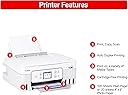
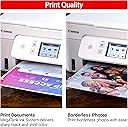
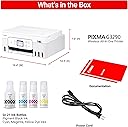
The Canon PIXMA G3290 MegaTank All-in-One printer combines high-volume, ultra-low-cost printing with wireless convenience and a user-friendly 2.7" color touchscreen. Designed for home and office use, it delivers sharp text and vivid photos with automatic duplexing and versatile media support, making it the ultimate productivity and savings powerhouse.


| ASIN | B0DF4GTWWK |
| Additional Printer Functions | Copy |
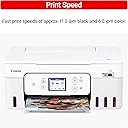
| B&W Pages per Minute | 11 ppm |
| Best Sellers Rank | #73,706 in Computers ( See Top 100 in Computers ) #169 in Ink Tank Printers |
| Brand | Canon |
| Built-In Media | Ink Bottles |
| Color | White |
| Color Depth | 16 |
| Color Pages per Minute | 6 ppm |
| Colour | White |
| Compatible Cartridge | Canon GI-20 |
| Compatible Devices | PC, Smartphones |
| Connectivity technology | USB, Wi-Fi |
| Control Method | Touch |
| Controller Type | iOS |
| Customer Reviews | 4.2 out of 5 stars 670 Reviews |
| Display Type | LCD |
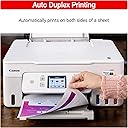
| Dual-sided printing | Yes |
| Duplex | Automatic |
| EU Spare Part Availability Duration | 1 Years |
| Global Trade Identification Number | 00013803378078 |
| Hardware Interface | USB 2.0 |
| Ink Color | Black, Cyan, Magenta, Yellow |
| Item Dimensions D x W x H | 36.3D x 41.7W x 17.8H centimeters |
| Item Type Name | Multifunction Printer |
| Item Weight | 6.44 kg |
| Manufacturer | Canon |
| Maximum Copy Resolution Black and White | 1200 dpi or higher |
| Maximum Copy Resolution Color | 600 dpi |
| Maximum Copy Speed Black and White | 11 ppm |
| Maximum Media Size | 8.5 x 14 inch |
| Maximum Print Resolution Black and White | 1200 dpi or higher |
| Maximum Sheet Capacity | 100 |
| Maximum print Resolution Color | 4800 x 1200 dpi |
| Model Name | PIXMA G3290 WH |
| Model Number | 6706C022 |
| Model Series | PIXMA |
| Model name | PIXMA G3290 WH |
| Number of Trays | 1 |
| Other Special Features of the Product | Borderless Printing |
| Output sheet capacity | 100 |
| Paper Size | 3.5โ x 3.5โ (Square), 4โ x 6โ, 5โ x 5โ (Square), 5โ x 7โ, 7โ x 10โ, 8โ x 10โ, Letter (8.5โ x 11โ), A4, A5, A6, B5, Legal (8.5โ x 14โ), U.S. #10 Envelopes, Card Size (3.6" x 2.2"), Custom size (width 2.1โ8.5 in, length 3.5โ47.2 in) Inches |
| Power Consumption | 18 Watts |
| Print media | Card stock, Envelopes, Glossy photo paper, High-resolution paper, Labels, Paper (plain) |
| Printer Connectivity Type | USB, Wi-Fi |
| Printer Output Type | Color |
| Printer Type | Inkjet |
| Printing technology | Inkjet |
| Resolution | 1200 x 1200 |
| Scanner Type | Flatbed |
| Series Number | 3290 |
| Special features | Borderless Printing |
| Specific Uses For Product | Home, Office |
| Total USB 2.0 Ports | 1 |
| Total Usb Ports | 1 |
| UPC | 013803378078 |
| Unit Count | 1 Count |
| Warranty Type | limited warranty |
C**Y
Great print quality and fairly easy setup.
I'm very happy with this printer. The ink cartridges for my old printer were quite expensive so I'm looking forward to saving a lot of money with these refillable ink tanks. My first colour print was perfect. I copied a page from a pattern book and it looked exactly like the original as far as clarity and colour exactness is concerned. Setup instructions on the printer screen were very clear and easy to follow. Connecting to Wifi was very fast and effortless. The only complaint I have is that the diagram on the printer screen for installing the print heads was not at all clear. Thank goodness for YouTube videos. Canon could have included a sheet of paper showing exactly how to open the print head housing. Some of us are wary of applying any force to delicate equipment unless it's clearly called for. Canon did not include a USB cable to connect the printer directly to a computer. For me it wasn't an issue because I had one already but it's something that potential buyers should be aware of. My Wifi is usually disabled as I use an ethernet cable to access the internet so having the USB option is more convenient & faster than enabling the Wifi. The only other complaint I have is that, to the best of my knowledge, Canon does not offer a downloadable PDF file of the user manual, which can only be accessed from their website. I like to have information available offline as well.
K**L
Great Color Printer
I am very happy with this printer. I have had it for a couple of months and I print every day and it has given me no problems at all. I had initially purchased a Brother printer and I had to send it back when I absolutely could not get it to find my Wi-Fi. This one not only found the Wi-Fi right away but also led me through the steps to hook it up. It could not have been easier. I run a happy mail subscription service and I needed to color pictures that I print to look good and they do. So far it seems to be exactly what I wanted: no trouble and dependable.
J**E
BEST CRAFT PRINTER EVER MADE
I've owned a very many lot of printers. I like the ones that print 12x12 and have Cannon's version of that, in my creative space, but I needed one that's tiny and I could put in my kitchen. I found this one and read some questionable reviews but thought I'll try it. Boy am I glad I did. If you watch this video that I made about it, there is nothing I do not like about this printer, and that says a lot. I do not have trouble connecting the Wi-Fi even though I live in a 276-year-old farmhouse. Which the walls are horsehair plaster and very thick, but yet a 50-foot stretch for the Wi-Fi signal, shows 59% when I check the strength. I have been using this solid for 3 days non-stop printing, having used just over half of the red ink, and about 3/4 of the yellow and blue, and nearly none of the black. This is a heck of a deal for this printer. The ink I found for less than $10 so I ordered it via subscribe and save. When visually observing the prints, there are no lines, no discoloration, no anything, just perfect prints. And all of my prints are done on the DRAFT option. That really speeds up the color printing. And as you see in the video, it does not take away from any of the Chrispness or saturation. I also read someone complaining about how colors just aren't this or just aren't that, take a look at the papers that I printed, there's absolutely nothing wrong with them. If you are searching for a high definition type printer or whatever you're lamenting about, go buy one of the really expensive ones, that does just that. And actually be honest about being cheap ๐คฃ This little guy gets the job done with bells on. I absolutely love him, it was my birthday present to myself, and I am so glad I bought Charlie the Canon that could. He's already got a warm spot in my kitchen and my heart โค๏ธ. You should get your own Charlie. He'll never let ya down!
A**K
Works great! Love it
Works great!
J**H
Easy setup and good quality print
just bought the g3290 last week. Setup was pretty easy and the printer works well on windows 11, macOS and my iPhone. I can see where other reviewers got into problems with the setup as the easy setup worked well, but the other variations may not. I may have gotten lucky. The print quality is pretty good for the price and the printer worked well in full duplex ( double sided printing ) on Macs, windows and IOS. The printer does not print that fast, but it's probably as fast as other printers in that price range. Hoping that this is as reliable as the epson workforce that this pinter replaced. I tried the epson printer equivalent to this model canon, but it died after 2 months.
Trustpilot
2 weeks ago
2 months ago