We remain fully operational. Our teams are working around the clock to ensure your deliveries continue safely.

DOWNLOAD THE APP


Customer Services
Copyright © 2025 Desertcart Holdings Limited
DOWNLOAD THE APP


⚡ Elevate your workspace with power, speed, and stunning visuals — don’t get left behind!
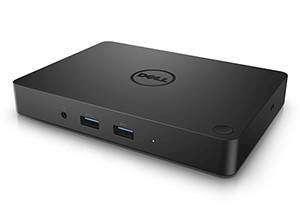
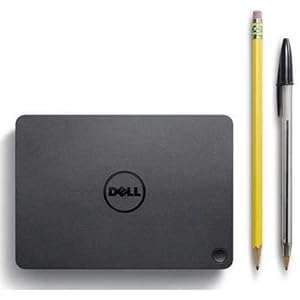
The Dell WD15 Monitor Dock is a high-performance docking station featuring a 180W power adapter, USB-C DisplayPort supporting 4K resolution at 30Hz, and five USB ports (3 USB 3.0 and 2 USB 2.0). Designed for broad compatibility with Dell Latitude, Precision, and XPS series laptops, it enables seamless connection of multiple peripherals and dual FHD or single 4K displays, streamlining your professional workspace with a single cable solution.


| ASIN | B01C8PHWQY |
| Best Sellers Rank | 19,746 in Computers & Accessories ( See Top 100 in Computers & Accessories ) 206 in Docking Stations |
| Box Contents | Dell Dock^DisplayPort over USB Type-C^Cable 180W AC Adapter |
| Brand Name | Dell |
| Colour | Black |
| Compatible Devices | Dell Latitude 5280, Dell Latitude 5480, Dell Latitude 5580, Dell Latitude 7280, Dell Latitude 7370, Dell Latitude 7480, Dell Precision Mobile Workstation 3510, Dell Precision Mobile Workstation 5510, Dell Precision Mobile Workstation 5520, Dell Precision Mobile Workstation 7510, Dell Precision Mobile Workstation 7710 |
| Customer Reviews | 4.1 4.1 out of 5 stars (1,086) |
| Global Trade Identification Number | 00689227626783, 00884116196723 |
| Hardware Interface | USB 2.0 |
| Input Voltage | 240 Volts |
| Item Dimensions L x W x H | 10.9L x 15.5W x 2H centimetres |
| Item Type Name | Dell 91K93 Dock Wd15 with 180W Adapter black Brown Box Packaging |
| Item Weight | 421 Grams |
| Manufacturer | Dell Marketing USA, LP |
| Number of Ports | 6 |
| Total HDMI Port | 1 |
| Total USB Ports | 5 |
| UPC | 689227626783 884116196723 689227626899 884116196730 689227626721 689227626738 |
| Unit Count | 1.0 Count |
| Wattage | 180 watts |
D**D
So far so good
All connections working fine. No issues.
S**L
Nice product 👌
Had one before, does the job.
K**S
Would never recommend
Sent with foreign plug and there is something rattling in the item
M**N
Works as expected
Brilliant item that means I only have to plug one cable into my laptop to use all my peripherals, including a monitor. I bought a refurbished one for under £40 and can’t fault it. I can’t speak to its longevity, but seems in good condition so I expect it to last. Only word of caution is check it has the right connections for your use case, as there is no usb-c or display port, along with a single hdmi.
J**E
Works good on my asus g15 and dell xps
This is fast and works well it makes my life easier as when i get home i only have 1 cable to plug into my laptop once i get to my desk. on my behalf i havent expirenced any problems unlike some other reviews ive read on here
P**O
He pedido un segundo producto porque el primero no funcionaba bien y me lo enviaron al instante. Muy buen servicio
た**。
※もちろんそういう用途なので今更ですが。 PCと接続が一本でよくなります。電源も含めてこれ一本です。 机上がすっきりするし、打ち合わせとか超楽ちんです。 ある程度値がはりますが、仮に2年つかえば十分じゃないかな。 海外から発送だけどすぐに届きました。
S**R
I am writing this review after almost 2 weeks of utilizing this dock. The dock is well built, feels sturdy with a rubberized base for anti skid. Also has an option to mount it with a mounting kit. The usb c cable is tethered to the dock so can't be separated. The power supply is 180 watts. U get a mini DP to display port cable along with this dock. The dock is plug and play. Does not need any drivers specifically. Has ample ports for USB and display. Doesn't heat up and has a small footprint. I am using this with my Dell Inspiron 5482 and though was skeptic whether it would work as there is no documentation to support but it works flawlessly. It even charges the laptop while docked. Only flaw I feel is that it doesn't have a usb c port on the dock to connect any usb c peripherals. Rest assured a perfect companion for WFH and laptop desk setups. Will post pics once I confirm my desk setup. Thanks
A**.
Funciona a la perfección. Consideren que solo trae 1 hdmi, 1 vga y un display port. Si buscan 1 opcion de 2 hdmi este no es el correcto. Se conecta muy fácil y detecta todo a la primera. Recuerden que sus laptops necesitan entrada thunderbolt para que funcione ya que es USB-C
N**N
Finally, a dock that works on Linux, USB-C, and charges my computer. I have tried 4 separate docks, Dell's TB15 and TB16 and two from Plugable. The TB15/16 were truly awful products. Each had their own problems: disconnecting the video, dropping Ethernet speeds, garbled audio ports, USB disconnecting, overheating, weird conflicts with strong WiFi signals. Pretty much everything that could go wrong with those docks did. The Plugable docks actually worked *wonderfully* and they have great customer service, but their products are misrepresenting compatibility with the ability to charge an XPS 15 9550 through the USB cable. Their docks that claim Linux compatibility worked great, but I had to keep the power plug into the computer. I wish I would have tried this dock first. On to the WD15. I'm running Ubuntu 17.04 with kernel 4.12. All BIOS updates have been applied, as is critical for any USB-C/thunderbolt functionality to work on these recent Dell machines. For the most part, that means installing Windows to apply the updates. While BIOS updates can be applied from DOS, dock updates MUST be done from Windows. So expect to install WIndows 10 (I recommend Rufus to install it on an external drive) to get everything working. With all updates applied, this thing works AMAZING. I only power a single external display, but I use nearly all ports: HDMI or DisplayPort both work fine, I've got ~4 USB ports occupied, audio out the front port, and ethernet. All work, no drivers or special downloads needed for the dock itself under Linux. I've run the internal and one external display both with the nVidia (running nvidia-381 package) and Intel graphics (with drivers installed from 01.org). All the usual hoops of getting something to work on Linux aside, this dock works great. Audio has been completely consistent (a near miracle). Even with my XPS 9550 power demands, charging through the USB-C port works. It doesn't seem to have any power charging issues as the Plugable docks did. The dock even seems to work okay with sleep and resume. Although occasionally I do have to unplug/replug after a reboot. Some times the second display does not immediately wake up, but a quick trip to the Displays control panel or cycling through the display options with F8 fix the issue for the duration of the session. The only small issue I've had is that external USB hard disks seem to start up and spin down repeatedly when plugged into the USB ports and the computer is asleep or unplugged. This does not seem to be a Linux issue because it happens even if the computer isn't plugged in. For now I'm simply plugging it in after the computer is awake or whenever I need to do a backup.
Trustpilot
1 week ago
1 month ago